
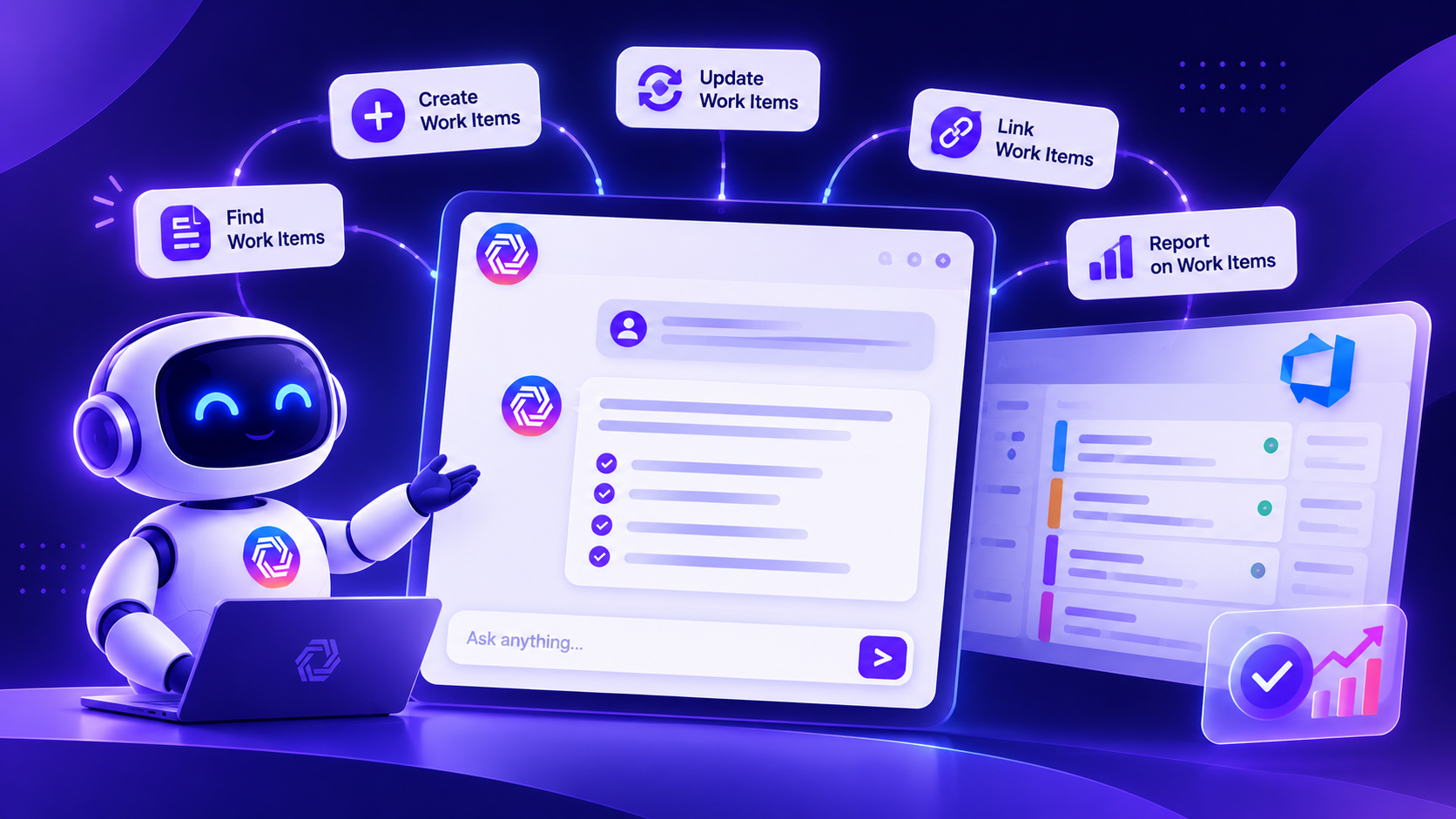
Nowadays, more than 90% of organizations are adopting AI to write user stories, review acceptance criteria, extract requirements from meeting notes, prepare documents, create requirement diagrams, and make sense of a busy backlog.
To understand how teams are using AI in requirements management and their pain points, we have reviewed 150+ sales calls at Copilot4DevOps that were conducted with teams using Azure DevOps. The main concern of most of them was that they struggled to get output from AI that is clear, concise, and fits the project. Furthermore, the 2025 Stack Overflow Developer Survey found that 66% of developers were frustrated by AI answers that were almost right, but not quite. In work item management, an error in a requirement or update can create more work later.
That’s why we are writing this blog, and we will introduce how to use the Copilot4DevOps’s AI chat module that works directly inside Azure Boards and how teams can find, create, update, link, and report on work items using natural language.
What 150+ Sales Calls Taught Us About Managing ADO Work Items
- Teams already use AI, but outside of Azure DevOps: 90% of teams were using AI tools like ChatGPT, Claude, and Gemini to draft user stories or other specific tools to analyze acceptance criteria of user stories. The main problem with that was that they needed to copy-paste generated outcomes between AI tools and Azure DevOps, and they might miss something important in this process. One team also told us that they built a custom AI agent to filter AI output, but it was not giving proper results due to a lack of input context.
- Large backlogs make it hard to find existing work: A transport company struggled to identify whether a new support ticket already had a related backlog item. Teams also wanted to find stories missing acceptance criteria or linked test cases.
- Small updates take too much manual effort: When teams need to change the priority of 100 work items of Sprint 1 to 1 or perform any other small actions like this, it takes lots of manual effort.
- Requirements change after meetings: A health services team wanted to update an epic and its child stories after sprint discussions. Keeping every related item in sync was a concern.
- Compliance checks involve manual work: One team working in Medical device development and the automotive industry told us that they are struggling to check which requirements are following compliance standards and internal checklists and find gaps.
- Security and control come first: Buyers asked where project data goes, whether AI models use it for training, and how teams can review changes before they are applied, as they work in regulatory industries.
Copilot4DevOps AI Chat
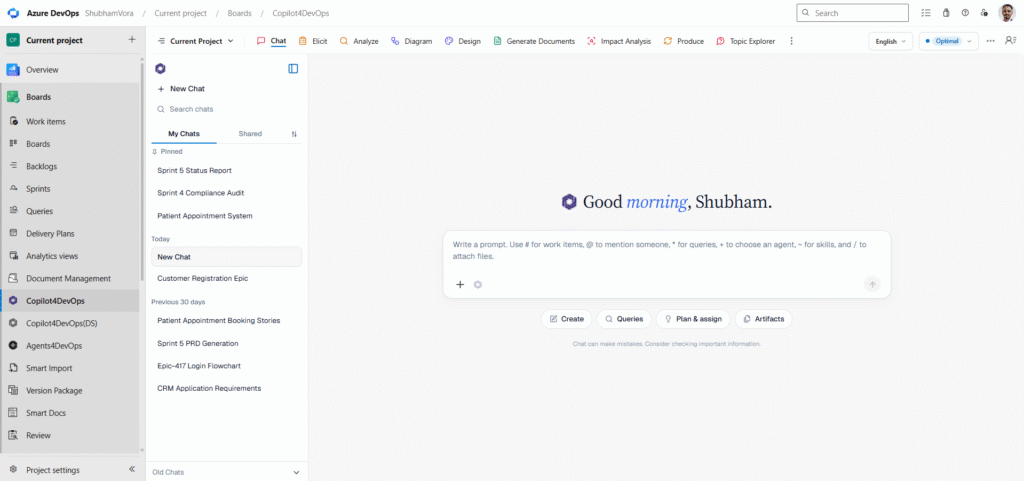
Copilot4DevOps’s AI chat module is developed for people who manage Azure DevOps work items, test plans, and DevOps tasks, such as pull requests and deployments, but not only for developers. Business analysts, product owners, scrum masters, QA testers, developers, project managers, compliance managers, etc., can use it to handle daily repetitive tasks using natural language instructions.
It could support tasks such as creating ADO work items from given documents in bulk, deleting them, filtering work items and preparing status reports, and creating and updating ADO queries. Similarly, it can create a set of wiki pages and update them. Furthermore, you can provide existing ADO work items directly as context, and it generates output accordingly.
Let’s see its use cases in the real world.
7 Ways to Manage Azure DevOps Work Items With AI Chat
1. Generate Work Item Hierarchies From Natural Language
One of the manufacturing software development teams told us they use external AI tools for brainstorming feature requirements based on the meeting discussion and need to create work item hierarchies and insert them into Azure DevOps, but it doesn’t follow the given regulatory standards while drafting requirements.
Copilot4DevOps’s AI Chat solves that exact problem. Product Owner or Project Manager can give the AI Chat meeting notes or existing work items, such as an Epic, as context and start brainstorming to create features, user stories, tasks, test cases, etc. Also, they can ask follow-up questions, and AI Chat gives answers within Azure DevOps only.
Once everything looks good, teams can ask it to create work item hierarchies such as “feature -> user story -> task -> test case”. In the image below, you can see that we’ve generated a work item hierarchy for the new customer registration feature.
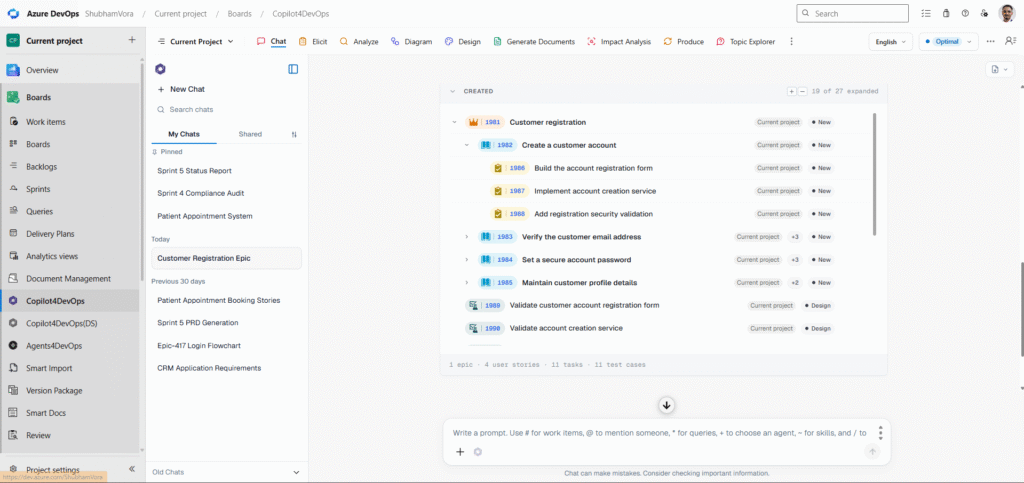
It has also been created as a work item inside the Azure DevOps backlog. So, teams don’t need to manually copy-paste requirements output into the ADO backlog.
2. Analyze Multiple Work Items in One Request
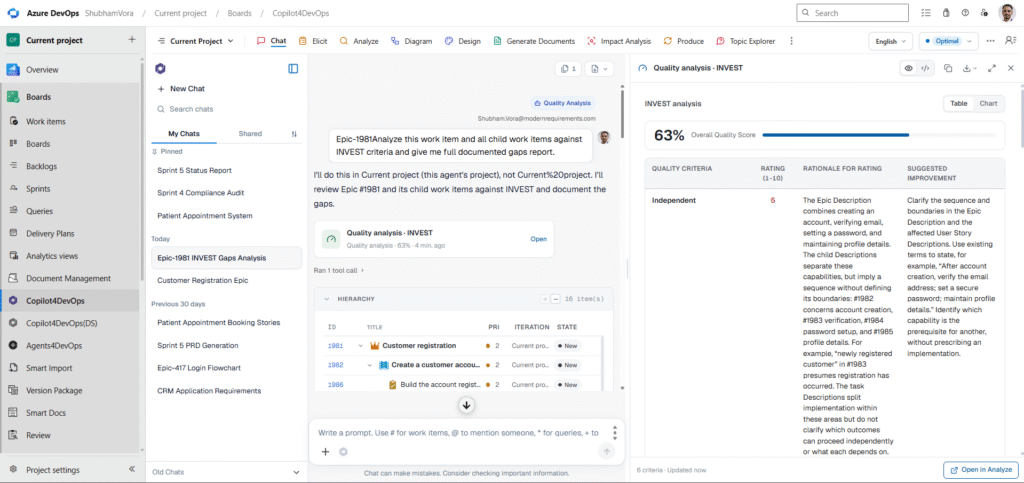
Reviewing and analyzing work items in bulk is difficult when a project has hundreds of work items. For each work item, teams need to check whether descriptions are clear, acceptance criteria are complete, and test cases align with them, and this can be done with AI Chat. Scrum Master can analyze work items against the MoSCoW method to prioritize requirements; Product Owners can analyze user stories against INVEST criteria, etc.
That’s not all. It can also prepare reports of gaps and update all work items to address those gaps. Furthermore, it can also analyze whether requirements are following specific regulatory rules.
3. Update Multiple Azure DevOps Work Items at Once
Manually updating ADO work items takes hours. Instead, teams can use AI Chat and ask it to perform tasks such as the following:
- Access all work items in Sprint 1 and set their priority to 2.
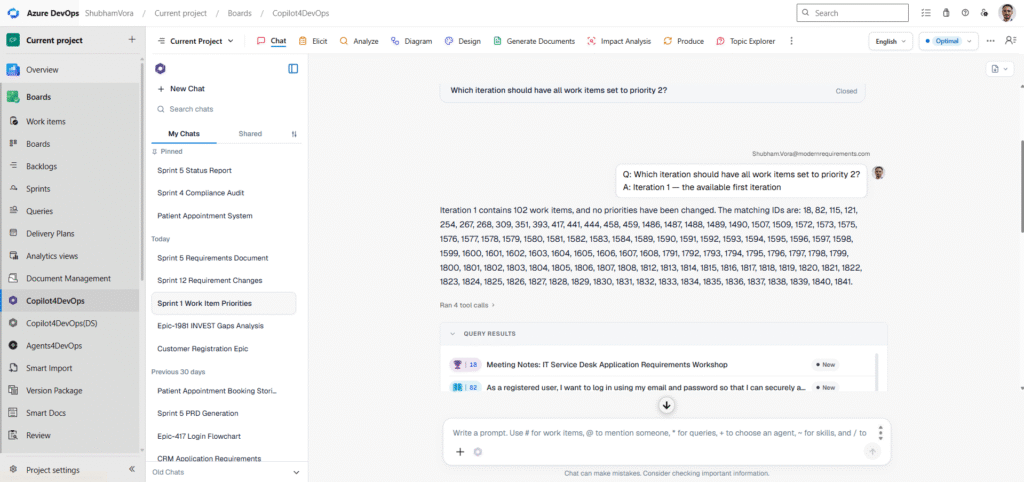
- For all child work items under #122 that are still New, move them to Sprint 10. Reassign any items with ‘CRM’ in the title to @Priya. Show me the proposed changes first.
- Find all user stories that are assigned to @Jack and are not linked to any test cases. Also, give test case suggestions for all of those user stories.
Instead of opening each work item, the Product Owner can review the proposed updates together and proceed with the required changes.
4. Prepare Documents and Save Chat Results as Word or PDF
One team working in the medical device development industry mentioned that they use ChatGPT to create project documentation based on existing requirements, and they need to manually give it requirements context. Otherwise, documents lack information.
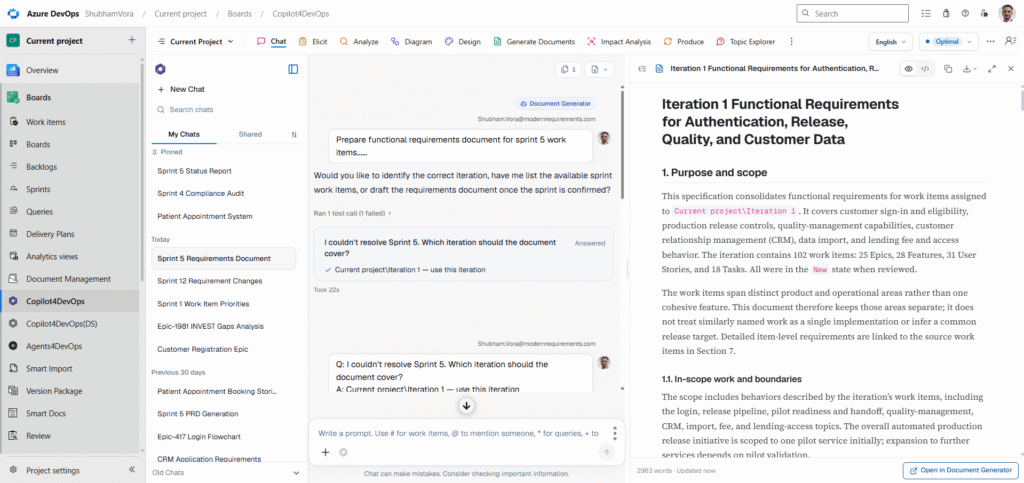
AI Chat can prepare structured content from Azure DevOps discussions and work items. Users can also export their chats to Word or PDF, making the results easier to review, store, and share.
5. Prepare Compliance Reports and Share Project Summaries
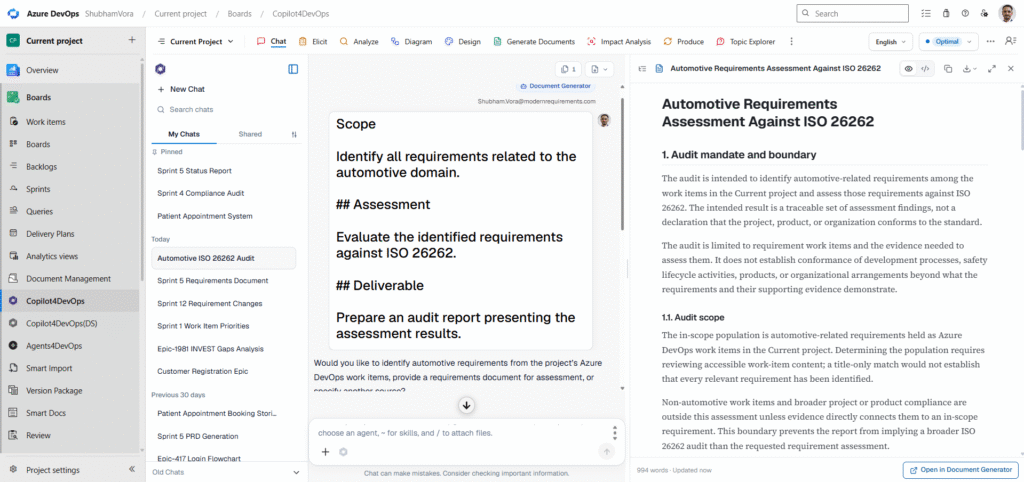
In regulatory industries, teams need to use custom templates for preparing audit reports. They also need to prepare evidence for reviews and audits. Separately, project managers and Scrum Masters spend time collecting sprint data, checking blocked work, and preparing status summaries for stakeholders.
AI Chat can read your ADO work items, extract requirements fields and comments from work items, check them against an uploaded checklist, identify gaps, and flag records for review. Also, it drafts custom audit reports. That draft can be further edited using AI with natural language instructions and, once ready, it could be saved in your ADO document management system or exported.
6. Get Project Status Report
The project manager, product owner, Scrum master, etc., can use AI Chat to get the project status report every day. They can ask AI Chat to list work items that are completed, pending, approved, and need to be implemented in the future. Furthermore, it can also provide a documented report that can be shared with all stakeholders and senior management. So, teams don’t need to manually go through each work item and prepare a report.
7. Find Duplicates and Incomplete Work Items
A large backlog generally contains similar user stories, tasks, or requirements without linked test cases. Finding these manually takes lots of time, and teams might miss a few duplicates.
As a solution, teams can use AI Chat and ask it to find all duplicate work items in a particular sprint, a project, or a workspace, and list them. After that, you can delete them in bulk or merge them with 1 prompt.
Using AI Chat in Regulated Industries
You might have this question: Can AI Chat be used in regulated industries where data security is most important?
Here is the answer: Copilot4DevOps provides access control functionality, so management can decide who can access which data and which features. Moreover, it works directly inside your Azure DevOps workspace and is SOC Type II certified, so it doesn’t share your data with any third-party tools or use it to train AI models. Also, whatever data it generates remains inside your workspace, ensuring your data is fully secure.
Also, it helps achieve compliance, such as ISO 13485, IEC 62304, or ISO 26262, by allowing teams to prepare requirements and documents with those standards.
Note: AI Chat supports these activities, but it does not certify compliance. Qualified team members must review its findings before using them as audit evidence.
A Quick Summary
We have covered how AI Chat solves almost all problems that teams face while using external AI tools to create and analyze requirements or documents. We’ve even interviewed different clients from different industries, and their words were the same: they are saving 80% of their time after they started using Copilot4DevOps.
Also, Copilot4DevOps is not limited to AI chat. Teams can use the Elicit module to generate work item hierarchies based on existing work items or relevant documents like requirement documents, meeting notes, etc. The Analyze module allows analysis of requirements against different methods like the PABLO criteria, INVEST, etc. Similarly, the diagramming module allows generation of requirements diagrams, and the mockup module allows generation of UI prototypes. Furthermore, you can also explore other features of Copilot4DevOps.
In short, Copilot4DevOps helps teams to overcome repetitive tasks.
FAQ
Is Copilot4DevOps AI Chat useful for regulated industries?
Yes. Teams can check requirements against internal compliance checklists, identify gaps, and flag work items for human review.
Is Copilot4DevOps AI Chat the same as Microsoft Copilot?
No. Copilot4DevOps AI Chat is built for Azure DevOps work item management, wiki updates, queries, and project summaries.
Is Copilot4DevOps similar to ChatGPT?
No. ChatGPT can generate requirements and may analyze them, but it can’t take bulk actions directly on ADO work items. Also, ChatGPT’s output lacks information when proper context is not given, but Copilot4DevOps takes context from existing ADO work items.
Essayez-le vous-même
Prêt à transformer votre DevOps avec Copilot4DevOps ?
Profitez dès aujourd'hui d'un essai gratuit.