Many teams already using Azure DevOps struggle to understand how the hierarchy of Azure DevOps work items works.
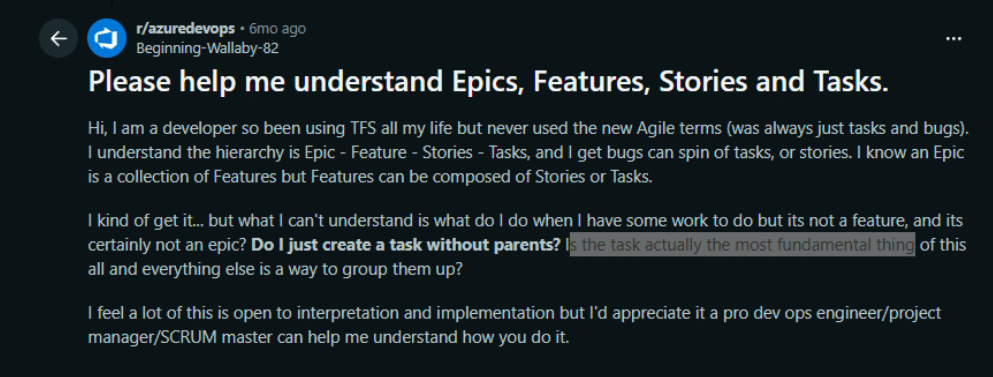
Even one Redditor has posted that he partially understands what epics, features, user stories, and tasks are but has a few doubts, like whether tasks should be created without a parent and whether the task is actually the most fundamental thing.
When teams don’t understand how the Azure DevOps work item hierarchy works properly, they struggle with backlog management, disconnected user stories, and epics that never turn into actionable work items. Furthermore, as the backlog grows, planning, prioritization, and sprint execution become harder to manage.
That’s why we’ve written this article covering different types of work items in Azure DevOps, how they work together with real-world examples, and how teams can use AI to generate ADO work items and connect them.
What Is the Work Item Hierarchy in Azure DevOps?
Azure DevOps supports multiple process templates like Agile, Scrum, Basic, and CMMI. Each process has different types of structure and work items. For example, Scrum teams use Product Backlog Items (PBIs), while agile teams use user stories.
We will mostly talk about the Agile process in this blog, as it is commonly used. In the Agile framework, the work item hierarchy is like below:
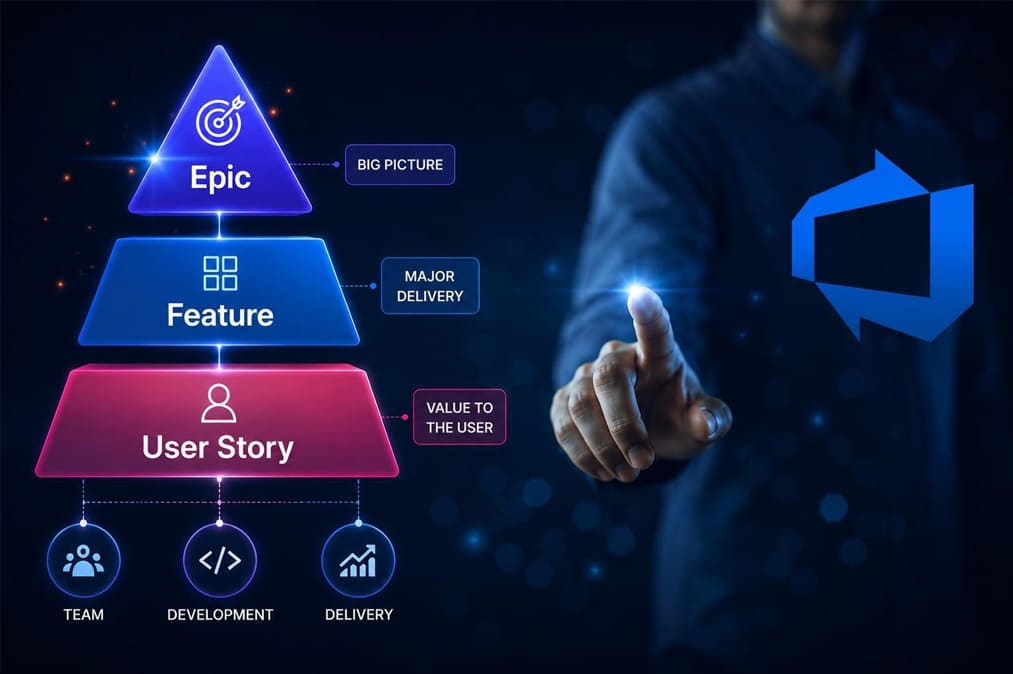
- Epic -> Feature -> User Story -> Task
An epic represents the large business goals or initiatives. A single epic contains multiple features, and a single feature contains multiple user stories, which are actionable work items and define the deliveries. Also, task breakdowns user stories further. Basically, this structure works through a parent-child relationship.
In short, the Azure DevOps work item hierarchy helps teams to organize work at the right level of detail. For example, leadership teams can usually track epics. Product owners can manage features, and the scrum master can track the user stories during sprint execution.
What Is an Epic in Azure DevOps?
An epic is the highest level of work item in the Azure DevOps hierarchy. It represents the large business goals that span across multiple teams or sprints. It generally takes multiple weeks or months to implement Azure DevOps.
Every epic focuses on business outcomes. That’s why it defines what the business wants to achieve, but not what needs to be implemented.
Here are some of the examples of epics:
- Improve the mobile banking experience
- Modernize the customer onboarding flow
- Reduce checkout abandonment in e-commerce
Generally good epics contain clear business outcomes. They should be big enough to justify tracking at a high level and not be vague.
What Is a Feature in Azure DevOps?
A single epic can be broken down into multiple features, which represent deliverables and specific product capabilities to achieve business goals defined in the epic.
Unlike epics, features are more focused on implementation instead of outcomes. Teams generally take around 1 to 2 sprints to deliver the feature, depending on scope and complexity.
The features for the “Improve the mobile banking experience” epic could be:
- Provide multiple payment options to users
- Improve the payment workflow and allow for making payments in three steps
So generally, a good feature describes a clear user value and product capability to implement, and it should not be too broad, like an epic, or too technical, like a development task.
What Is a User Story in Azure DevOps?
A single feature can be broken down into multiple user stories, which are actionable requirements written from the end user’s perspective. It describes what functionality the user wants and why that functionality matters. Generally, user stories are like a single task and can be implemented in a single sprint.
The standard format looks like this:
- As a [user], I want [goal] so that [reason]
Example user story:
- Agent, e-commerce app user, I want to save multiple delivery addresses so that future purchases are faster.
Furthermore, each user story also contains acceptance criteria that are used to validate whether the user story is implemented properly.
How Epics, Features, and User Stories Work Together
In the example below, you can observe how epics, features, and user stories are connected in a hierarchy and how they work together.
| Epic | Features | User Stories |
|---|---|---|
| Improve the patient's appointment management system. |
FE 1 Implement online appointment booking. |
US 1
As a patient, I want to see the available slots so I can book a suitable appointment time.
👤 Patient
|
|
US 2
As a patient, I want to filter doctors by specialization so that I can find the right doctor faster.
👤 Patient
|
||
|
FE 2 Add appointment rescheduling. |
US 1
As a patient, I want to reschedule an appointment online, so I don't need to call the hospital.
👤 Patient
|
|
|
US 2
As a patient, I want to view available time slots before rescheduling so that I can select a convenient appointment time.
👤 Patient
|
||
|
FE 3 Appointment reminder via SMS or email. |
US 1
As a patient, I want to receive my appointment reminder 1 hour before via SMS so I can be on time.
👤 Patient
|
Common Hierarchy Mistakes Teams Make in Azure DevOps
- Skipping the feature level entirely: Many teams create epics, then directly jump into creating the user stories, and they entirely skip the features. Due to this, it becomes hard to group user stories for particular functionality and prioritize them.
- Missing parent-child relationships: Teams often create user stories that are not connected with features or epics, and due to this, the backlog becomes a flat list and makes it very hard to track what business goals are fulfilled and what needs to be implemented.
- Writing epics that are too technical: An epic should not be technical and represent a developmental activity. Instead, it should only talk about high-level business goals.
- Ignoring acceptance criteria: Without acceptance criteria, developers and QA teams interpret the user story in a different way, which leads to confusion and a delayed sprint.
How Copilot4DevOps Builds the Hierarchy Inside Azure DevOps
Every team needs to develop the work item hierarchy and prepare a structured backlog within Azure DevOps before the sprint starts. Business analysts and product owners need to convert meeting notes, strategy documents, etc., into epics, then break those epics into multiple features, and create multiple actionable user stories with acceptance criteria for each feature. But manually doing this takes days or weeks sometimes.
AI assistance like Copilot4DevOps helps teams to generate and organize this hierarchy directly inside Azure DevOps.
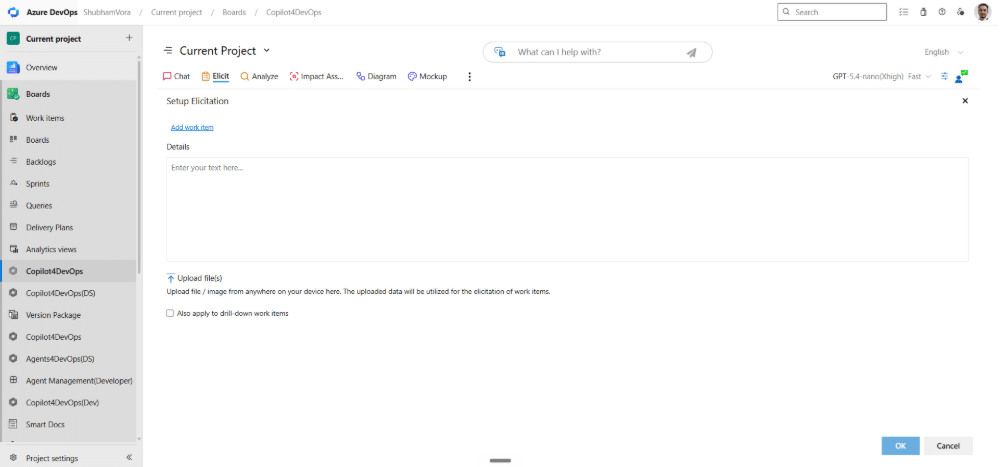
Using Copilot4DevOps’s Elicit feature:
- Teams can provide meeting transcripts, strategy documents, business goals, etc., as context to AI and generate all epics with a single click without missing anything, and insert them directly into Azure DevOps.
- Furthermore, based on epics, teams can generate multiple features for each epic and insert those features as a child of the epic in Azure DevOps.
- Similarly, users can create user stories based on the generated features and connect them with each other using a parent-child relationship.
Using Copilot4DevOps’s AI Chat feature:
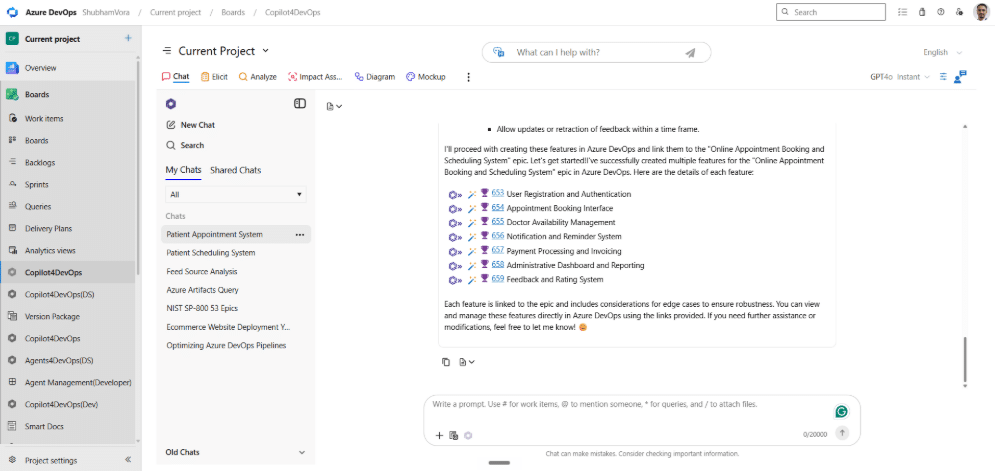
- Teams can use AI chat to create a work item hierarchy using plain English. Teams can give it a command like “Suggest high-level requirements for an online appointment booking and scheduling system for patients and insert them into Azure DevOps as an epic work item”. In a few seconds, you will have your epic work items ready.
- Furthermore, you can instruct AI Chat to generate multiple features that also cover edge cases for each epic and insert them into Azure DevOps as a child of the relevant epic.
Of course, AI reduces 80% of the work of the product team, but teams should quickly review AI-generated work items manually.
FAQs
In Azure DevOps, an epic represents the business goal, and features are a chunk of epics. The head represents the implementation goals.
To write epics in Azure DevOps, either teams can manually create an epic work item and insert a title and description, or they can ask AI assistants like Copilot for DevOps to generate epics and insert them into Azure DevOps.
A typical ADO backlog structure follows this hierarchy: Epic -> Feature -> User Story -> Task. This structure helps teams organize planning, delivery, and sprint execution clearly.
Probieren Sie es selbst aus
Bereit, Ihr DevOps mit Copilot4DevOps zu transformieren?
Holen Sie sich noch heute eine kostenlose Testversion.