Use Cases vs. Test Cases: The Difference and How to Convert One to Another in ADO

Last month, we were talking with one of our customers’ product team members, and he raised the concern: my team spends days preparing use cases and test cases for any new feature we launch in our product. Still, they miss 50% of edge cases. He was not wrong, because research from Virtuoso QA also shows that even mature test suites achieve only 20–30% edge case coverage.

As a solution, we offered them the Convert module of Copilot4DevOps, which takes Azure DevOps work items as context, AI analyzes them, and converts requirements into use cases, Gherkin scenarios, and test cases without missing any edge cases.

In just two weeks, their team got productivity gains, as now BA teams and QA engineers focus on reviewing use cases and test cases instead of manually writing them from scratch. Also, as 95%+ of edge cases Copilot4DevOps covers, the rework of the team is reduced.

In this blog, we’re sharing the exact same process they are following to convert requirements into use cases and test cases using Copilot4DevOps and also explaining the difference between use cases and test cases if someone is confused between them.

Difference Between Use Case and Test Case and When to Use Each

A use case defines how a user interacts with a system to achieve a specific goal. Its main focus is generally to outline the actions that the user takes, system behavior, and describe what happens when something goes wrong mid-flow. For example, “A customer makes the payment for an online order” could be the use case that outlines the complete flow from checkout to payment and final order confirmation.

A test case generally takes one specific scenario from that use case and ensures whether the system actually delivers it or not. Test cases actually define test conditions, input data, step-by-step execution processes, and what correct results look like. For example, a test case may check whether the user is able to make a payment successfully with net banking.

Here is the core difference between them and when to use each:

Paramètre Use Case Test Case
Purpose Describes user goals and interactions. Verifies system functionality.
Main Goal Define what users need. Confirm that the feature works correctly.
Created By Business analysts, product owners, or system analysts. QA engineers and testers.
Level of Detail High-level overview. Detailed execution steps.
Audience Stakeholders, developers, and analysts. Testers and QA teams.
Input Data Usually not required. Required for testing.
Output User flow and expected behavior. Pass or fail result.
Timing Created during requirement gathering. Created during the testing phase.
Portée Covers complete user scenarios. Covers specific functionality or condition.
When to use During planning and requirement analysis. They help teams understand user expectations and define system behavior before development. Used during quality assurance. They help verify that every feature works correctly and meets the requirements defined in the use cases.

How to Automate the Use Case Creation Using Copilot4DevOps

Copilot4DevOps is an award-winning AI assistant native to Azure DevOps, which helps to convert business goals and functional requirements into use cases, test cases, or Gherkin scenarios without leaving Azure DevOps. Here is how teams use it generally:

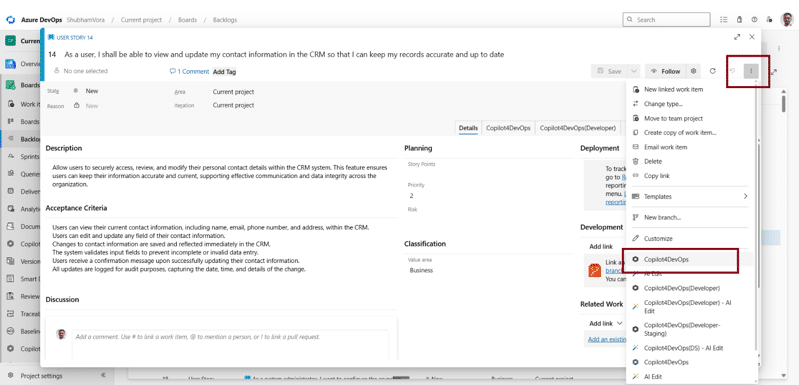
Step 1: First, open any user story or work item inside Azure DevOps that you want to convert into a use case. Then open Copilot4DevOps from that ADO work item.
Step 2: Open the Convert module of Copilot4DevOps.
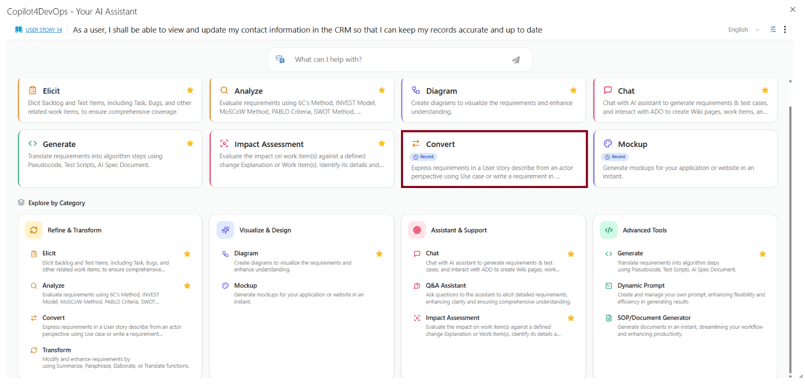
Step 3: Copilot4DevOps automatically takes the ADO work item as a context from where we opened it. Still, you can select which field of that work item to pass as a context to AI.
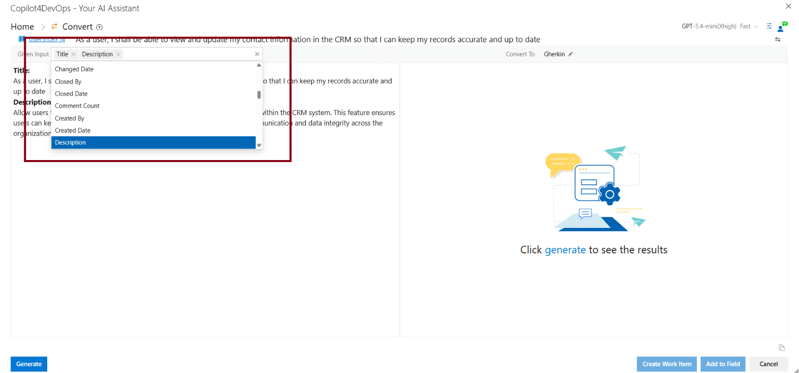
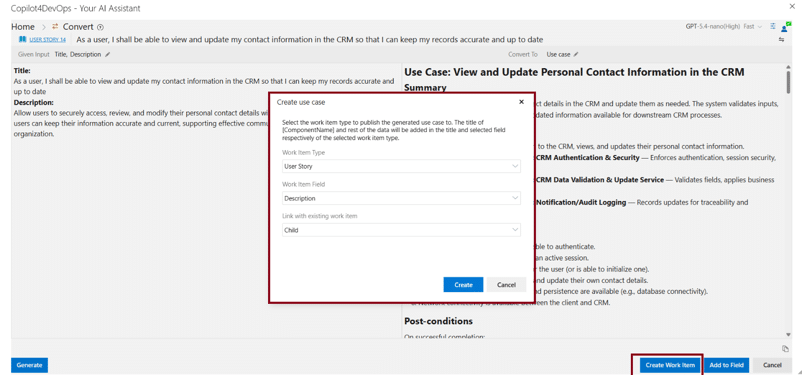
Step 4: Next, from the “Convert to” drop-down menu, select Use case. After that, click the “Generate” button.
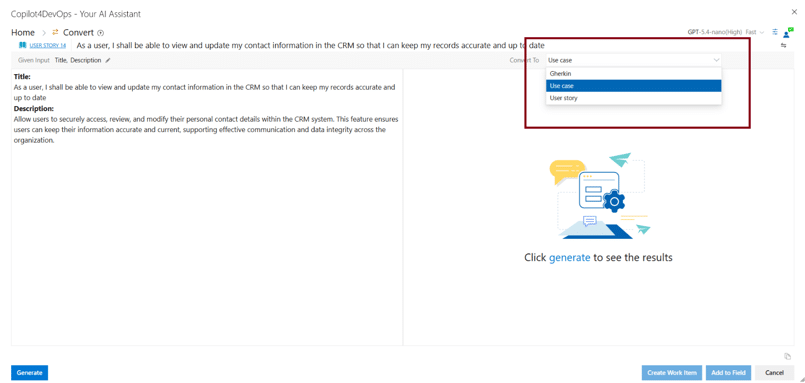
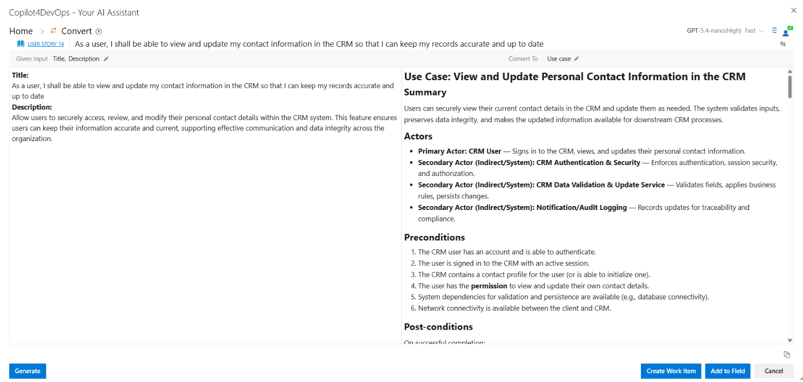
Step 5: On the right side, you can see that a use case is generated that outlines a quick summary, actors, preconditions, post-conditions, primary scenarios, and alternative scenarios.
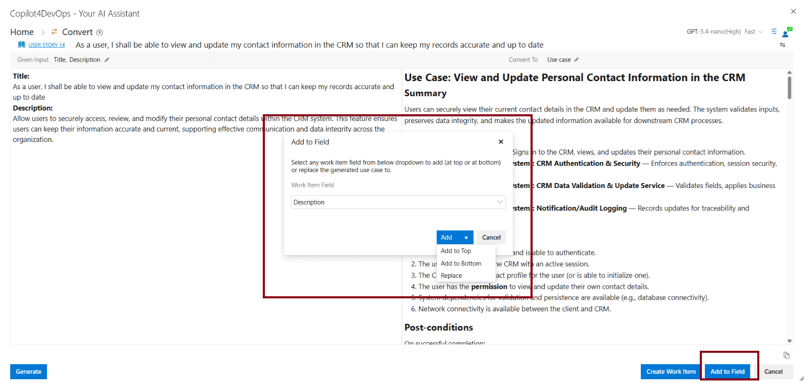
Step 6: Once generated, you can directly insert these use cases into Azure DevOps. You can click on the “Add to field” button at the bottom and add this use case to the particular field of the existing work item at the top or bottom or replace the field content.
Step 7: You can also create a new work item, insert this use case into the newly created work item, and link it with an existing work item.
This way, teams can generate use cases within seconds instead of spending hours. Also, this reduces the chances of missing edge cases. Furthermore, the tool has the capability to develop use case diagrams using AI. So, everything happens in one place without context switching.

Similarly, users can generate test cases from user stories and ADO work items and insert them directly into Azure DevOps. To learn more about that, you can explore the “AI Test Case Generation from User Stories in Azure DevOps” blog.

Unifying Delivery with Native Traceability

Most teams using AI to generate use cases and test cases follow the workflow below:

  • Copy the requirement out of Azure DevOps and paste it into ChatGPT.
  • Generate use cases and insert them into Azure DevOps.
  • For each use case, generate multiple test cases and insert them into Azure DevOps, and connect them with the use cases manually.

This workflow looks straightforward, but it eats up lots of time of the team’s time and often misses edge cases that increase rework later.

Also, there’s no audit history showing what input produced which output. The formatting rarely matches your organization’s work item standards, like field names, acceptance criteria structure, and naming conventions, all of which come back inconsistent.

This also introduces the compliance gap. On the other hand, Copilot4DevOps generates everything inside Azure DevOps, and teams can directly link generated use cases with requirements and test cases. Also, teams can provide custom instructions to follow some rules and get consistent output.

Every step, from the original requirement to the generated test case, is timestamped, linked, and traceable inside the same workspace where the work gets done. So, these logs are very useful while preparing audit reports. This way, Copilot4DevOps delivers use cases within Azure DevOps and with end-to-end traceability.

Foire aux questions

What is a Gherkin scenario, and how does it relate to a test case?


Gherkin scenarios are test cases written in plain language and Given-When-Then format, where:

  • Given defines the starting state
  • When describes the action
  • Then states what the system should do
Can AI convert use cases to test cases within Azure DevOps?

Yes. You can use the Elicit module of Copilot4DevOps, which takes use cases as input and generates multiple test cases with execution steps, without missing any edge cases. You can also link generated test cases to use cases inside Azure DevOps.

Can Copilot4DevOps be used in regulated industries?

Yes. First of all, Copilot4DevOps directly works within your ADO permission limit. Also, it logs every action it performs, whether it is generating use cases or test cases, and that is very helpful while preparing the audit reports for teams working in regulatory industries.

Essayez-le vous-même

Prêt à transformer votre DevOps avec Copilot4DevOps ?

Profitez dès aujourd'hui d'un essai gratuit.
Table des matières

Table des matières

Last month, we were talking with one of our customers’ product team members, and he raised the concern: my team spends days preparing use cases and test cases for any new feature we launch in our product. Still, they miss 50% of edge cases. He was not wrong, because research from Virtuoso QA also shows that even mature test suites achieve only 20–30% edge case coverage.

As a solution, we offered them the Convert module of Copilot4DevOps, which takes Azure DevOps work items as context, AI analyzes them, and converts requirements into use cases, Gherkin scenarios, and test cases without missing any edge cases.

In just two weeks, their team got productivity gains, as now BA teams and QA engineers focus on reviewing use cases and test cases instead of manually writing them from scratch. Also, as 95%+ of edge cases Copilot4DevOps covers, the rework of the team is reduced.

In this blog, we’re sharing the exact same process they are following to convert requirements into use cases and test cases using Copilot4DevOps and also explaining the difference between use cases and test cases if someone is confused between them.

Difference Between Use Case and Test Case and When to Use Each

A use case defines how a user interacts with a system to achieve a specific goal. Its main focus is generally to outline the actions that the user takes, system behavior, and describe what happens when something goes wrong mid-flow. For example, “A customer makes the payment for an online order” could be the use case that outlines the complete flow from checkout to payment and final order confirmation.

A test case generally takes one specific scenario from that use case and ensures whether the system actually delivers it or not. Test cases actually define test conditions, input data, step-by-step execution processes, and what correct results look like. For example, a test case may check whether the user is able to make a payment successfully with net banking.

Here is the core difference between them and when to use each:

Paramètre Use Case Test Case
Purpose Describes user goals and interactions. Verifies system functionality.
Main Goal Define what users need. Confirm that the feature works correctly.
Created By Business analysts, product owners, or system analysts. QA engineers and testers.
Level of Detail High-level overview. Detailed execution steps.
Audience Stakeholders, developers, and analysts. Testers and QA teams.
Input Data Usually not required. Required for testing.
Output User flow and expected behavior. Pass or fail result.
Timing Created during requirement gathering. Created during the testing phase.
Portée Covers complete user scenarios. Covers specific functionality or condition.
When to use During planning and requirement analysis. They help teams understand user expectations and define system behavior before development. Used during quality assurance. They help verify that every feature works correctly and meets the requirements defined in the use cases.

How to Automate the Use Case Creation Using Copilot4DevOps

Copilot4DevOps is an award-winning AI assistant native to Azure DevOps, which helps to convert business goals and functional requirements into use cases, test cases, or Gherkin scenarios without leaving Azure DevOps. Here is how teams use it generally:

Step 1: First, open any user story or work item inside Azure DevOps that you want to convert into a use case. Then open Copilot4DevOps from that ADO work item.

Step 2: Open the Convert module of Copilot4DevOps.

Step 3: Copilot4DevOps automatically takes the ADO work item as a context from where we opened it. Still, you can select which field of that work item to pass as a context to AI.

Step 4: Next, from the “Convert to” drop-down menu, select Use case. After that, click the “Generate” button.

Step 5: On the right side, you can see that a use case is generated that outlines a quick summary, actors, preconditions, post-conditions, primary scenarios, and alternative scenarios.

Step 6: Once generated, you can directly insert these use cases into Azure DevOps. You can click on the “Add to field” button at the bottom and add this use case to the particular field of the existing work item at the top or bottom or replace the field content.

Step 7: You can also create a new work item, insert this use case into the newly created work item, and link it with an existing work item.

This way, teams can generate use cases within seconds instead of spending hours. Also, this reduces the chances of missing edge cases. Furthermore, the tool has the capability to develop use case diagrams using AI. So, everything happens in one place without context switching.

Similarly, users can generate test cases from user stories and ADO work items and insert them directly into Azure DevOps. To learn more about that, you can explore the “AI Test Case Generation from User Stories in Azure DevOps” blog.

Unifying Delivery with Native Traceability

Most teams using AI to generate use cases and test cases follow the workflow below:

  • Copy the requirement out of Azure DevOps and paste it into ChatGPT.
  • Generate use cases and insert them into Azure DevOps.
  • For each use case, generate multiple test cases and insert them into Azure DevOps, and connect them with the use cases manually.

This workflow looks straightforward, but it eats up lots of time of the team’s time and often misses edge cases that increase rework later.

Also, there’s no audit history showing what input produced which output. The formatting rarely matches your organization’s work item standards, like field names, acceptance criteria structure, and naming conventions, all of which come back inconsistent.

This also introduces the compliance gap. On the other hand, Copilot4DevOps generates everything inside Azure DevOps, and teams can directly link generated use cases with requirements and test cases. Also, teams can provide custom instructions to follow some rules and get consistent output.

Every step, from the original requirement to the generated test case, is timestamped, linked, and traceable inside the same workspace where the work gets done. So, these logs are very useful while preparing audit reports. This way, Copilot4DevOps delivers use cases within Azure DevOps and with end-to-end traceability.

Foire aux questions

What is a Gherkin scenario, and how does it relate to a test case?


Gherkin scenarios are test cases written in plain language and Given-When-Then format, where:

  • Given defines the starting state
  • When describes the action
  • Then states what the system should do
Can AI convert use cases to test cases within Azure DevOps?

Yes. You can use the Elicit module of Copilot4DevOps, which takes use cases as input and generates multiple test cases with execution steps, without missing any edge cases. You can also link generated test cases to use cases inside Azure DevOps.

Can Copilot4DevOps be used in regulated industries?

Yes. First of all, Copilot4DevOps directly works within your ADO permission limit. Also, it logs every action it performs, whether it is generating use cases or test cases, and that is very helpful while preparing the audit reports for teams working in regulatory industries.

Essayez-le vous-même

Prêt à transformer votre DevOps avec Copilot4DevOps ?

Profitez dès aujourd'hui d'un essai gratuit.