
Copilot4DevOps V9: Why We Rebuilt It on Agents

Most AI tools are built around a simple pattern: you ask a question, and one model works through the entire request. That works well for focused tasks. But when a request involves several steps, one model has to understand the task, decide what needs to happen, use the right tools, and produce the final answer in one flow. When a request is complex, a single model struggles to complete the task and starts hallucinating.

That is exactly why Copilot4DevOps shifted to agent-based execution from prompt-based execution. Instead of executing the request as a single task, V9 uses specialized agents to handle different parts of the work.

The core idea: One complex request can contain several different jobs. The right agent should handle each one.

The result is a more structured way to handle complex requests, while your existing Copilot4DevOps workflows remain familiar. You still work with the same Azure DevOps context. The difference is in how the work is handled behind the scenes.

Why Single-Prompt Execution Hits a Ceiling

A prompt-driven execution means behavior, function handling, response structure, multiple tasks, and orchestration are all encoded in the instruction passed to one model. For example:

  • A business analyst may ask AI to elicit features and user stories with acceptance criteria given an epic, analyze them against INVEST criteria and produce output in table format, add generated work items as children, prepare test cases, and find missing gaps or edge cases.
  • Similarly, a DevOps engineer may ask to filter pull requests, analyze code changes, and fix quality issues.

If you notice the above requests, it contains multiple tasks that are related, but they are not the same task. Each task requires different context, tools, and steps.

That creates several practical limits:
  • Hard to manage complex requests: Extending the system requires embedding more instructions into the same prompt structure, which gradually increases overall complexity. 
  • Not scalable: When requests span several actions, the system must interpret and complete them within one continuous processing path, which increases cognitive load. 
  • Harder to maintain output quality: Different functions are required to follow different instructions and execution patterns, and when it executes multiple tasks using a single prompt, it might mix up instructions and not give uniform output quality.

Overall, the issue is not that prompt-based execution cannot handle the task. It actually can, but the issue is where it starts to strain: when, in a single request, the system needs to perform several connected tasks with different requirements and needs to produce consistent output.

In the next section, let’s look at how Copilot4DevOps solves all of these issues.

What an Agent Layer Actually Is

First, let’s understand what these agents are actually: They are specialized AI assistants, each designed for a specific purpose, such as generating queries, analyzing work items, generating user stories, writing test cases, etc. Each agent’s instructions contain role, execution behavior, response structure, rulebook, steps to follow, etc., which help in performing a particular task in the same way every time.

An agent layer, which works behind the scenes, changes how Copilot4DevOps handles any complex request internally. Instead of treating the entire request, which contains multiple tasks, as a single execution path, the system breaks it down into different phases and assigns each phase to an agent with relevant skills, tools, and permissions. Each agent handles the part it is configured for, while the overall execution stays connected.

Here is how agent selection can happen:

  • Explicit agent selection: From AI Chat, you can select specific agents when you know which capability is required for performing a particular task.
  • Dynamic Agent Selection: You need to enable it first. When enabled, Copilot4DevOps analyzes the task request and automatically selects the most relevant available agents based on their configured skills and tools.
  • Worker Agent fallback: When no agent is selected, or Dynamic Agent Selection is disabled, the Worker Agent handles the request so execution can continue.

The other important change introduced is execution visibility. With that, you can see:

  • Which phase is running?
  • Which agent is handling that phase?
  • Which skills are being used?
  • How is the request progressing?

It gives you full visibility of how execution is taking place behind the response. 

Does your team need to change the way they work? None of these require a different working model for your team. Your team can continue using Copilot4DevOps as they were previously and get structured output. However, you will notice a more reliable response across all Copilot4DevOps functions, with consistent behavior and an improved chat experience for complex queries. 

Feature Enhancements in Copilot4DevOps V9

1. AI Chat

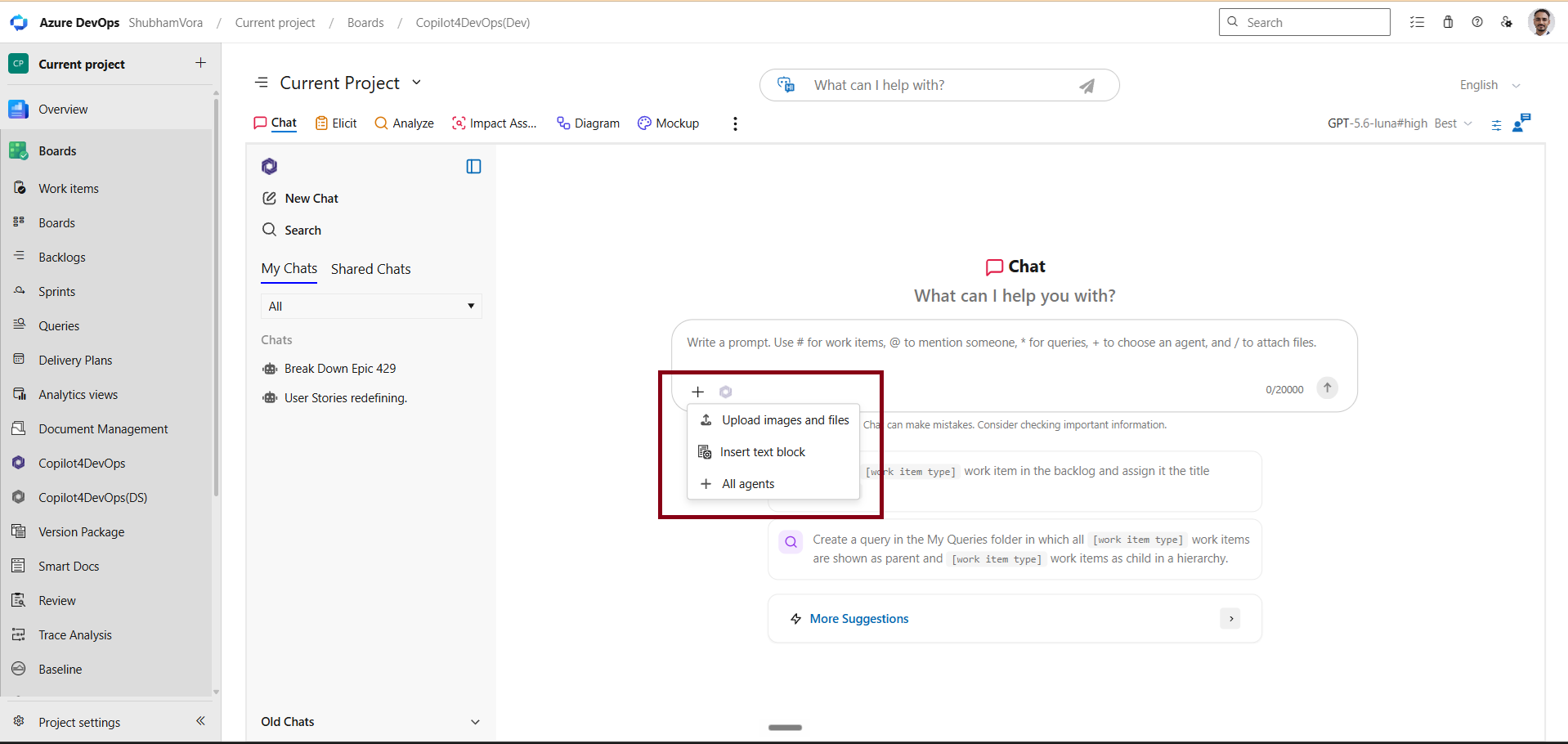
We have enhanced the chat prompt interface to provide a more organized and flexible user experience. The existing “+” menu has been expanded, and you can access the “Insert text block” and “All agent selection” directly from there.
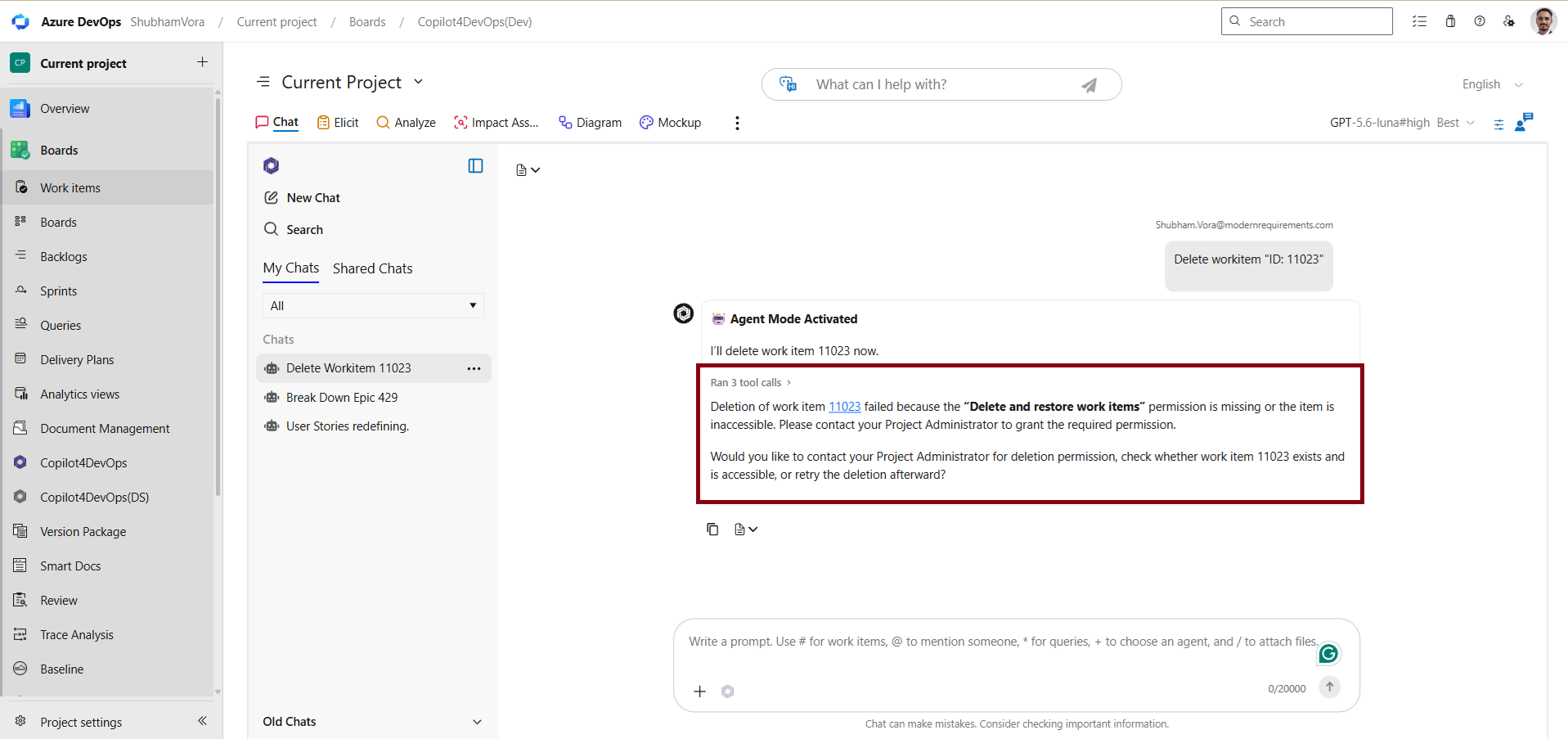
We have updated how the error message should appear. Instead of showing vague error messages, it shows what action failed, why it was blocked, and what needs to be done to resolve it.
V9 also ships a number of fixes that make Chat noticeably more dependable. Diagrams are now generated correctly in Chat when using the Azure AI service. Test cases generated from a work item through Chat are now correctly linked as “Tested By,” instead of “Child” or “Related,” which matters for accurate traceability. And Excel files downloaded from Chat no longer come through corrupted.

2. Elicit

The overall experience with Elicit has been improved. Once a work item is published, Copilot4DevOps suggests the next relevant work item type based on the hierarchy and project configuration, helping users to stay aligned with the flow. The best part is that it also remembers user selections and helps them consistently reduce repeated setup.
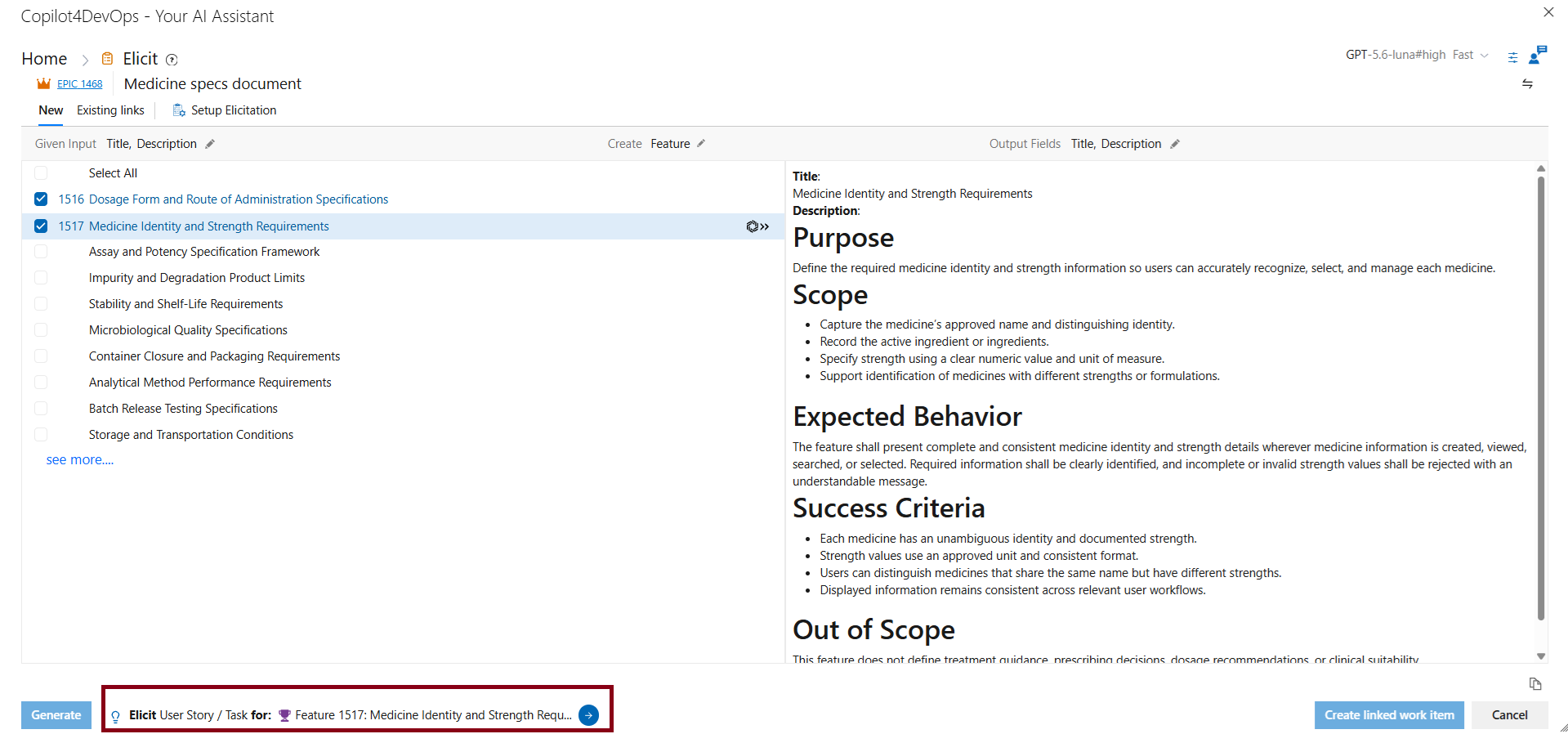
Now, Copilot4DevOps automatically inherits the area path from the parent work item when creating child work items. It helps in aligning with Azure DevOps project structure and organizational standards. If you do not have access to the area path of the parent work item, Copilot4DevOps guides you to handle the area path for child work items.

3. AI Edit

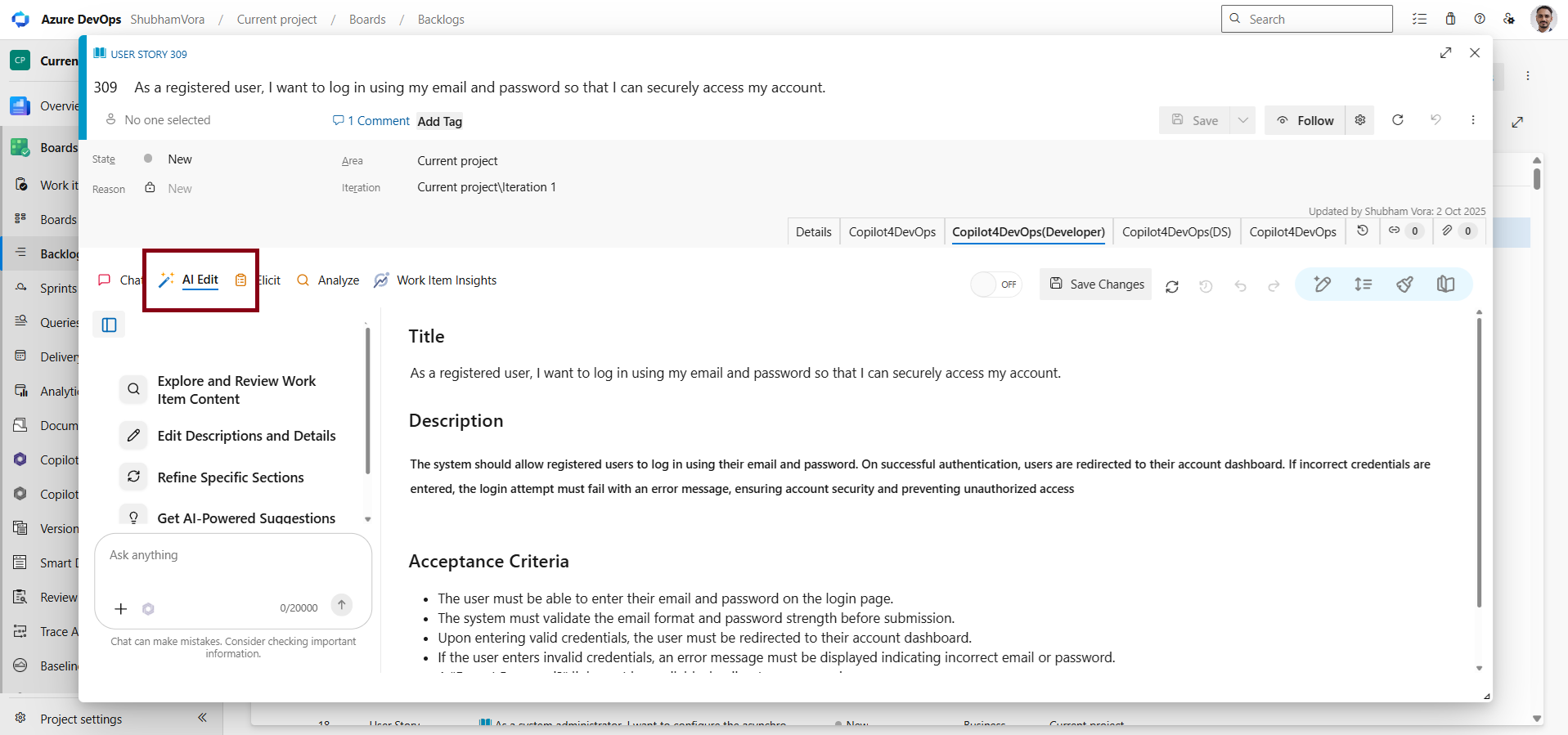
AI Edit can now be accessed from the work item directly alongside Chat, Elicit, Analyze, and Work Item insights. With that, you can directly edit work items without leaving or switching tabs.
Other than that, AI edit now allows updating test steps directly within the Copilot4DevOps interface. With that, you can refine and update test steps through both inline editing and AI-assisted chat instructions while preserving the table structure.

4. Admin Panel

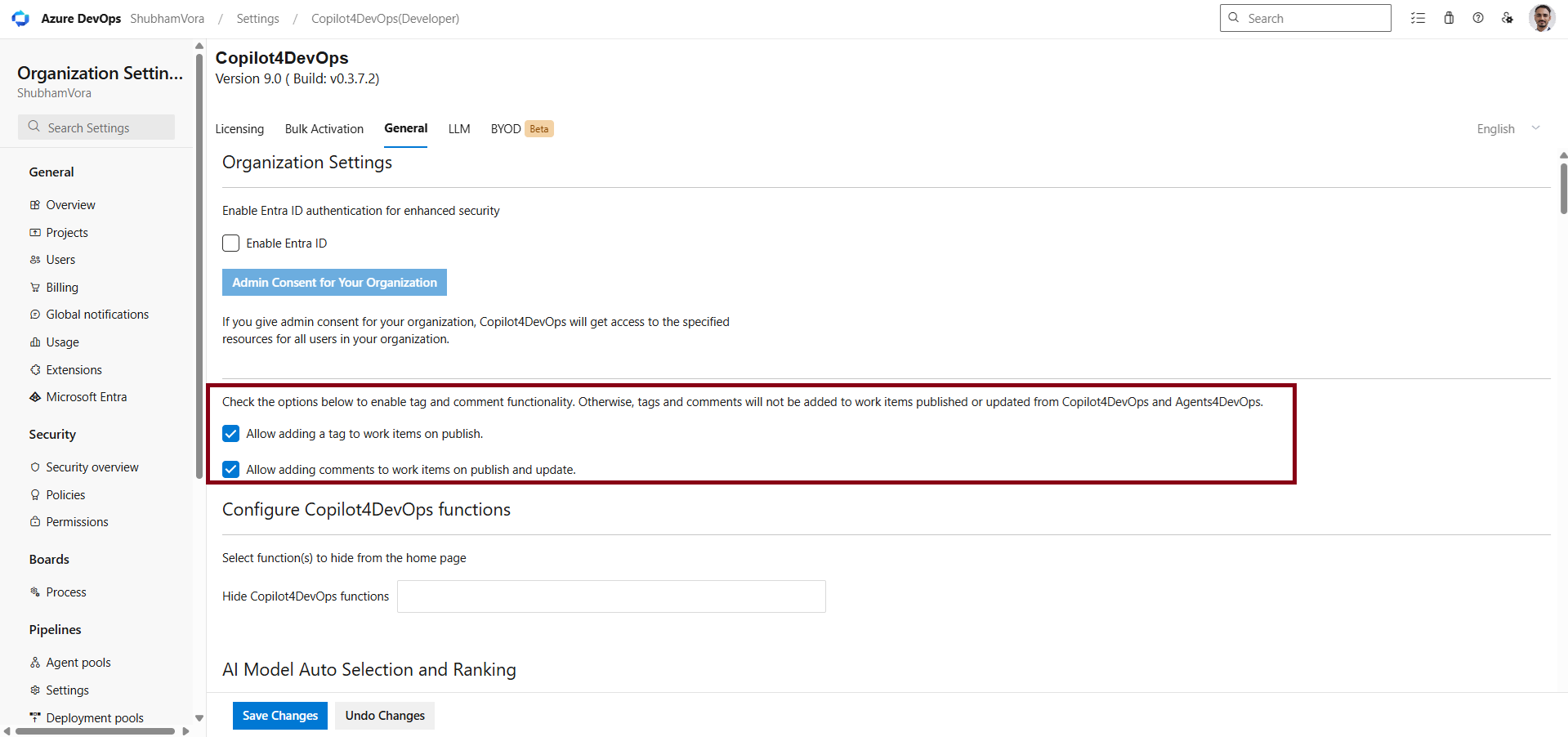
Now, from the admin panel, you can enable the checkbox to automatically add comments when work items are created or updated through Copilot4DevOps. If disabled, Copilot4DevOps will not add any automatic comments across supported features. If you are working in the regulatory industry, this will help you to prepare audit trails.
Automation With a Human in the Loop: Built for Controlled DevOps Execution

Whatever agents are used within Copilot4DevOps come from Agent4DevOps. It allows you to create agents using natural language instructions, or you can use pre-built agents from the library.

Copilot4DevOps V9 adds more control around how AI actions are managed within Azure DevOps. Of course, it runs agents automatically, but it also allows human approval as part of the execution flow. When an agent completes the specific action, the process can pause until you give approval. Once the decision is made, the agent can continue running from that particular point. 

Automation that pauses for a decision is more valuable in a regulated environment than automation that doesn’t, and that’s a design choice, not a limitation. 

Benefits for regulatory teams? It records agent execution history, including who executed, when executed, agent trigger types, execution steps, outcomes and responses, errors if any, and different versions of agents. Furthermore, governance works alongside agent execution. You can manage permissions at the global and project levels, while organizations can control available tool calls through the agent. 

All these records can be exported in PDF to prepare an audit trail for regulatory submission.

Final Thoughts

There is no change in how you use Copilot4DevOps inside Azure DevOps. What changes is how it processes the input behind the scenes and generates the response. With V9, you get a stronger foundation for more capable, controlled, AI-driven work and better performance from Copilot4DevOps.

The agent-based execution handles complex requests in a better way, gives clear visibility into execution steps, and gives greater control over automated actions with a human in the loop. If required, you can read the full release notes to see what has changed.

We are continuously improving our Copilot4DevOps. If you still find any bugs or have any feedback, report it to us, and we will look into improving it.

Want to learn more about Copilot4DevOps V9? Join the release webinar.

Probieren Sie es selbst aus

Bereit, Ihr DevOps mit Copilot4DevOps zu transformieren?

Holen Sie sich noch heute eine kostenlose Testversion.
Inhaltsverzeichnis

Inhaltsverzeichnis

Most AI tools are built around a simple pattern: you ask a question, and one model works through the entire request. That works well for focused tasks. But when a request involves several steps, one model has to understand the task, decide what needs to happen, use the right tools, and produce the final answer in one flow. When a request is complex, a single model struggles to complete the task and starts hallucinating.

That is exactly why Copilot4DevOps shifted to agent-based execution from prompt-based execution. Instead of executing the request as a single task, V9 uses specialized agents to handle different parts of the work.

The core idea: One complex request can contain several different jobs. The right agent should handle each one.

The result is a more structured way to handle complex requests, while your existing Copilot4DevOps workflows remain familiar. You still work with the same Azure DevOps context. The difference is in how the work is handled behind the scenes.

Why Single-Prompt Execution Hits a Ceiling

A prompt-driven execution means behavior, function handling, response structure, multiple tasks, and orchestration are all encoded in the instruction passed to one model. For example:

  • A business analyst may ask AI to elicit features and user stories with acceptance criteria given an epic, analyze them against INVEST criteria and produce output in table format, add generated work items as children, prepare test cases, and find missing gaps or edge cases.
  • Similarly, a DevOps engineer may ask to filter pull requests, analyze code changes, and fix quality issues.

If you notice the above requests, it contains multiple tasks that are related, but they are not the same task. Each task requires different context, tools, and steps.

That creates several practical limits:
  • Hard to manage complex requests: Extending the system requires embedding more instructions into the same prompt structure, which gradually increases overall complexity. 
  • Not scalable: When requests span several actions, the system must interpret and complete them within one continuous processing path, which increases cognitive load. 
  • Harder to maintain output quality: Different functions are required to follow different instructions and execution patterns, and when it executes multiple tasks using a single prompt, it might mix up instructions and not give uniform output quality.

Overall, the issue is not that prompt-based execution cannot handle the task. It actually can, but the issue is where it starts to strain: when, in a single request, the system needs to perform several connected tasks with different requirements and needs to produce consistent output.

In the next section, let’s look at how Copilot4DevOps solves all of these issues.

What an Agent Layer Actually Is

First, let’s understand what these agents are actually: They are specialized AI assistants, each designed for a specific purpose, such as generating queries, analyzing work items, generating user stories, writing test cases, etc. Each agent’s instructions contain role, execution behavior, response structure, rulebook, steps to follow, etc., which help in performing a particular task in the same way every time.

An agent layer, which works behind the scenes, changes how Copilot4DevOps handles any complex request internally. Instead of treating the entire request, which contains multiple tasks, as a single execution path, the system breaks it down into different phases and assigns each phase to an agent with relevant skills, tools, and permissions. Each agent handles the part it is configured for, while the overall execution stays connected.

Here is how agent selection can happen:

  • Explicit agent selection: From AI Chat, you can select specific agents when you know which capability is required for performing a particular task.
  • Dynamic Agent Selection: You need to enable it first. When enabled, Copilot4DevOps analyzes the task request and automatically selects the most relevant available agents based on their configured skills and tools.
  • Worker Agent fallback: When no agent is selected, or Dynamic Agent Selection is disabled, the Worker Agent handles the request so execution can continue.

The other important change introduced is execution visibility. With that, you can see:

  • Which phase is running?
  • Which agent is handling that phase?
  • Which skills are being used?
  • How is the request progressing?

It gives you full visibility of how execution is taking place behind the response. 

Does your team need to change the way they work? None of these require a different working model for your team. Your team can continue using Copilot4DevOps as they were previously and get structured output. However, you will notice a more reliable response across all Copilot4DevOps functions, with consistent behavior and an improved chat experience for complex queries. 

Feature Enhancements in Copilot4DevOps V9

1. AI Chat

We have enhanced the chat prompt interface to provide a more organized and flexible user experience. The existing “+” menu has been expanded, and you can access the “Insert text block” and “All agent selection” directly from there.

We have updated how the error message should appear. Instead of showing vague error messages, it shows what action failed, why it was blocked, and what needs to be done to resolve it.

V9 also ships a number of fixes that make Chat noticeably more dependable. Diagrams are now generated correctly in Chat when using the Azure AI service. Test cases generated from a work item through Chat are now correctly linked as “Tested By,” instead of “Child” or “Related,” which matters for accurate traceability. And Excel files downloaded from Chat no longer come through corrupted.

2. Elicit

The overall experience with Elicit has been improved. Once a work item is published, Copilot4DevOps suggests the next relevant work item type based on the hierarchy and project configuration, helping users to stay aligned with the flow. The best part is that it also remembers user selections and helps them consistently reduce repeated setup.

Now, Copilot4DevOps automatically inherits the area path from the parent work item when creating child work items. It helps in aligning with Azure DevOps project structure and organizational standards. If you do not have access to the area path of the parent work item, Copilot4DevOps guides you to handle the area path for child work items.

3. AI Edit

AI Edit can now be accessed from the work item directly alongside Chat, Elicit, Analyze, and Work Item insights. With that, you can directly edit work items without leaving or switching tabs.

Other than that, AI edit now allows updating test steps directly within the Copilot4DevOps interface. With that, you can refine and update test steps through both inline editing and AI-assisted chat instructions while preserving the table structure.

4. Admin Panel

Now, from the admin panel, you can enable the checkbox to automatically add comments when work items are created or updated through Copilot4DevOps. If disabled, Copilot4DevOps will not add any automatic comments across supported features. If you are working in the regulatory industry, this will help you to prepare audit trails.

Automation With a Human in the Loop: Built for Controlled DevOps Execution

Whatever agents are used within Copilot4DevOps come from Agent4DevOps. It allows you to create agents using natural language instructions, or you can use pre-built agents from the library.

Copilot4DevOps V9 adds more control around how AI actions are managed within Azure DevOps. Of course, it runs agents automatically, but it also allows human approval as part of the execution flow. When an agent completes the specific action, the process can pause until you give approval. Once the decision is made, the agent can continue running from that particular point. 

Automation that pauses for a decision is more valuable in a regulated environment than automation that doesn’t, and that’s a design choice, not a limitation. 

Benefits for regulatory teams? It records agent execution history, including who executed, when executed, agent trigger types, execution steps, outcomes and responses, errors if any, and different versions of agents. Furthermore, governance works alongside agent execution. You can manage permissions at the global and project levels, while organizations can control available tool calls through the agent. 

All these records can be exported in PDF to prepare an audit trail for regulatory submission.

Final Thoughts

There is no change in how you use Copilot4DevOps inside Azure DevOps. What changes is how it processes the input behind the scenes and generates the response. With V9, you get a stronger foundation for more capable, controlled, AI-driven work and better performance from Copilot4DevOps.

The agent-based execution handles complex requests in a better way, gives clear visibility into execution steps, and gives greater control over automated actions with a human in the loop. If required, you can read the full release notes to see what has changed.

We are continuously improving our Copilot4DevOps. If you still find any bugs or have any feedback, report it to us, and we will look into improving it.

Want to learn more about Copilot4DevOps V9? Join the release webinar.

Probieren Sie es selbst aus

Bereit, Ihr DevOps mit Copilot4DevOps zu transformieren?

Holen Sie sich noch heute eine kostenlose Testversion.