Copilot4DevOps vs. GitHub Copilot + Azure DevOps MCP: What Teams Actually Need

Many enterprise teams using Azure DevOps are looking to bring AI into their existing DevOps workflow to manage requirements, code, test cases, pull requests, and the whole SDLC (Software Development Life Cycle).

However, they usually face two clear approaches:

  • One is using GitHub Copilot with Azure DevOps MCP. It allows accessing ADO records in the development environment using AI.
  • The other one is adopting Copilot4DevOps, which brings AI directly inside Azure DevOps. This adds an intelligence layer within Azure DevOps.
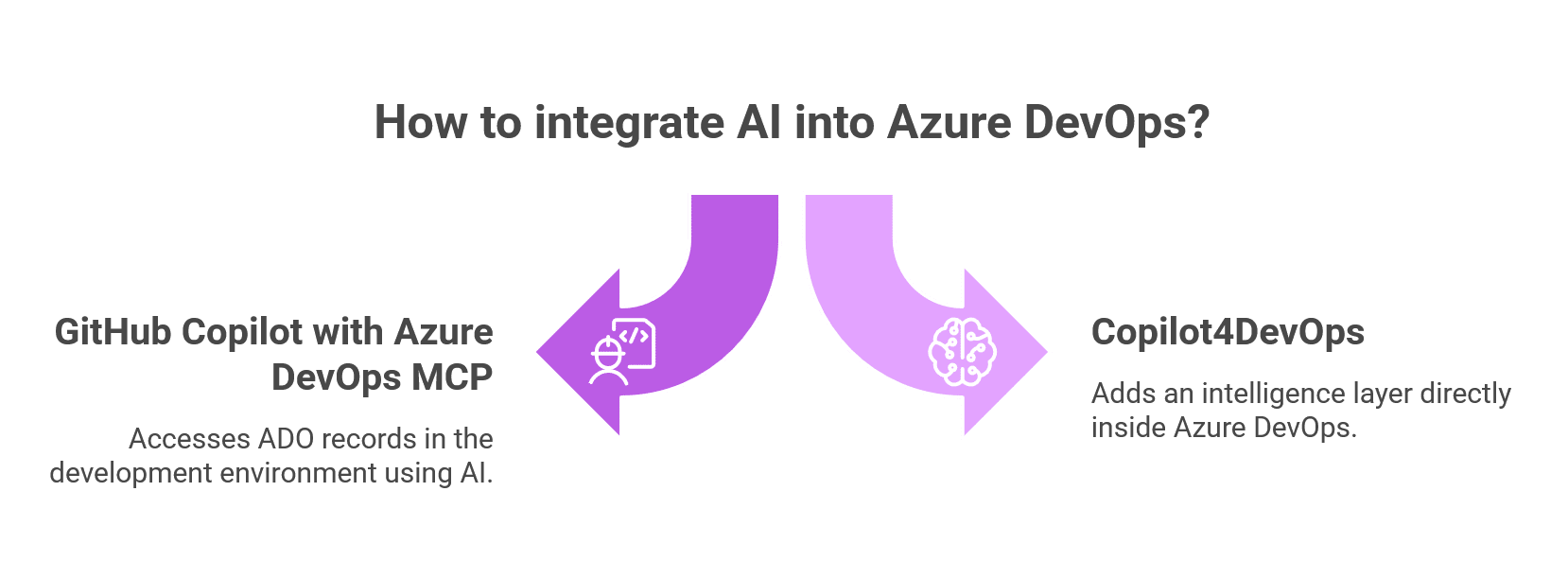
How to integrate AI into Azure DevOps
Two powerful paths to AI in Azure DevOps: Copilot for intelligent data access, or Copilot4DevOps for built-in intelligence.

Both approaches add real value in DevOps, but in different ways. One helps developers to improve their productivity, and another improves how teams plan, code, validate, and deliver work across the whole DevOps lifecycle.

So, for enterprise teams adopting AI in DevOps, it is a must to understand the difference between both to make the right decisions.

What GitHub Copilot + Azure DevOps MCP Actually Enables

GitHub Copilot is an AI coding assistant that works directly in code editors like VS Code, Visual Studio, etc. On the other hand, Azure DevOps MCP (Model Context Protocol) acts as a bridge between GitHub Copilot and Azure DevOps. It allows secure access to ADO work items, pipelines, repositories, and other artifacts without writing a single line of code.

With GitHub Copilot + ADO MCP, teams can perform actions like below:

  • Access work items, queries, and project data without leaving the editors like VS Code.
  • Update tasks, comments, and status through natural language prompts.
  • Trigger pipeline-related actions from within the code editor or development workflows.

Some example prompts can be the following:

  • List all work items related to sprint 2 in the “Car engine development” project.
  • List all test cases for user story #123.
  • Create the wiki page with content about ISO 9001 compliance.

This way, developers can ask in GitHub Copilot Chat, and it interacts with Azure DevOps in real-time to fetch records.

Outcomes for enterprise teams

  • Developers can fetch any records directly in the code editor and implement them instead of doing context switching.
  • Better alignment between code and assigned work items.
  • Lower friction in executing routine DevOps tasks.
  • Improved developer experience without major workflow disruption.
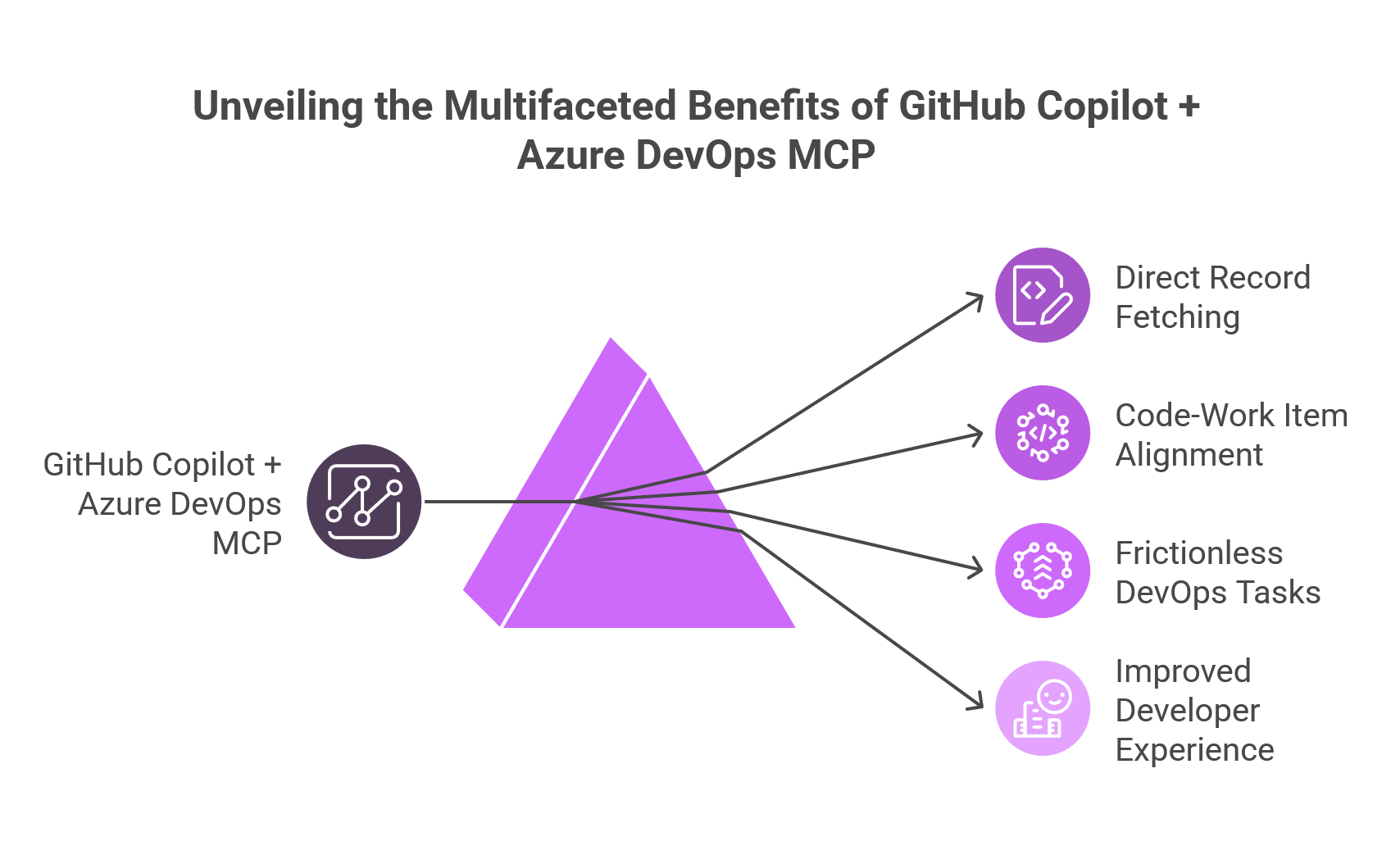
Unveiling the Multifaceted Benefits of GitHub Copilot Azure DevOps MCP
Unlock smarter DevOps with AI—where GitHub Copilot meets Azure DevOps MCP to streamline workflows, align code with work items, and elevate developer productivity.

Where its scope typically stays limited

Here are some limitations of GitHub Copilot + ADO MCP:

  • Team members like BAs, product owners, etc., can’t use AI to create and refine requirements within Azure DevOps.
  • Project managers still manually need to update requirements for planning & tracking.
  • Compliance teams manually need to check for gaps.
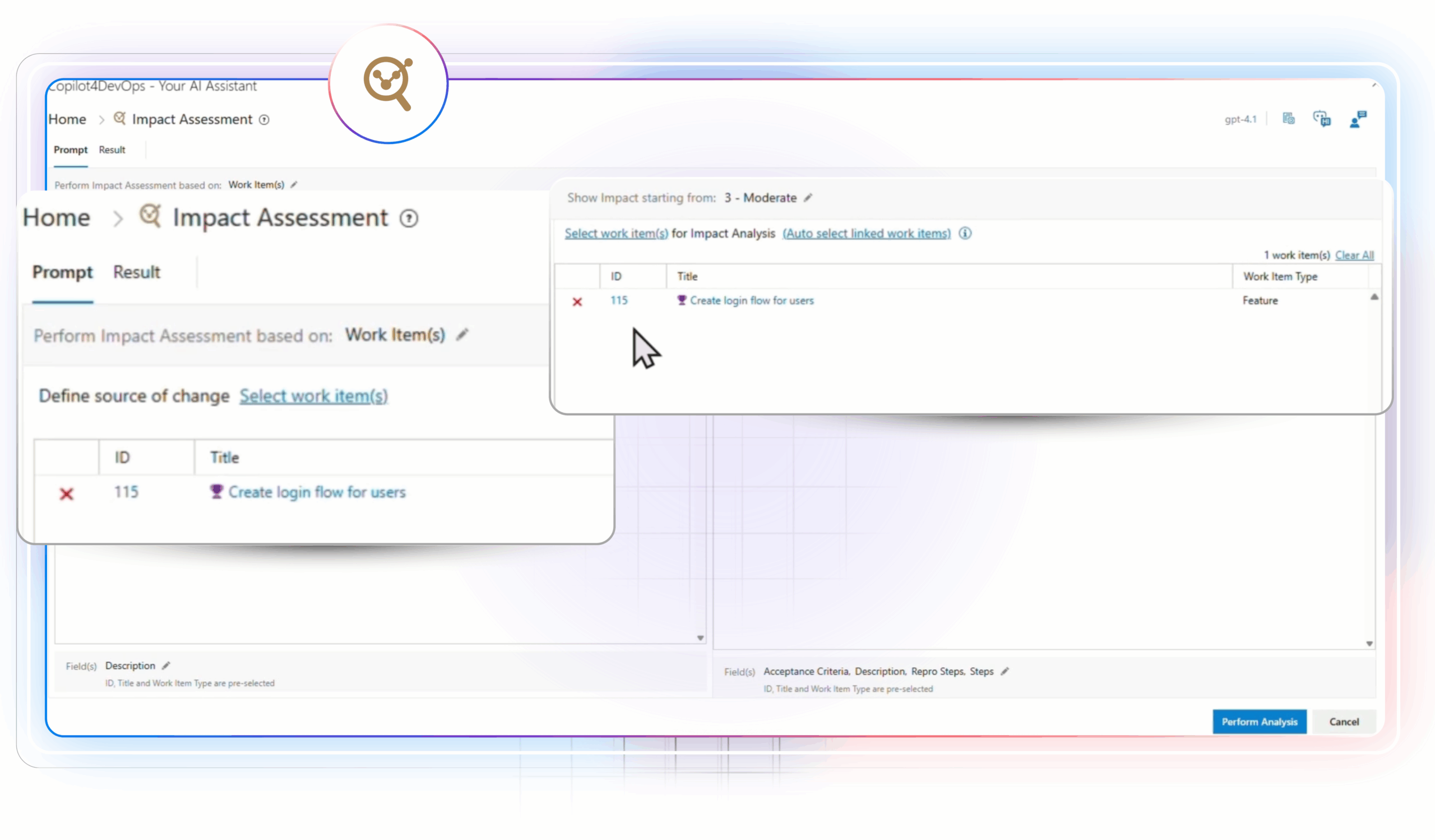
  • DevOps and QA teams can’t use AI for impact analysis or performing other tasks.
  • To use this setup effectively, developers must have prompt engineering skills; without that, they also struggle.

So, this model works best when the core goal is to boost developers’ productivity by keeping ADO records in the development workflow while continuing to rely on existing Azure DevOps practices for the rest of the lifecycle.

What Copilot4DevOps Is and Why It Exists

Copilot4DevOps is an AI assistant that works directly within Azure DevOps. It has multiple AI capabilities that help enterprise teams to plan and validate requirements and deliver software across the full lifecycle.

Copilot4DevOps doesn’t just offer a single chat interface for everyone to interact, but also a task-based module that anyone, including non-technical people and those unfamiliar with prompt engineering, can use.

The best part of Copilot4DevOps is that teams can access it directly within ADO work items, which saves them lots of time.
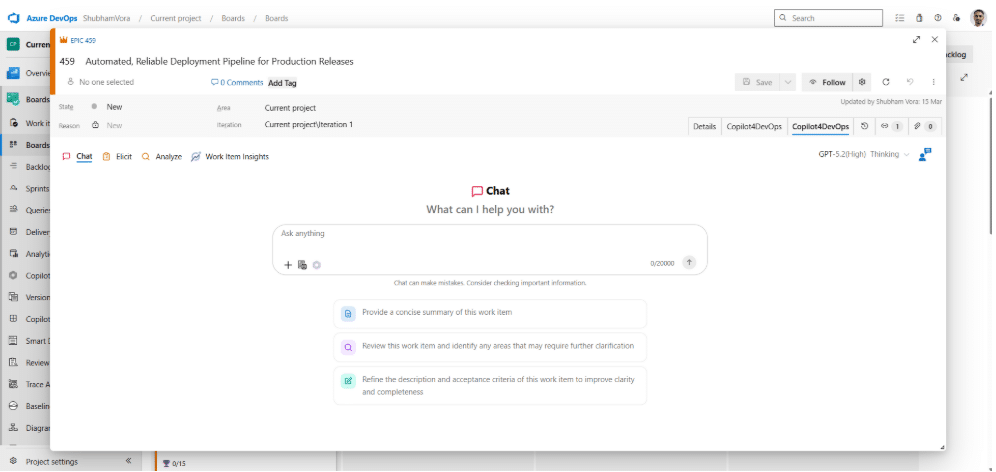
Here are the key capabilities of Copilot4DevOps:

Elicit: Takes existing requirements or external documents as input and drafts and inserts requirements into Azure DevOps.
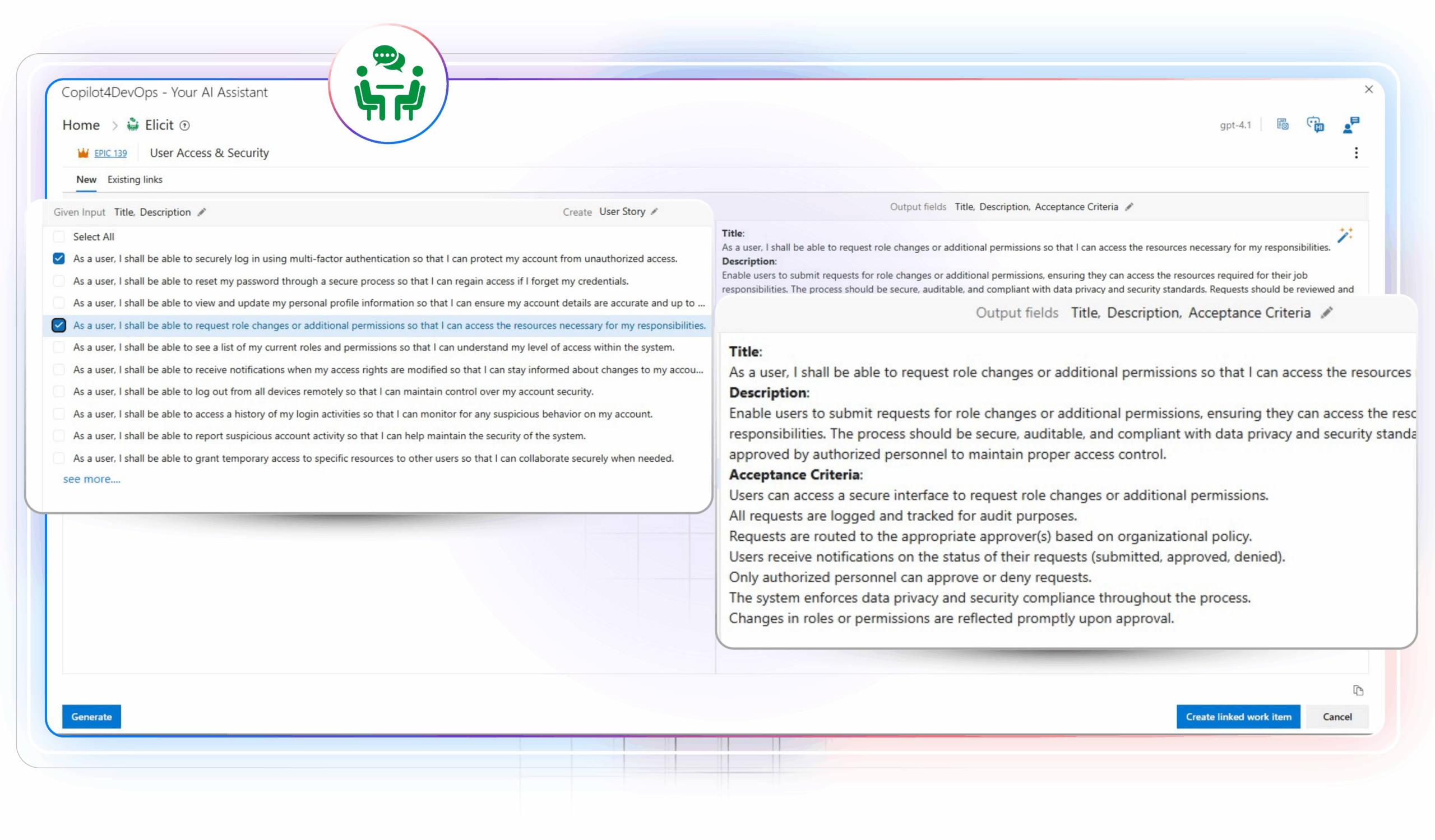
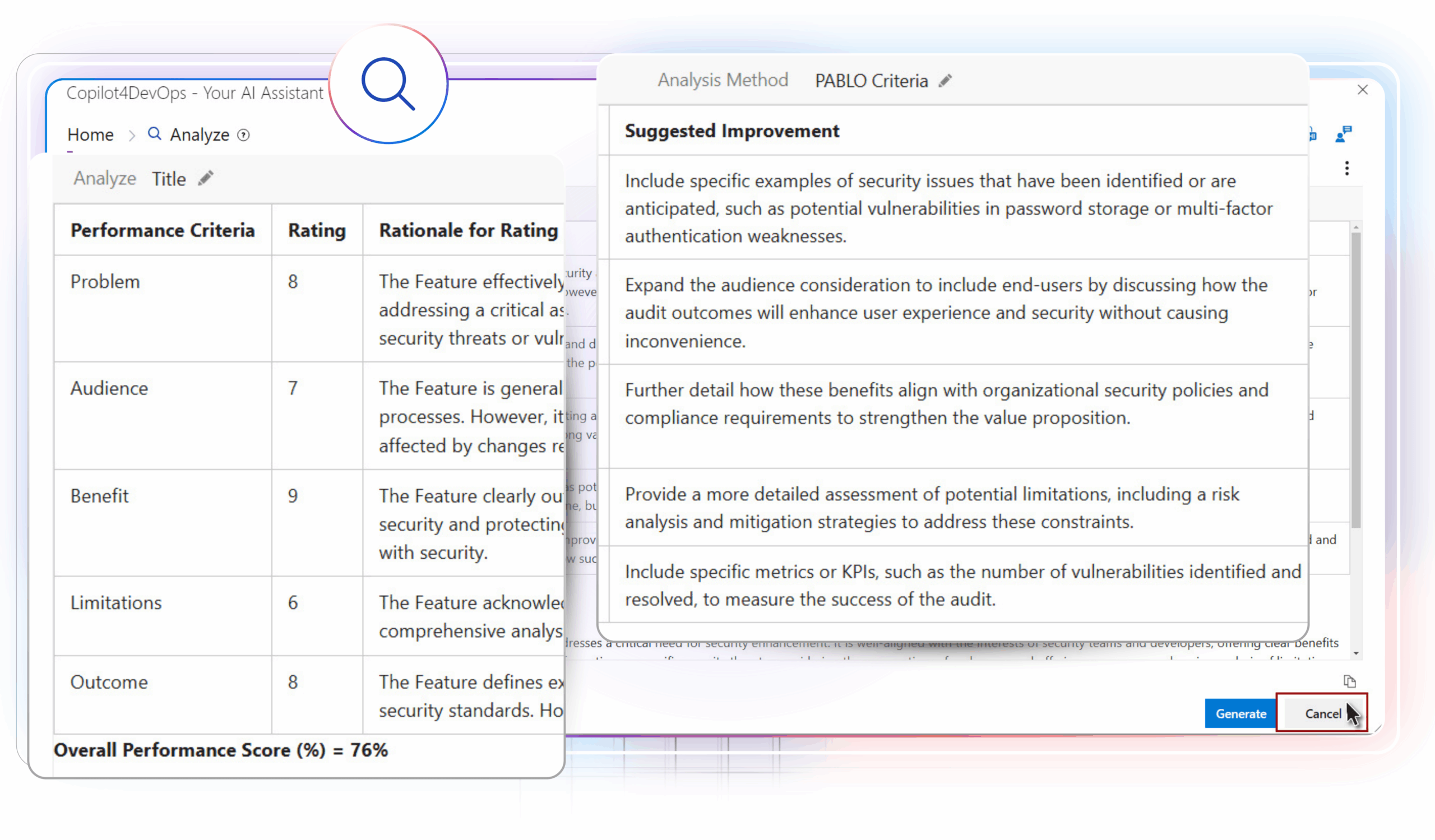
Analyze: Helps to analyze requirements using AI against frameworks like MosCoW, PABLO Criteria, 6C’s method, etc.
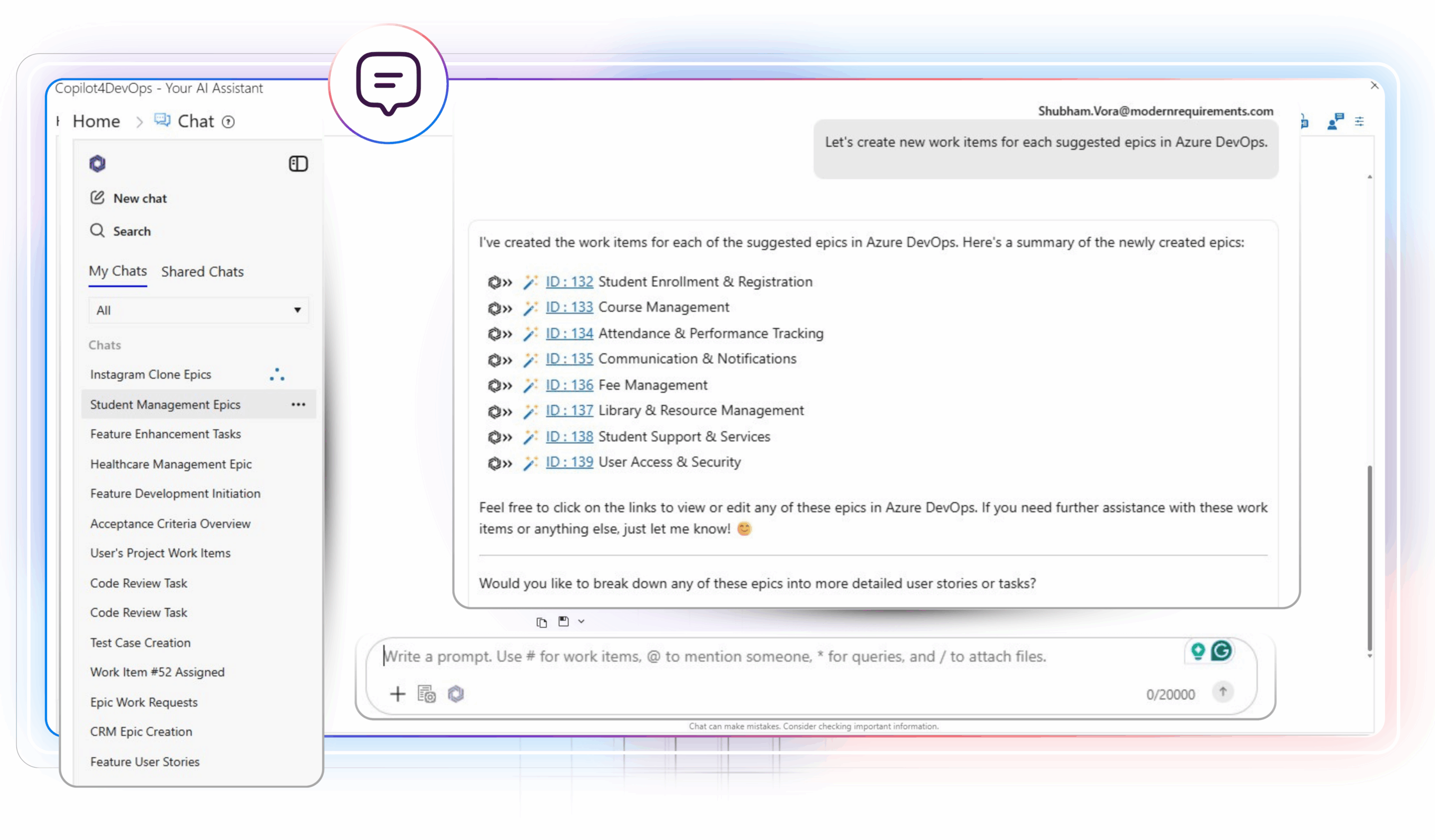
AI Chat: It is like GitHub Copilot chat, where you can write an action to perform in natural language, and it executes directly within Azure DevOps.
Other than that, it offers features like Convert, which helps in converting requirements into user stories. The Transform feature helps to translate requirements into different languages and different formats within Azure DevOps.

Real-world use cases across enterprise teams

  • In healthcare, BA uses the Elicit feature of Copilot4DevOps while developing patient management software to draft requirements that align with HIPAA, and then they analyze requirements against Moscow to prioritize. Next, developers convert software requirements into actionable user stories and insert them within Azure DevOps. Then, QA teams generate test cases and validate implemented features based on the acceptance criteria of user stories.
  • The operations and delivery team developing the banking application uses Copilot4DevOps to draft release-related tasks. For example, they can draft tasks for the release of “a new payment method integration in an online app” and insert them within their ADO workspace. They also use the SOP/Document generator to prepare the release notes with AI. Furthermore, they might use AI chat to identify gaps in application security by using natural language instructions.
  • The automotive development team uses Copilot4DevOps AI to convert ISO 9001 obligations into actionable requirements while developing a car engine. They also use the Transform feature in CP to translate requirements into multiple languages directly within Azure DevOps for globally working teams. Teams also use the Dynamic Prompt module to prepare audit reports using AI to get approvals from regulatory bodies.

Outcomes for enterprise teams

For enterprise teams, Copilot4DevOps improves how delivery systems operate, not just assists individual tasks.

  • First of all, it adds an AI execution layer within Azure DevOps. So, no need to set up extra tools or MCP.
  • It is SOC II compliant, which means it doesn’t use your data to train models or share it with third-party apps. This is most important for enterprise teams working in regulatory industries.
  • It supports multiple roles like Business Analysts, Compliance Managers, Developers, Delivery Teams, QAs, Project Managers, and many more. Even if they don’t have knowledge of prompting, they can use Copilot4DevOps.
  • It allows teams to use AI throughout the SDLC, but not only in the development stage.
  • Helps in achieving regulatory certifications by pushing compliance into the development workflow.
  • Allows collaboration between multiple team members.

For enterprise teams, this creates better alignment, stronger quality, and more reliable delivery.

Also read: Copilot4DevOps vs GitHub Copilot: Which is Ideal for your Organization?

Key Differences Between Copilot4DevOps and GitHub Copilot + ADO MCP

Area GitHub Copilot + ADO MCP Copilot4DevOps
Primary focus Allows only developers to access Azure DevOps records using AI inside coding environments. Improves delivery across planning, testing, and release inside Azure DevOps using AI.
Approach Connects AI to Azure DevOps through the MCP (access layer). Brings AI directly into Azure DevOps workflows (embedded layer).
Core users Developers, DevOps engineers working in IDEs. Business Analysts, Product Owners, QA, DevOps, developers, and all team members working in SDLC.
Interaction model Prompt-based interaction in the editor. A combination of UI-based and prompt-based interaction for non-technical users, and directly within the ADO interface.
Work context Works outside Azure DevOps and pulls data when needed. Works inside Azure DevOps with the full context of artifacts.
Collaboration Developers working on the same project can collaborate. Teams working within Azure DevOps, including planning, development, QA, operations, and delivery teams, can collaborate and use AI to see who performed which activity.
Lifecycle coverage Strong in the development phase. Covers planning, validation, testing, and delivery stages.
Enterprise value Improves the speed of execution for developers. Improves consistency, traceability, and coordination across teams.
Pricing model
  • Get the Pro plan at $10/month.
  • Get the Pro+ plan at $39/month.
  • Azure DevOps MCP is free to use.
  • $30 per month for the Copilot4DevOps plan – Contains features like Elicit, Analyze, etc.
  • $40 per month for Copilot4DevOps Ultimate — Offers advanced features like AI Chat.
  • Contact sales if you are an enterprise — Offers multiple seats and onboarding training.
Best use case Teams focused on coding productivity and IDE workflows Teams focused on lifecycle improvement and delivery quality

What Should Enterprise Teams Choose?

The choice between Copilot4DevOps and GitHub Copilot + Azure DevOps MCP totally depends on where your teams need to use AI across the delivery lifecycle.

GitHub Copilot + ADO MCP provides access to Azure DevOps within the code editor. So, choose it if:

  • Focus is on coding productivity and developer efficiency.
  • Teams spend most of their time in IDE environments.
  • Quick access to work items, pipelines, and tasks is needed during development.
  • Governance and compliance are already handled through existing processes.

On the other hand, choosing Copilot4DevOps adds an intelligence layer within Azure DevOps. So, choose it if:

  • You want to improve how teams deliver software end-to-end.
  • Multiple roles are involved across planning, QA, and operations.
  • Requirement quality and test alignment need improvement.
  • Traceability across requirements, tests, and releases is critical.
  • Audit readiness and governance are key decision factors.

In many cases, enterprises benefit from using both. One improves coding speed, while the other improves delivery outcomes across teams.

FAQs

How to get started with Copilot4DevOps?

You can purchase Copilot4DevOps and install it within your Azure DevOps workspace with a single click. If required, our support team can help you.

Can GitHub Copilot + MCP replace Copilot4DevOps?

Of course not. GitHub Copilot + ADO MCP works only within code editors and is helpful for developers. If you need to use AI in every stage of the development lifecycle, we recommend going for Copilot4DevOps.

Which option is better for regulated industries?

Copilot4DevOps is better suited when traceability, audit readiness, and compliance with standards like ISO 26262 or ISO 13485 are required. It supports lifecycle alignment within Azure DevOps.

Probieren Sie es selbst aus

Bereit, Ihr DevOps mit Copilot4DevOps zu transformieren?

Holen Sie sich noch heute eine kostenlose Testversion.
Inhaltsverzeichnis

Inhaltsverzeichnis

Many enterprise teams using Azure DevOps are looking to bring AI into their existing DevOps workflow to manage requirements, code, test cases, pull requests, and the whole SDLC (Software Development Life Cycle).

However, they usually face two clear approaches:

  • One is using GitHub Copilot with Azure DevOps MCP. It allows accessing ADO records in the development environment using AI.
  • The other one is adopting Copilot4DevOps, which brings AI directly inside Azure DevOps. This adds an intelligence layer within Azure DevOps.
How to integrate AI into Azure DevOps
Two powerful paths to AI in Azure DevOps: Copilot for intelligent data access, or Copilot4DevOps for built-in intelligence.

Both approaches add real value in DevOps, but in different ways. One helps developers to improve their productivity, and another improves how teams plan, code, validate, and deliver work across the whole DevOps lifecycle.

So, for enterprise teams adopting AI in DevOps, it is a must to understand the difference between both to make the right decisions.

What GitHub Copilot + Azure DevOps MCP Actually Enables

GitHub Copilot is an AI coding assistant that works directly in code editors like VS Code, Visual Studio, etc. On the other hand, Azure DevOps MCP (Model Context Protocol) acts as a bridge between GitHub Copilot and Azure DevOps. It allows secure access to ADO work items, pipelines, repositories, and other artifacts without writing a single line of code.

With GitHub Copilot + ADO MCP, teams can perform actions like below:

  • Access work items, queries, and project data without leaving the editors like VS Code.
  • Update tasks, comments, and status through natural language prompts.
  • Trigger pipeline-related actions from within the code editor or development workflows.

Some example prompts can be the following:

  • List all work items related to sprint 2 in the “Car engine development” project.
  • List all test cases for user story #123.
  • Create the wiki page with content about ISO 9001 compliance.

This way, developers can ask in GitHub Copilot Chat, and it interacts with Azure DevOps in real-time to fetch records.

Outcomes for enterprise teams

  • Developers can fetch any records directly in the code editor and implement them instead of doing context switching.
  • Better alignment between code and assigned work items.
  • Lower friction in executing routine DevOps tasks.
  • Improved developer experience without major workflow disruption.
Unveiling the Multifaceted Benefits of GitHub Copilot Azure DevOps MCP
Unlock smarter DevOps with AI—where GitHub Copilot meets Azure DevOps MCP to streamline workflows, align code with work items, and elevate developer productivity.

Where its scope typically stays limited

Here are some limitations of GitHub Copilot + ADO MCP:

  • Team members like BAs, product owners, etc., can’t use AI to create and refine requirements within Azure DevOps.
  • Project managers still manually need to update requirements for planning & tracking.
  • Compliance teams manually need to check for gaps.
  • DevOps and QA teams can’t use AI for impact analysis or performing other tasks.
  • To use this setup effectively, developers must have prompt engineering skills; without that, they also struggle.

So, this model works best when the core goal is to boost developers’ productivity by keeping ADO records in the development workflow while continuing to rely on existing Azure DevOps practices for the rest of the lifecycle.

What Copilot4DevOps Is and Why It Exists

Copilot4DevOps is an AI assistant that works directly within Azure DevOps. It has multiple AI capabilities that help enterprise teams to plan and validate requirements and deliver software across the full lifecycle.

Copilot4DevOps doesn’t just offer a single chat interface for everyone to interact, but also a task-based module that anyone, including non-technical people and those unfamiliar with prompt engineering, can use.

The best part of Copilot4DevOps is that teams can access it directly within ADO work items, which saves them lots of time.

Here are the key capabilities of Copilot4DevOps:

Elicit: Takes existing requirements or external documents as input and drafts and inserts requirements into Azure DevOps.

Analyze: Helps to analyze requirements using AI against frameworks like MosCoW, PABLO Criteria, 6C’s method, etc.

AI Chat: It is like GitHub Copilot chat, where you can write an action to perform in natural language, and it executes directly within Azure DevOps.

Other than that, it offers features like Convert, which helps in converting requirements into user stories. The Transform feature helps to translate requirements into different languages and different formats within Azure DevOps.

Real-world use cases across enterprise teams

  • In healthcare, BA uses the Elicit feature of Copilot4DevOps while developing patient management software to draft requirements that align with HIPAA, and then they analyze requirements against Moscow to prioritize. Next, developers convert software requirements into actionable user stories and insert them within Azure DevOps. Then, QA teams generate test cases and validate implemented features based on the acceptance criteria of user stories.
  • The operations and delivery team developing the banking application uses Copilot4DevOps to draft release-related tasks. For example, they can draft tasks for the release of “a new payment method integration in an online app” and insert them within their ADO workspace. They also use the SOP/Document generator to prepare the release notes with AI. Furthermore, they might use AI chat to identify gaps in application security by using natural language instructions.
  • The automotive development team uses Copilot4DevOps AI to convert ISO 9001 obligations into actionable requirements while developing a car engine. They also use the Transform feature in CP to translate requirements into multiple languages directly within Azure DevOps for globally working teams. Teams also use the Dynamic Prompt module to prepare audit reports using AI to get approvals from regulatory bodies.

Outcomes for enterprise teams

For enterprise teams, Copilot4DevOps improves how delivery systems operate, not just assists individual tasks.

  • First of all, it adds an AI execution layer within Azure DevOps. So, no need to set up extra tools or MCP.
  • It is SOC II compliant, which means it doesn’t use your data to train models or share it with third-party apps. This is most important for enterprise teams working in regulatory industries.
  • It supports multiple roles like Business Analysts, Compliance Managers, Developers, Delivery Teams, QAs, Project Managers, and many more. Even if they don’t have knowledge of prompting, they can use Copilot4DevOps.
  • It allows teams to use AI throughout the SDLC, but not only in the development stage.
  • Helps in achieving regulatory certifications by pushing compliance into the development workflow.
  • Allows collaboration between multiple team members.

For enterprise teams, this creates better alignment, stronger quality, and more reliable delivery.

Also read: Copilot4DevOps vs GitHub Copilot: Which is Ideal for your Organization?

Key Differences Between Copilot4DevOps and GitHub Copilot + ADO MCP

Area GitHub Copilot + ADO MCP Copilot4DevOps
Primary focus Allows only developers to access Azure DevOps records using AI inside coding environments. Improves delivery across planning, testing, and release inside Azure DevOps using AI.
Approach Connects AI to Azure DevOps through the MCP (access layer). Brings AI directly into Azure DevOps workflows (embedded layer).
Core users Developers, DevOps engineers working in IDEs. Business Analysts, Product Owners, QA, DevOps, developers, and all team members working in SDLC.
Interaction model Prompt-based interaction in the editor. A combination of UI-based and prompt-based interaction for non-technical users, and directly within the ADO interface.
Work context Works outside Azure DevOps and pulls data when needed. Works inside Azure DevOps with the full context of artifacts.
Collaboration Developers working on the same project can collaborate. Teams working within Azure DevOps, including planning, development, QA, operations, and delivery teams, can collaborate and use AI to see who performed which activity.
Lifecycle coverage Strong in the development phase. Covers planning, validation, testing, and delivery stages.
Enterprise value Improves the speed of execution for developers. Improves consistency, traceability, and coordination across teams.
Pricing model
  • Get the Pro plan at $10/month.
  • Get the Pro+ plan at $39/month.
  • Azure DevOps MCP is free to use.
  • $30 per month for the Copilot4DevOps plan – Contains features like Elicit, Analyze, etc.
  • $40 per month for Copilot4DevOps Ultimate — Offers advanced features like AI Chat.
  • Contact sales if you are an enterprise — Offers multiple seats and onboarding training.
Best use case Teams focused on coding productivity and IDE workflows Teams focused on lifecycle improvement and delivery quality

What Should Enterprise Teams Choose?

The choice between Copilot4DevOps and GitHub Copilot + Azure DevOps MCP totally depends on where your teams need to use AI across the delivery lifecycle.

GitHub Copilot + ADO MCP provides access to Azure DevOps within the code editor. So, choose it if:

  • Focus is on coding productivity and developer efficiency.
  • Teams spend most of their time in IDE environments.
  • Quick access to work items, pipelines, and tasks is needed during development.
  • Governance and compliance are already handled through existing processes.

On the other hand, choosing Copilot4DevOps adds an intelligence layer within Azure DevOps. So, choose it if:

  • You want to improve how teams deliver software end-to-end.
  • Multiple roles are involved across planning, QA, and operations.
  • Requirement quality and test alignment need improvement.
  • Traceability across requirements, tests, and releases is critical.
  • Audit readiness and governance are key decision factors.

In many cases, enterprises benefit from using both. One improves coding speed, while the other improves delivery outcomes across teams.

FAQs

How to get started with Copilot4DevOps?

You can purchase Copilot4DevOps and install it within your Azure DevOps workspace with a single click. If required, our support team can help you.

Can GitHub Copilot + MCP replace Copilot4DevOps?

Of course not. GitHub Copilot + ADO MCP works only within code editors and is helpful for developers. If you need to use AI in every stage of the development lifecycle, we recommend going for Copilot4DevOps.

Which option is better for regulated industries?

Copilot4DevOps is better suited when traceability, audit readiness, and compliance with standards like ISO 26262 or ISO 13485 are required. It supports lifecycle alignment within Azure DevOps.

Probieren Sie es selbst aus

Bereit, Ihr DevOps mit Copilot4DevOps zu transformieren?

Holen Sie sich noch heute eine kostenlose Testversion.