
What Is a Product Backlog? A Complete Guide for Azure DevOps Teams

What Is a Product Backlog? A Complete Guide for Azure DevOps Teams

Product team members, including Product Owners, BAs, and Scrum Masters, setting up a new Azure DevOps project often come with this question: How to structure the product backlog within Azure DevOps so the whole team can work from it? This question arises as Azure DevOps offers multiple process templates, and each template has a different kind of backlog work items.

Furthermore, Azure DevOps has a 13.62% share in the DevOps service market, which positions it as a notable player in the DevOps ecosystem. So, it is very important to know how the product backlog works inside Azure DevOps to run projects smoothly from day one.

In this guide, we will cover what a product backlog in Azure DevOps is, how to build one, and how generative AI can help in building the product backlog.

What a Product Backlog Is (and What It Is Not)

In Azure DevOps, the product backlog is a list of work items, which you can consider as a project plan. It is a single source of truth that shows what your team needs to deliver. It might contain epics, features, user stories, issues, backlog items, and requirements that you add to it.

The product team members are responsible for backlog management. They decide what to add to the product backlog, what to remove from it, and which work items to pick up for the next sprint. 

Note that a backlog is not a task list or used to track project progress. A task can be included at the user story level but not at the backlog level, where they add clutter and make prioritization harder. It is also not a fixed requirement document because backlog work items keep changing continuously as the product scales and the user learns about problems and solutions.

What is the difference between a product backlog and a sprint backlog?

A product backlog and a sprint backlog both remain inside Azure boards. Generally, teams move product backlog work items into the sprint backlog during the sprint planning, where teams commit to what they can deliver in the next sprint. Here is the clear difference between the two of them:

Criteria Product Backlog Sprint Backlog
Purpose It covers all product features and future requirements. It contains work items that are committed for the particular sprint.
Owner Responsable produit Development Team
Contents Epics, features, user stories, bugs, and enhancement requests. Selected backlog items, tasks, and implementation plan.
Timeframe Generally, the whole product life cycle. Generally, 1 to 4 weeks, depending on sprint length.
Prioritization Ordered by business value and risk. Ordered based on priority and needs.
Changes It is ongoing. Teams generally keep changing the product backlog as the project evolves and scales. Updated during the sprint as work progresses.
Level of Detail Higher-level view of upcoming work. More detailed and execution-focused. It also includes tasks, bugs, etc.
Relationship Source of all future work. Created from the product backlog.
Goal Help decide what should be built next. Help the team deliver the sprint goal.

What Goes into an Azure DevOps Product Backlog

In Azure DevOps, the product backlog is created using work item hierarchies, not a flat list. This hierarchy is determined by the process template chosen while creating the project. Here are four types of process templates offered by Azure DevOps:

  • Basic: Epic -> Issue -> Task. It is the simplest structure and useful for non-software projects.
  • Agile: Epic -> Feature -> User Story -> Task. This template is most widely used by software teams.
  • Scrum: Epic -> Feature -> Product Backlog Item -> Task. Follows standard Scrum terminology.
  • CMMI: Epic -> Feature -> Requirement -> Task. This template is used in the regulatory industries.
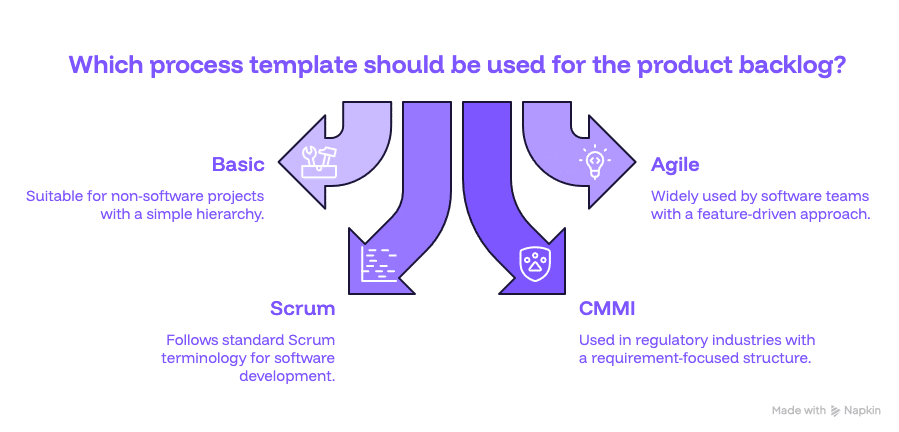
If you notice, regardless of the template, the top-level work item is an epic, which represents a large business goal. Furthermore, an epic can be broken down into multiple product features, and each feature can be further broken down into user stories, which represent features from the user’s perspective.

Also, bugs can appear at the backlog level depending on how the team has configured them. Tasks always stay inside individual stories, never as standalone backlog items.

How to Build a Product Backlog in Azure DevOps

  • Pick your process template before creating the project: When you create a project in Azure DevOps, you need to select a process template like Agile, CMMI, or one of the other available templates. This locks down what type of work items will be used during the project. If you are a software team, we recommend selecting the Agile template. 
  • Create your epics first: It is a top-level work item in the Agile process template, which represents large business goals. For example, “implement functionality to allow users to place orders online and track.” Generally, a single epic is implemented in 1 to 3 sprints.
  • Break epics into features: Create multiple features for every epic. Features could be, “add product search functionality,” “allow users to place orders online and make payment without signing in,”, “Prepare dashboard for users to track orders,” etc.
  • Break features into user stories and tasks: For every feature, add user stories to the backlog. It explains functionality from the end user’s perspective. For example, “As a guest, I want to pay without creating an account.” Also, add acceptance criteria for each user story, which allows for testing user stories.
  • Prioritize work items for each sprint: Once work items are added to the backlog, you can filter out priority work items and insert them into the sprint backlog to implement next.

That’s not all. You need to continuously add new work items into the backlog if any feature request arrives or cleanup the backlog.

Product Backlog Best Practices for Azure DevOps Teams

Each team should keep the backlog detailed and ready for development, but avoid spending time fully defining work items that may not be picked up for months. Whenever a priority changes and lower-priority work items become high priority, keep crafting descriptions and acceptance criteria for those work items.

Other than that, maintain a clear parent-child relationship between epics, features, user stories, backlog work items, tasks, bugs, etc. This makes it easier to understand how work item hierarchies are built and how each lower-level work item supports business goals and helps teams track progress across multiple levels of planning.

Furthermore, always do backlog refinement before every sprint planning, split oversized work items into stories or tasks, and confirm each work item has a clear description so teams don’t get confused.

How Copilot4DevOps Helps You Build and Manage Your Product Backlog

Copilot4DevOps is an AI assistant for requirement management that directly works inside Azure DevOps as an extension. It helps product teams to create and manage the backlog using AI and without leaving Azure DevOps.

The Elicit feature of Copilot4DevOps takes raw inputs, existing work items, meeting transcripts, requirement documents, and web pages, and generates product backlog items in Azure DevOps. This reduces the burden of writing each requirement manually and saves time.
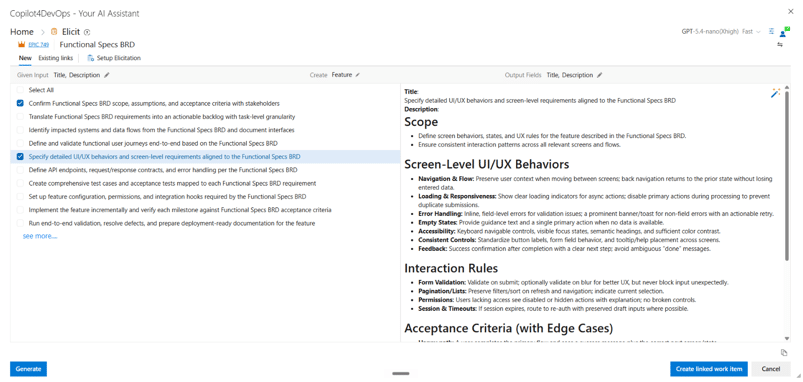
The AI Chat helps in managing backlog using natural language instructions. It allows performing actions on backlog work items in bulk. For example, you can ask it to “Create five user stories for the login module,” and they appear instantly. Type “Change the priority of all child work items under Epic #122 to 1” and every linked item updates at once.

Similarly, the Analyze feature allows for analyzing each work item against different frameworks, including INVEST, PABLO Criteria, 6C’s method, etc., directly inside Azure DevOps.
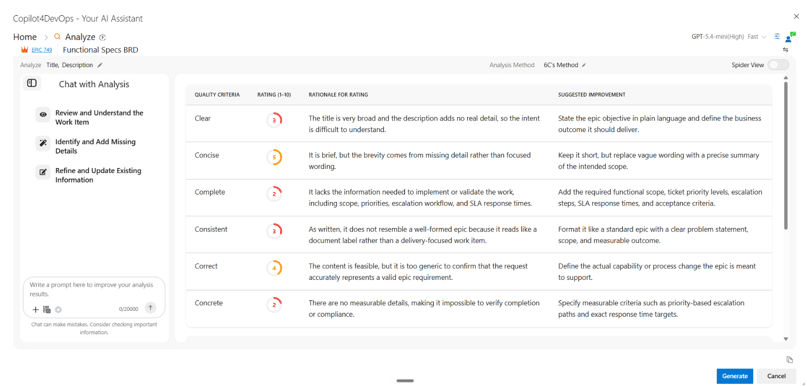
One of the product team members has described that Copilot4DevOps helps them in producing user stories in a standardized and consistent format, which was very hard while doing it manually.

Overall, Copilot4DevOps reduces product backlog management efforts by 90%.

Important note: It’s true that generative AI gives the structured starting point to your team, but it is also important to review AI-generated product backlog work items during the sprint planning.

FAQ

Can I help to build my whole product backlog?

Yes, generative AI tools like Copilot4DevOps can create new work items, including epics, features, user stories, tasks, etc., directly within Azure DevOps and help product teams to create product backlogs.

Does Copilot4DevOps use my data while creating the product backlog?

Copilot4DevOps is SOC type 2 certified, so it does not share your data with any third-party tools or save it at any location.

How can I translate my product backlog work items into different languages?

You can use the Transform feature of Copilot4DevOps to translate your product backlog requirements into 46+ languages.

Essayez-le vous-même

Prêt à transformer votre DevOps avec Copilot4DevOps ?

Profitez dès aujourd'hui d'un essai gratuit.
Table des matières

Table des matières

Product team members, including Product Owners, BAs, and Scrum Masters, setting up a new Azure DevOps project often come with this question: How to structure the product backlog within Azure DevOps so the whole team can work from it? This question arises as Azure DevOps offers multiple process templates, and each template has a different kind of backlog work items.

Furthermore, Azure DevOps has a 13.62% share in the DevOps service market, which positions it as a notable player in the DevOps ecosystem. So, it is very important to know how the product backlog works inside Azure DevOps to run projects smoothly from day one.

In this guide, we will cover what a product backlog in Azure DevOps is, how to build one, and how generative AI can help in building the product backlog.

What a Product Backlog Is (and What It Is Not)

In Azure DevOps, the product backlog is a list of work items, which you can consider as a project plan. It is a single source of truth that shows what your team needs to deliver. It might contain epics, features, user stories, issues, backlog items, and requirements that you add to it.

The product team members are responsible for backlog management. They decide what to add to the product backlog, what to remove from it, and which work items to pick up for the next sprint. 

Note that a backlog is not a task list or used to track project progress. A task can be included at the user story level but not at the backlog level, where they add clutter and make prioritization harder. It is also not a fixed requirement document because backlog work items keep changing continuously as the product scales and the user learns about problems and solutions.

What is the difference between a product backlog and a sprint backlog?

A product backlog and a sprint backlog both remain inside Azure boards. Generally, teams move product backlog work items into the sprint backlog during the sprint planning, where teams commit to what they can deliver in the next sprint. Here is the clear difference between the two of them:

Criteria Product Backlog Sprint Backlog
Purpose It covers all product features and future requirements. It contains work items that are committed for the particular sprint.
Owner Responsable produit Development Team
Contents Epics, features, user stories, bugs, and enhancement requests. Selected backlog items, tasks, and implementation plan.
Timeframe Generally, the whole product life cycle. Generally, 1 to 4 weeks, depending on sprint length.
Prioritization Ordered by business value and risk. Ordered based on priority and needs.
Changes It is ongoing. Teams generally keep changing the product backlog as the project evolves and scales. Updated during the sprint as work progresses.
Level of Detail Higher-level view of upcoming work. More detailed and execution-focused. It also includes tasks, bugs, etc.
Relationship Source of all future work. Created from the product backlog.
Goal Help decide what should be built next. Help the team deliver the sprint goal.

What Goes into an Azure DevOps Product Backlog

In Azure DevOps, the product backlog is created using work item hierarchies, not a flat list. This hierarchy is determined by the process template chosen while creating the project. Here are four types of process templates offered by Azure DevOps:

  • Basic: Epic -> Issue -> Task. It is the simplest structure and useful for non-software projects.
  • Agile: Epic -> Feature -> User Story -> Task. This template is most widely used by software teams.
  • Scrum: Epic -> Feature -> Product Backlog Item -> Task. Follows standard Scrum terminology.
  • CMMI: Epic -> Feature -> Requirement -> Task. This template is used in the regulatory industries.

If you notice, regardless of the template, the top-level work item is an epic, which represents a large business goal. Furthermore, an epic can be broken down into multiple product features, and each feature can be further broken down into user stories, which represent features from the user’s perspective.

Also, bugs can appear at the backlog level depending on how the team has configured them. Tasks always stay inside individual stories, never as standalone backlog items.

How to Build a Product Backlog in Azure DevOps

  • Pick your process template before creating the project: When you create a project in Azure DevOps, you need to select a process template like Agile, CMMI, or one of the other available templates. This locks down what type of work items will be used during the project. If you are a software team, we recommend selecting the Agile template. 
  • Create your epics first: It is a top-level work item in the Agile process template, which represents large business goals. For example, “implement functionality to allow users to place orders online and track.” Generally, a single epic is implemented in 1 to 3 sprints.
  • Break epics into features: Create multiple features for every epic. Features could be, “add product search functionality,” “allow users to place orders online and make payment without signing in,”, “Prepare dashboard for users to track orders,” etc.
  • Break features into user stories and tasks: For every feature, add user stories to the backlog. It explains functionality from the end user’s perspective. For example, “As a guest, I want to pay without creating an account.” Also, add acceptance criteria for each user story, which allows for testing user stories.
  • Prioritize work items for each sprint: Once work items are added to the backlog, you can filter out priority work items and insert them into the sprint backlog to implement next.

That’s not all. You need to continuously add new work items into the backlog if any feature request arrives or cleanup the backlog.

Product Backlog Best Practices for Azure DevOps Teams

Each team should keep the backlog detailed and ready for development, but avoid spending time fully defining work items that may not be picked up for months. Whenever a priority changes and lower-priority work items become high priority, keep crafting descriptions and acceptance criteria for those work items.

Other than that, maintain a clear parent-child relationship between epics, features, user stories, backlog work items, tasks, bugs, etc. This makes it easier to understand how work item hierarchies are built and how each lower-level work item supports business goals and helps teams track progress across multiple levels of planning.

Furthermore, always do backlog refinement before every sprint planning, split oversized work items into stories or tasks, and confirm each work item has a clear description so teams don’t get confused.

How Copilot4DevOps Helps You Build and Manage Your Product Backlog

Copilot4DevOps is an AI assistant for requirement management that directly works inside Azure DevOps as an extension. It helps product teams to create and manage the backlog using AI and without leaving Azure DevOps.

The Elicit feature of Copilot4DevOps takes raw inputs, existing work items, meeting transcripts, requirement documents, and web pages, and generates product backlog items in Azure DevOps. This reduces the burden of writing each requirement manually and saves time.

The AI Chat helps in managing backlog using natural language instructions. It allows performing actions on backlog work items in bulk. For example, you can ask it to “Create five user stories for the login module,” and they appear instantly. Type “Change the priority of all child work items under Epic #122 to 1” and every linked item updates at once.

Similarly, the Analyze feature allows for analyzing each work item against different frameworks, including INVEST, PABLO Criteria, 6C’s method, etc., directly inside Azure DevOps.

One of the product team members has described that Copilot4DevOps helps them in producing user stories in a standardized and consistent format, which was very hard while doing it manually.

Overall, Copilot4DevOps reduces product backlog management efforts by 90%.

Important note: It’s true that generative AI gives the structured starting point to your team, but it is also important to review AI-generated product backlog work items during the sprint planning.

FAQ

Can I help to build my whole product backlog?

Yes, generative AI tools like Copilot4DevOps can create new work items, including epics, features, user stories, tasks, etc., directly within Azure DevOps and help product teams to create product backlogs.

Does Copilot4DevOps use my data while creating the product backlog?

Copilot4DevOps is SOC type 2 certified, so it does not share your data with any third-party tools or save it at any location.

How can I translate my product backlog work items into different languages?

You can use the Transform feature of Copilot4DevOps to translate your product backlog requirements into 46+ languages.

Essayez-le vous-même

Prêt à transformer votre DevOps avec Copilot4DevOps ?

Profitez dès aujourd'hui d'un essai gratuit.