Copilot4DevOps V8 is Live: A More Advanced AI-Powered Requirements Management Assistant Within ADO

Copilot4DevOps V8 has just landed, and it’s not a minor patch. It’s a ground-up rethink of how AI fits into your daily DevOps workflow.

Teams can now easily access Copilot4DevOps from Azure Boards, easily navigate through features with a newly designed homepage, and make everyday workflow consistent with better context and input handling. AI Chat now supports shared conversations with controlled access, while updates in Elicit and Analyze reduce setup effort and improve how teams elicit, review, update, and act on work items.

In the introduction  session, the team walks through Copilot4DevOps Version 8—focused on reducing context switching, improving work item quality, enabling team collaboration in AI, and grounding outputs using attachments / files / BYOD.

One release. A lot of “why wasn’t this always here?” moments.

Let’s get into what’s new.

TLDR: What’s New in Copilot4DevOps V8?

Feature Area What’s New in V8 How It Helps Users
Access & Navigation
  • Copilot4DevOps can be accessed from Azure Boards.
  • Also, it is available as a dedicated tab in the work item editor.
Allows you to quickly access Copilot4DevOps without switching between screens.
Homepage
  • Newly designed home page
  • Mark features as favorites
  • Customize layout
  • Check out recent activity
Faster access to the tools you use most
Input Handling
  • Upload files using drag-and-drop or copy-pasting.
  • Provide work item attachments, files from BYOD, and links as context.
Better context leads to more accurate outputs.
KI-Chat
  • Shared chats are not read-only but users can interact with them.
  • A locking mechanism is introduced to ensure only 1 user interacts with the chat to avoid conflicts.
    Collaborate safely
Ermitteln Remembers a work item’s input and output field settings for each type. Less setup, faster requirement creation
Analysieren Improved toolbar spacing, quick view toggle Provides a better experience
BYOD (Admin) Team-level data control and retrieval settings More relevant results with controlled data usage
Data Sync (Admin) Auto sync for Wiki and Query data Keeps data updated without manual effort
Model Selection Simple tiers (Plus, Thinking, Standard, Instant) instead of naming like GPT 5.1, 5.2. Easier to choose the right model quickly
Dynamischer Prompt Introduced the “File Upload” option to allow users to attach documents, templates, and images. Providing better context without manual copy/pasting.

General Enhancements and New Additions in Copilot4DevOps V8

Easier Access to Copilot Across Azure DevOps

Previously, Copilot4DevOps users had to leave Azure Boards or a work item editor to use it, and the V8 fixes that.

  • You can now open Copilot4DevOps directly from the Azure Boards hub and launch features like Chat, Elicit, Analyze, Diagram, and Mockup without switching screens.
  • A dedicated tab inside the work item editor lets you use the AI capabilities of Copilot4DevOps while staying in the same context.
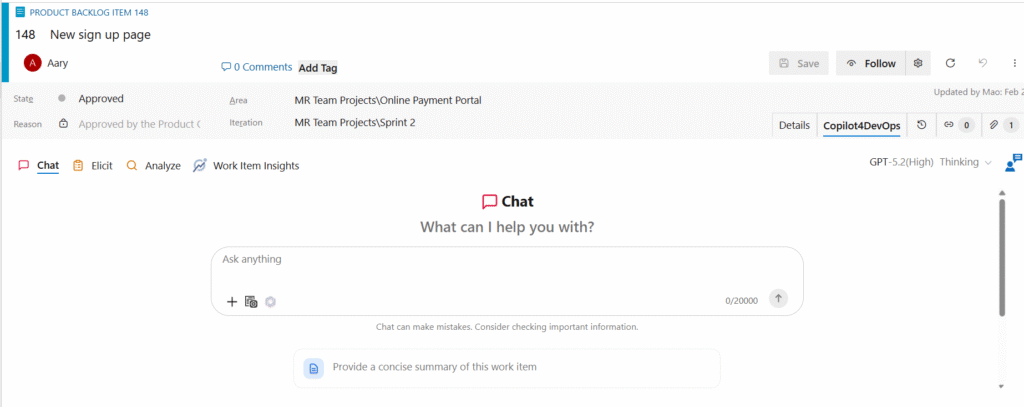
Why this matters: If your team loses time switching between tools during sprint planning or backlog grooming, this update alone makes V8 worth it.

A More Practical and Personalized Homepage

V8 has introduced a dynamic and personalized homepage for each Copilot4DevOps user:

  • You can mark frequently used features as favorites and quickly access them every time you open Copilot4DevOps.
  • Customize layout by dragging-and-dropping feature cards.
  • Quickly jump back into recent work with the Recently Used section
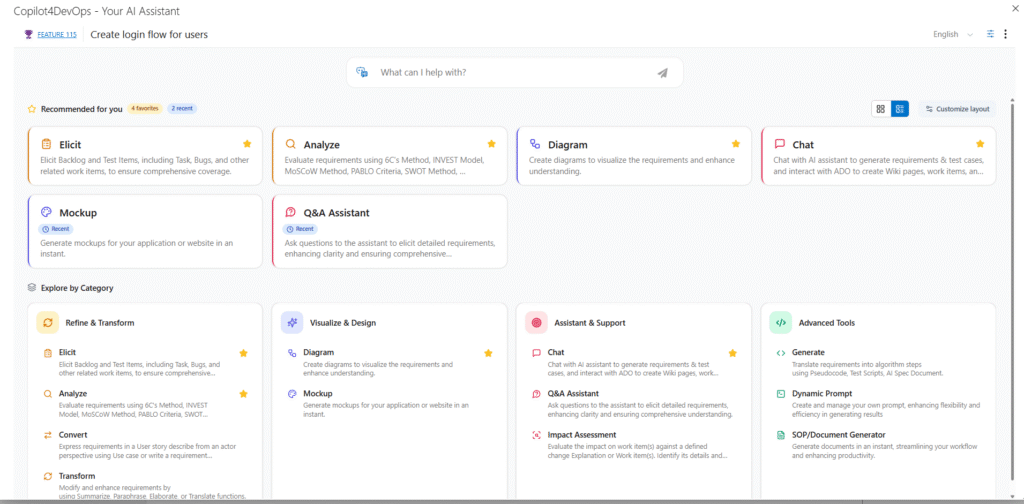
CP homepage

A quick benefit: Teams that use Copilot4DevOps daily will spend noticeably less time navigating and more time actually getting work done.

Addition of Work Item Insights

In Copilot4DevOps V8, we’ve introduced the “Work Item Insights” tab in the work item editor itself. It analyzes work items’ fields, quickly evaluates them, and prepares an in-depth report about work item readiness, associated risks, and gaps. You can also download this report in Microsoft Word or PDF format.

Better Input Handling for More Accurate Outputs

The quality of AI output depends on the context you provide. V8 simplifies to provide a richer context to AI.
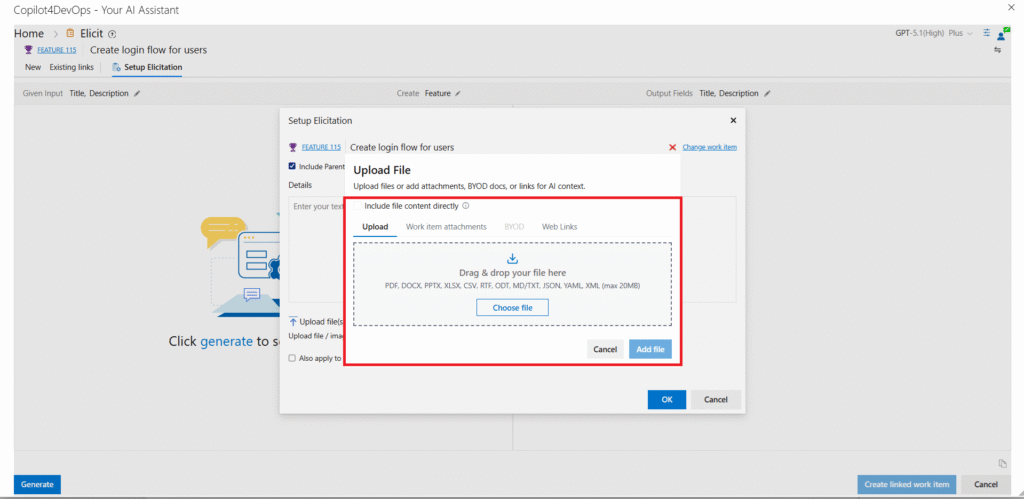
Better input handling
  • Upload files from multiple sources, including local files, work item attachments, or BYOD (bring your own data) directly. You can also provide web page links as a context.
  • Now you can use copy-and-paste and drag-and-drop to quickly add files and screenshots as context.

Additional Enhancements

  • Improved capabilities of the Rewrite Prompt feature: Now, the feature produces high-quality and context-rich prompts. This helps teams create usable content faster without rewriting the same information multiple times.
  • Expanded “Given Input” field support: Across Convert, Generate, and Transform features, we’ve added options to select all standard non-HTML fields, custom non-HTML fields, and the History field in the “Given Input” dropdown. This helps in providing a broader range of work item data as a context.
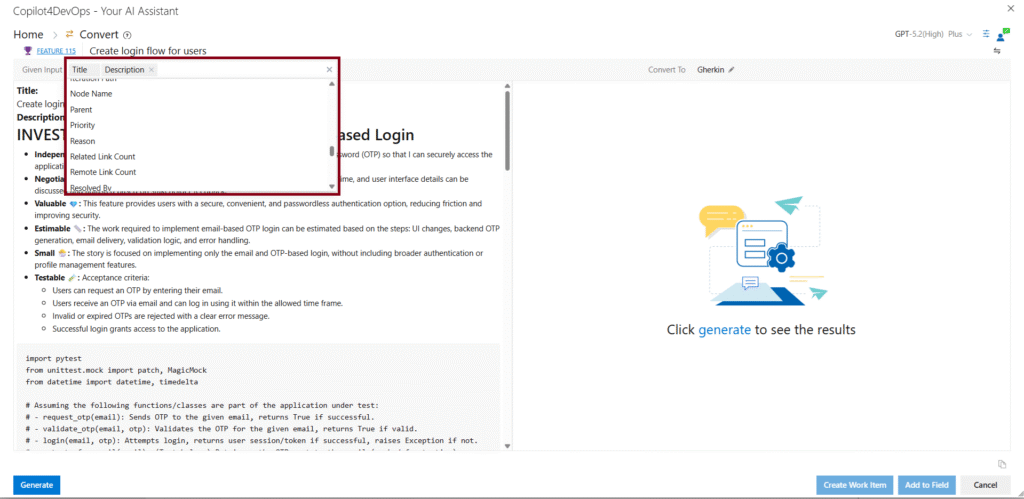
More given input for convert

Stability Improvements and Fixes

This release also addresses several issues that affected day-to-day usage.

  • Fixed cases where changes in AI Edit were not saved properly.
  • Resolved inconsistent language translation behavior while switching between different languages.
  • Improved visibility issues in the dark mode, where work item titles in the Generate and Convert functions were not visible properly.

These fixes make the overall experience more reliable and consistent during regular use.

Feature Enhancements in Specific Modules of Copilot4DevOps V8

1. AI Chat

  • Shared chats now support real collaboration: Until now, shared chats were read-only, but now you can continue interacting with them. We’ve introduced a built-in automatic lock-in system to ensure only 1 person at a time uses chat.
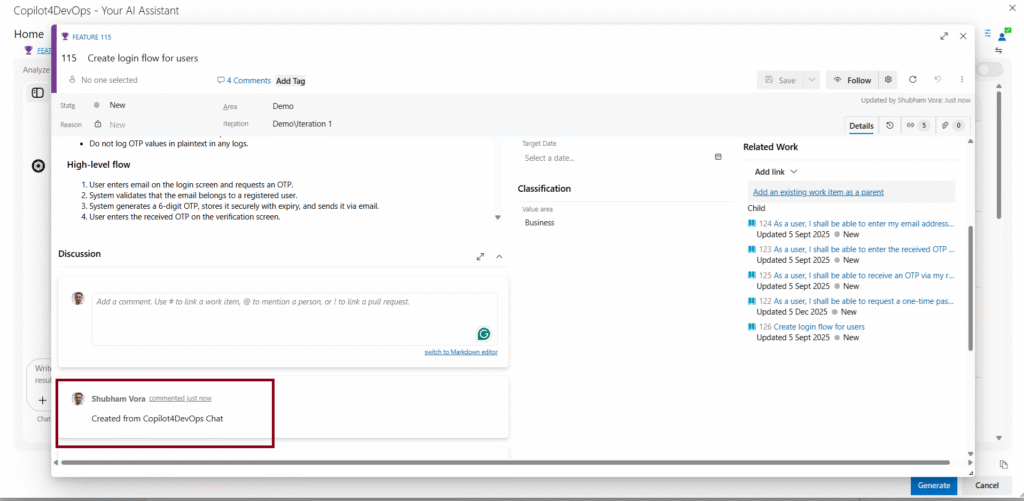
  • AI-generated work items are now traceable: Any work item created using the AI Chat feature automatically gets a “Created from Copilot4DevOps Chat” comment in the Discussion section. This helps users distinguish AI-generated work items from manually created work items.
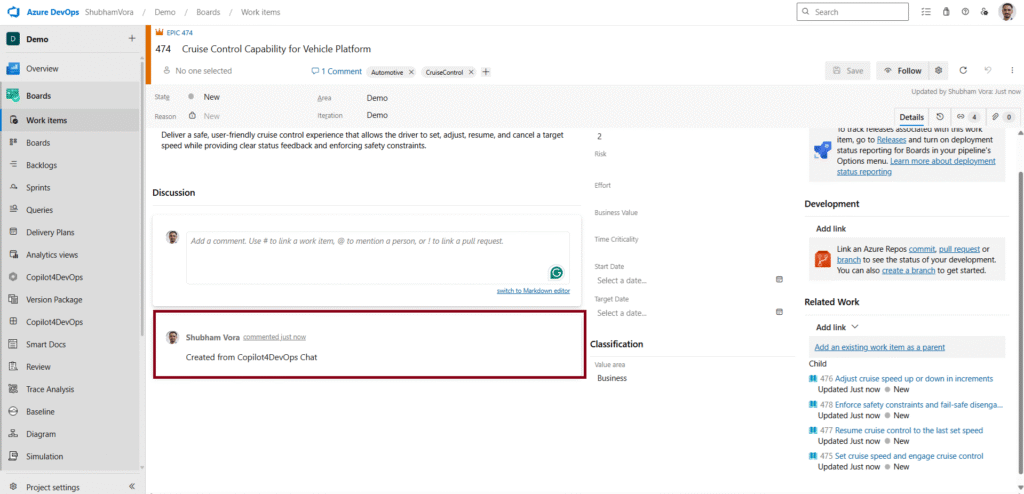
Comments in AI-generated work items
Bug Fixes

In Copilot4DevOps V8, we’ve fixed multiple bugs in AI Chat:

  • Fixed an issue where AI Chat was not able to retrieve all work items from the sprint, area path, or iteration path.
  • Fixed an issue where it was generating new blank test cases instead of editing existing ones.
  • Query results now show all configured columns properly, improving visibility for teams.
  • Fixed an issue where titles were displayed incorrectly after fetching more than 30 work items.

These updates to AI Chat provide a smoother, more collaborative experience for users.

2. Elicit

In Copilot4DevOps V8, we’ve made a few changes, which are smaller but were important to make:

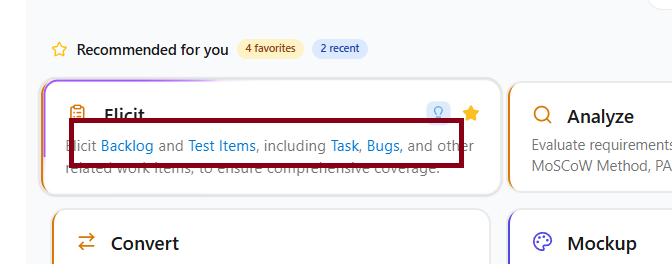
  • No more repeated setup for input and output fields: Elicit now removes the last selected input and output fields for each work item type. So, teams don’t need to do the same setup again and again.
  • Click to elicit, No manual setup required: From the Copilot4DevOps homepage, you can now click directly on Backlog, Test Items, Tasks, or Bugs within the Elicit card, and it automatically maps your selection to the correct work item type based on the process template, including the Agile or Scrum you are using.
Ermitteln

3. Analyze

  • Auto adds comments into work items updated using Chat: Whenever any work item is updated using Chat in Analyze, it automatically adds “Updated from Copilot4DevOps Analyze” comments. This helps in improving traceability and provides a better audit history.
Analyze auto comment
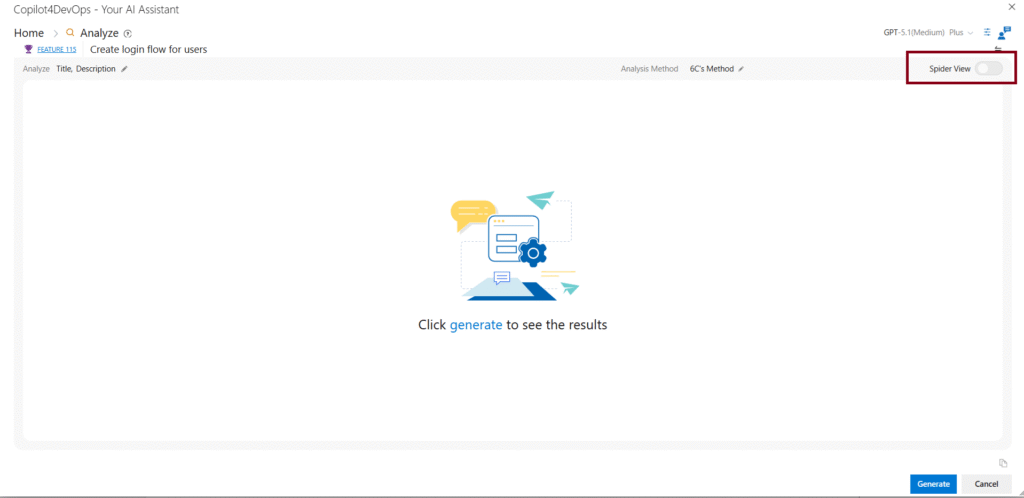
  • UI improvements: The “table” and “chart” view buttons are not merged into the single button called “Spider UI”. Also, spacing in the toolbar is improved for better UX.
Analyze Spider View

4. Admin Panel

What’s New
  • Team-level BYOD: In Copilot4DevOps V8, teams can manage the knowledge base at the project level instead of relying on organization-level data. This means responses can be more relevant to each team’s context while still following overall governance. Also, Teams can choose when their data should be used in AI responses. So, AI only uses relevant data and removes noise.
What’s Improved
  • Automatic sync for Wiki and Query data: Now, users can set a weekly or monthly schedule to sync Wiki and Query data. So, teams don’t need to manually refresh and sync data.
  • Better visibility into user activity: In Copilot4DevOps V8, admins can see the “Last Accessed” column, which shows when each user last used Copilot4DevOps. This helps admins monitor the activities of users and manage licenses accordingly.

5. Dynamic Prompt
Dynamic prompt

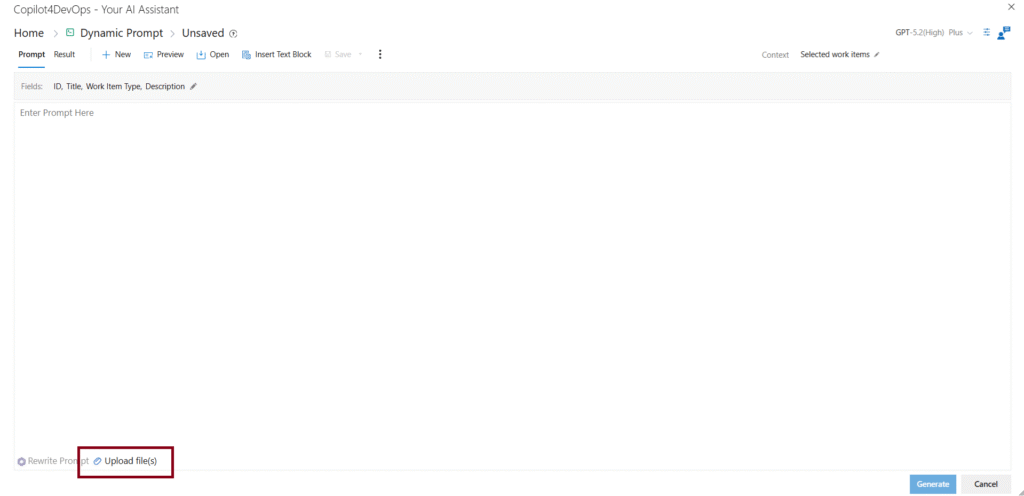
We’ve added support for “File Upload” in the Dynamic Prompt module. With this, users can attach supporting documents and images while writing a prompt query and provide richer context to AI. So, users don’t need to manually copy/paste the content of documents into the prompt area.

6. Mockup

Minor fixes have been made in the Mockup module.

Now, the “Generate” button won’t remain enabled while the rewrite prompt process is in progress.

Also, we’ve fixed an issue where work item context was still passed to chat even when the Work Item toggle was turned off.

7. Smart Prompt

A bug has been fixed that caused duplicate action buttons to appear for suggested features. Now, it won’t cause incorrect or non-functional behavior.

8. Diagram

We’ve updated the Mermaid library to the latest version. So, you will notice improved stability and better diagram rendering.

Ready to Experience Copilot4DevOps V8?

V8 isn’t just an update, but it’s a shift in how your team works with AI inside Azure DevOps.

It is built to make everyday work simpler and more reliable. From improved collaboration across shared chats to automatic elicitation setup, smarter file and context handling, and fixed smaller issues, the changes focus on what teams actually deal with daily.

The result is simple. Less rework, fewer gaps, and more confidence in what you ship.

Have feedback or suggestions? Share them with us; we’re listening.

Probieren Sie es selbst aus

Bereit, Ihr DevOps mit Copilot4DevOps zu transformieren?

Holen Sie sich noch heute eine kostenlose Testversion.
Inhaltsverzeichnis

Inhaltsverzeichnis

Copilot4DevOps V8 has just landed, and it’s not a minor patch. It’s a ground-up rethink of how AI fits into your daily DevOps workflow.

Teams can now easily access Copilot4DevOps from Azure Boards, easily navigate through features with a newly designed homepage, and make everyday workflow consistent with better context and input handling. AI Chat now supports shared conversations with controlled access, while updates in Elicit and Analyze reduce setup effort and improve how teams elicit, review, update, and act on work items.

In the introduction  session, the team walks through Copilot4DevOps Version 8—focused on reducing context switching, improving work item quality, enabling team collaboration in AI, and grounding outputs using attachments / files / BYOD.

One release. A lot of “why wasn’t this always here?” moments.

Let’s get into what’s new.

TLDR: What’s New in Copilot4DevOps V8?

Feature Area What’s New in V8 How It Helps Users
Access & Navigation
  • Copilot4DevOps can be accessed from Azure Boards.
  • Also, it is available as a dedicated tab in the work item editor.
Allows you to quickly access Copilot4DevOps without switching between screens.
Homepage
  • Newly designed home page
  • Mark features as favorites
  • Customize layout
  • Check out recent activity
Faster access to the tools you use most
Input Handling
  • Upload files using drag-and-drop or copy-pasting.
  • Provide work item attachments, files from BYOD, and links as context.
Better context leads to more accurate outputs.
KI-Chat
  • Shared chats are not read-only but users can interact with them.
  • A locking mechanism is introduced to ensure only 1 user interacts with the chat to avoid conflicts.
    Collaborate safely
Ermitteln Remembers a work item’s input and output field settings for each type. Less setup, faster requirement creation
Analysieren Improved toolbar spacing, quick view toggle Provides a better experience
BYOD (Admin) Team-level data control and retrieval settings More relevant results with controlled data usage
Data Sync (Admin) Auto sync for Wiki and Query data Keeps data updated without manual effort
Model Selection Simple tiers (Plus, Thinking, Standard, Instant) instead of naming like GPT 5.1, 5.2. Easier to choose the right model quickly
Dynamischer Prompt Introduced the “File Upload” option to allow users to attach documents, templates, and images. Providing better context without manual copy/pasting.

General Enhancements and New Additions in Copilot4DevOps V8

Easier Access to Copilot Across Azure DevOps

Previously, Copilot4DevOps users had to leave Azure Boards or a work item editor to use it, and the V8 fixes that.

  • You can now open Copilot4DevOps directly from the Azure Boards hub and launch features like Chat, Elicit, Analyze, Diagram, and Mockup without switching screens.
  • A dedicated tab inside the work item editor lets you use the AI capabilities of Copilot4DevOps while staying in the same context.

Why this matters: If your team loses time switching between tools during sprint planning or backlog grooming, this update alone makes V8 worth it.

A More Practical and Personalized Homepage

V8 has introduced a dynamic and personalized homepage for each Copilot4DevOps user:

  • You can mark frequently used features as favorites and quickly access them every time you open Copilot4DevOps.
  • Customize layout by dragging-and-dropping feature cards.
  • Quickly jump back into recent work with the Recently Used section
CP homepage

A quick benefit: Teams that use Copilot4DevOps daily will spend noticeably less time navigating and more time actually getting work done.

Addition of Work Item Insights

In Copilot4DevOps V8, we’ve introduced the “Work Item Insights” tab in the work item editor itself. It analyzes work items’ fields, quickly evaluates them, and prepares an in-depth report about work item readiness, associated risks, and gaps. You can also download this report in Microsoft Word or PDF format.

Better Input Handling for More Accurate Outputs

The quality of AI output depends on the context you provide. V8 simplifies to provide a richer context to AI.

Better input handling
  • Upload files from multiple sources, including local files, work item attachments, or BYOD (bring your own data) directly. You can also provide web page links as a context.
  • Now you can use copy-and-paste and drag-and-drop to quickly add files and screenshots as context.

Additional Enhancements

  • Improved capabilities of the Rewrite Prompt feature: Now, the feature produces high-quality and context-rich prompts. This helps teams create usable content faster without rewriting the same information multiple times.
  • Expanded “Given Input” field support: Across Convert, Generate, and Transform features, we’ve added options to select all standard non-HTML fields, custom non-HTML fields, and the History field in the “Given Input” dropdown. This helps in providing a broader range of work item data as a context.
More given input for convert

Stability Improvements and Fixes

This release also addresses several issues that affected day-to-day usage.

  • Fixed cases where changes in AI Edit were not saved properly.
  • Resolved inconsistent language translation behavior while switching between different languages.
  • Improved visibility issues in the dark mode, where work item titles in the Generate and Convert functions were not visible properly.

These fixes make the overall experience more reliable and consistent during regular use.

Feature Enhancements in Specific Modules of Copilot4DevOps V8

1. AI Chat

  • Shared chats now support real collaboration: Until now, shared chats were read-only, but now you can continue interacting with them. We’ve introduced a built-in automatic lock-in system to ensure only 1 person at a time uses chat.
  • AI-generated work items are now traceable: Any work item created using the AI Chat feature automatically gets a “Created from Copilot4DevOps Chat” comment in the Discussion section. This helps users distinguish AI-generated work items from manually created work items.
Comments in AI-generated work items
Bug Fixes

In Copilot4DevOps V8, we’ve fixed multiple bugs in AI Chat:

  • Fixed an issue where AI Chat was not able to retrieve all work items from the sprint, area path, or iteration path.
  • Fixed an issue where it was generating new blank test cases instead of editing existing ones.
  • Query results now show all configured columns properly, improving visibility for teams.
  • Fixed an issue where titles were displayed incorrectly after fetching more than 30 work items.

These updates to AI Chat provide a smoother, more collaborative experience for users.

2. Elicit

In Copilot4DevOps V8, we’ve made a few changes, which are smaller but were important to make:

  • No more repeated setup for input and output fields: Elicit now removes the last selected input and output fields for each work item type. So, teams don’t need to do the same setup again and again.
  • Click to elicit, No manual setup required: From the Copilot4DevOps homepage, you can now click directly on Backlog, Test Items, Tasks, or Bugs within the Elicit card, and it automatically maps your selection to the correct work item type based on the process template, including the Agile or Scrum you are using.
Ermitteln

3. Analyze

  • Auto adds comments into work items updated using Chat: Whenever any work item is updated using Chat in Analyze, it automatically adds “Updated from Copilot4DevOps Analyze” comments. This helps in improving traceability and provides a better audit history.
Analyze auto comment
  • UI improvements: The “table” and “chart” view buttons are not merged into the single button called “Spider UI”. Also, spacing in the toolbar is improved for better UX.
Analyze Spider View

4. Admin Panel

What’s New
  • Team-level BYOD: In Copilot4DevOps V8, teams can manage the knowledge base at the project level instead of relying on organization-level data. This means responses can be more relevant to each team’s context while still following overall governance. Also, Teams can choose when their data should be used in AI responses. So, AI only uses relevant data and removes noise.
What’s Improved
  • Automatic sync for Wiki and Query data: Now, users can set a weekly or monthly schedule to sync Wiki and Query data. So, teams don’t need to manually refresh and sync data.
  • Better visibility into user activity: In Copilot4DevOps V8, admins can see the “Last Accessed” column, which shows when each user last used Copilot4DevOps. This helps admins monitor the activities of users and manage licenses accordingly.

5. Dynamic Prompt

Dynamic prompt

We’ve added support for “File Upload” in the Dynamic Prompt module. With this, users can attach supporting documents and images while writing a prompt query and provide richer context to AI. So, users don’t need to manually copy/paste the content of documents into the prompt area.

6. Mockup

Minor fixes have been made in the Mockup module.

Now, the “Generate” button won’t remain enabled while the rewrite prompt process is in progress.

Also, we’ve fixed an issue where work item context was still passed to chat even when the Work Item toggle was turned off.

7. Smart Prompt

A bug has been fixed that caused duplicate action buttons to appear for suggested features. Now, it won’t cause incorrect or non-functional behavior.

8. Diagram

We’ve updated the Mermaid library to the latest version. So, you will notice improved stability and better diagram rendering.

Ready to Experience Copilot4DevOps V8?

V8 isn’t just an update, but it’s a shift in how your team works with AI inside Azure DevOps.

It is built to make everyday work simpler and more reliable. From improved collaboration across shared chats to automatic elicitation setup, smarter file and context handling, and fixed smaller issues, the changes focus on what teams actually deal with daily.

The result is simple. Less rework, fewer gaps, and more confidence in what you ship.

Have feedback or suggestions? Share them with us; we’re listening.

Probieren Sie es selbst aus

Bereit, Ihr DevOps mit Copilot4DevOps zu transformieren?

Holen Sie sich noch heute eine kostenlose Testversion.