




Copilot4DevOps: Data Security, Compliance & Bring Your Own LLM

AI Data Security

When AI is used without guardrails, it opens the door to serious data privacy and compliance concerns. In a recent analysis by Harmonic involving over 1 million GenAI prompts and 20,000 uploaded files, nearly 22% of uploaded files and 4.37% of prompts were found to contain sensitive content. These figures highlight how easily confidential data can be exposed when safeguards are not in place.

Businesses must take this seriously. Considering this, Copilot4DevOps was built to inherit the latest security controls from Azure OpenAI and OpenAI, offering a safe, enterprise-aligned way to use AI within Azure DevOps.

Let’s look at how your sensitive data stays protected when you use Copilot4DevOps.

How Copilot4DevOps ensures enterprise-grade data security

Modern Requirements is recognized as a Microsoft AI Transformation Partner, which means Copilot4DevOps benefits from Microsoft’s security, compliance, and infrastructure best practices. This partnership ensures the platform aligns with the security standards expected by public sector agencies and regulated industries.

Furthermore, Copilot4DevOps works as a native extension within Azure DevOps, but not as a separate tool. So, all AI features of Copilot4DevOps operate within your existing DevOps environments and follow the same rules for access control, permissions, and data storage that your organization has already put in place for Azure.

Moreover, Modern Requirements is SOC 2 Type II certified and follows practices that align with ISO 27001 and related standards. With this, we are ensuring that our internal controls, audit trails, and deployment processes are all designed to meet the needs of security-conscious teams.

Copilot4DevOps also follows the GDPR and CCPA compliance requirements. We don’t use customers’ prompt data, generated outputs, or usage logs to train our models, and we don’t share them with other customers or third-party service providers.

To ensure enterprise-grade security, we inherit the security posture of the LLM platforms we support—OpenAI and Azure OpenAI. Both platforms have strict policies on how customer data is processed, stored, and accessed.
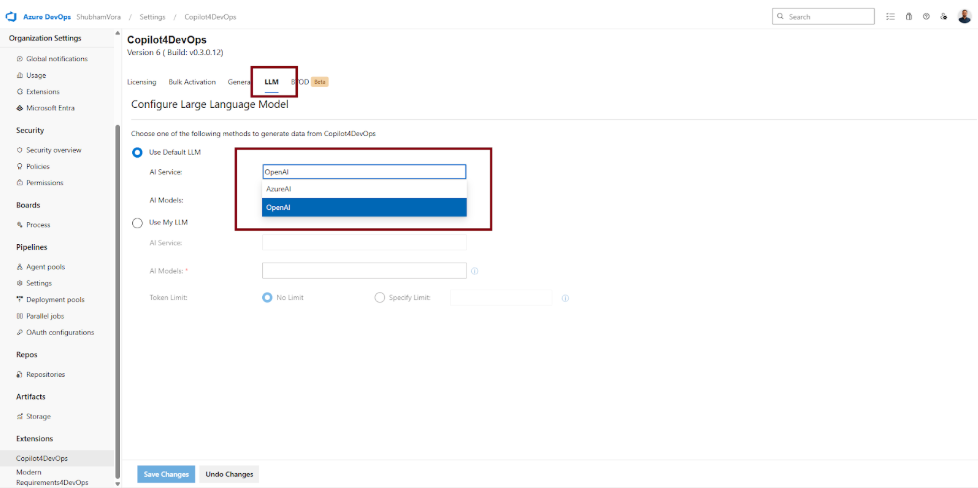
Here’s how the built-in LLM option protects your data:

How your data is handled with OpenAI LLM

OpenAI doesn’t take ownership of your data. You own and control your data. Also, OpenAI doesn’t train its model using your data and ensures that your custom models won’t be shared with other users.

To ensure security, OpenAI has successfully completed the SoC 2 audit. This ensures that OpenAI is following security and confidentiality standards to protect customers’ data. Moreover, it uses the AES-256 data encryption method to protect customer data.

In short, your data is not exposed or reused. It’s processed, responded to, and discarded.

To know more about enterprise privacy at OpenAI, you can visit here.

How your data is handled with Azure OpenAI

Similar to OpenAI, Azure OpenAI also has a strict privacy policy for protecting users’ data. 

When data is stored and processed through Azure OpenAI Service, it remains within the customer’s Azure resource and region, fully encrypted at rest using Microsoft’s default AES-256 encryption. Customers also have the option to enable their own encryption keys through Azure Key Vault, giving them direct control over data protection. Stored data is never shared outside the customer’s environment and can be deleted at any time by the customer.

These controls meet enterprise-level expectations for data residency, access governance, and compliance readiness, allowing organizations to manage stored AI data without compromising on confidentiality or ownership.

This way, you get powerful AI features without giving up ownership or oversight.

To know more about Azure OpenAI security policies, you can visit Data, privacy, and security for Azure OpenAI Service.

And if you want even more control over data security, we also offer an option to bring your own LLM, which we’ll cover in the upcoming section of this blog.

Complimentary LLM tokens included with your current Copilot4DevOps plan

Before we talk about connecting your own LLM with Copilot4DevOps, let’s take a quick look at the complimentary token access included with your subscription.

When you subscribe to Copilot4DevOps, you receive 100 million tokens per month with the Ultimate plan and 30 million tokens with the Plus plan as a complementary benefit and at no extra cost.

However, if your team wants higher token availability or prefers to manage LLM usage directly, you can connect your own LLM with Copilot4DevOps, which is covered in the next section.

Bring your own LLM to align with organization-specific security policies

While Copilot4DevOps includes secure built-in access to OpenAI and Azure OpenAI LLMs, some organizations require a higher degree of control over how data is processed, stored, and monitored. For these teams, especially those operating in government, healthcare, aerospace, or other regulated sectors, we offer the option to connect your own LLM.

By integrating your own LLM with Copilot4DevOps, you define the boundaries. This includes full control over the deployment region, data handling policies, access governance, and retention settings. Your AI model runs inside your own cloud environment, fully managed under your infrastructure and compliance policies.

Copilot4DevOps is designed to support this integration with minimal effort. Our admin interface allows you to switch from built-in models to your own endpoint securely, without affecting product functionality or user access.

In addition to compliance benefits, bringing your own LLM also gives you control over token usage. Instead of relying on the complimentary monthly limits included in your subscription, your usage is based on your own Azure quota or OpenAI billing. This gives teams the ability to scale LLM usage based on internal needs and policies.

Steps to configure your own LLM in Copilot4DevOps

You can follow the step-by-step process below to configure your own LLM with Copilot4DevOps:

To be noted: If you are using Copilot4DevOps Lite, you won’t be able to configure your own LLM. You need to upgrade to either the Plus or the Ultimate plan.

Step 1: First, set up your own LLM within OpenAI or Azure OpenAI, and get an API key to use.

Step 2: Then, open Azure DevOps, and go to the “Organization settings”.

Step 3: Click on “Copilot4DevOps” in the “Extensions” section. If you are using Copilot4DevOps as a standalone product.
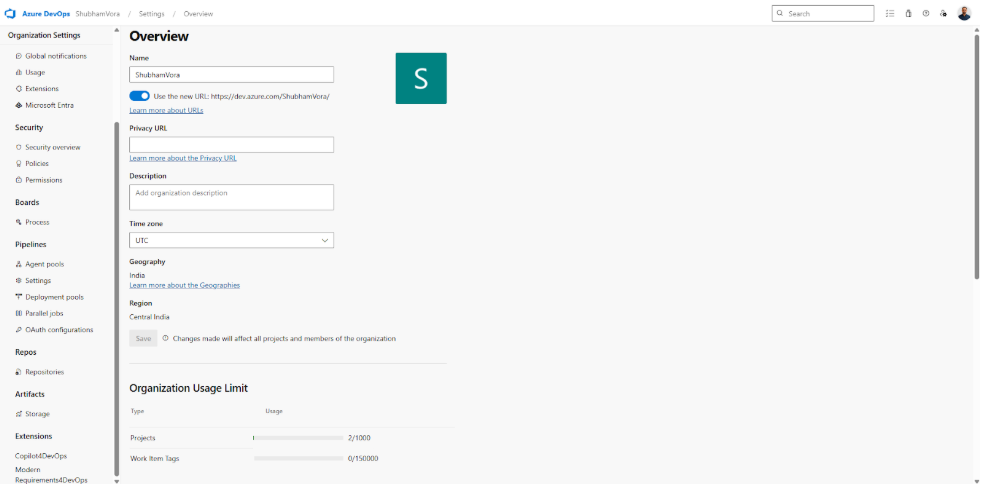
If you are using Copilot4DevOps with Modern Requirements4DevOps, click on “Modern Requirements4DevOps” in the “Extensions” section, and go to the Copilot4DevOps tab.

Step 4: Go to the “LLM” tab.
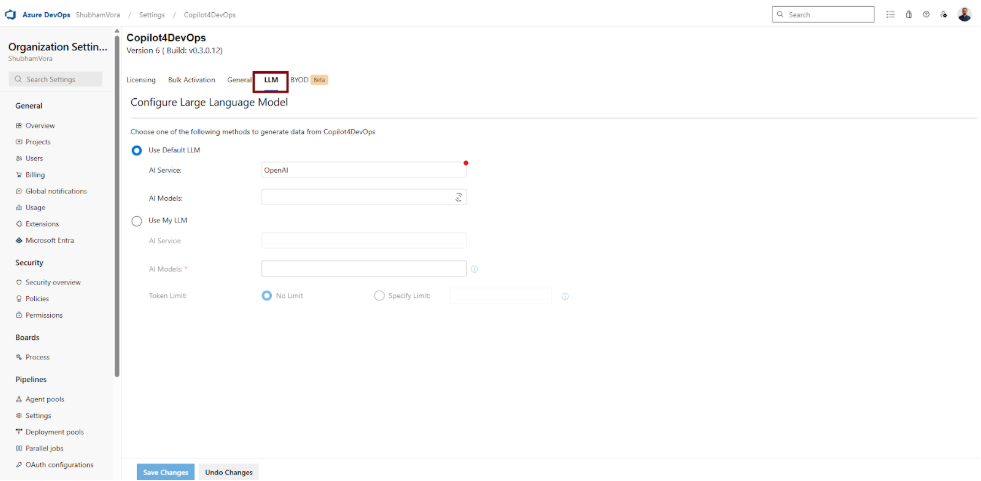
Step 5: Select “Use my LLM”.

  • Step 5.1: Select an AI service from OpenAI or Azure OpenAI.
  • Step 5.2: Add AI models that you want to use.
  • Step 5.3: Enter the API key according to the service you have selected.

Step 6: Then, click on the “Test Configuration” button to test your setup. If everything is alright, you will get a notification, like “Configuration valid”. Otherwise, you will get an error message.

Step 7: Click on “Save Changes” at the bottom to store your changes.

If you face any issues while configuring your own LLM in Copilot4DevOps, you can create a support ticket by emailing support@modernrequirements.com. The team will reach out to help. You can also visit this page for more information.

Summarizing Data Security with Copilot4DevOps

Security is a top priority for us at Copilot4DevOps. Our main aim is to equip businesses with powerful AI for faster, smarter requirements management and ensure their highly sensitive data is safe, confidential, and secure.

By inheriting the security protocols from OpenAI and Azure OpenAI, we ensure that customers’ data, like prompts, documents, etc., is not used to train our LLMs or shared with other users. We also explained how you can bring your own LLM if you are dealing with regulatory obligations and stricter data policies.

Whether you use our managed service or deploy your own, the focus remains the same: secure, responsible, and enterprise-ready AI.

Try it Yourself

Ready to transform your DevOps with Copilot4DevOps?

Get a free trial today.
Table of Contents

Table of Contents

When AI is used without guardrails, it opens the door to serious data privacy and compliance concerns. In a recent analysis by Harmonic involving over 1 million GenAI prompts and 20,000 uploaded files, nearly 22% of uploaded files and 4.37% of prompts were found to contain sensitive content. These figures highlight how easily confidential data can be exposed when safeguards are not in place.

Businesses must take this seriously. Considering this, Copilot4DevOps was built to inherit the latest security controls from Azure OpenAI and OpenAI, offering a safe, enterprise-aligned way to use AI within Azure DevOps.

Let’s look at how your sensitive data stays protected when you use Copilot4DevOps.

How Copilot4DevOps ensures enterprise-grade data security

Modern Requirements is recognized as a Microsoft AI Transformation Partner, which means Copilot4DevOps benefits from Microsoft’s security, compliance, and infrastructure best practices. This partnership ensures the platform aligns with the security standards expected by public sector agencies and regulated industries.

Furthermore, Copilot4DevOps works as a native extension within Azure DevOps, but not as a separate tool. So, all AI features of Copilot4DevOps operate within your existing DevOps environments and follow the same rules for access control, permissions, and data storage that your organization has already put in place for Azure.

Moreover, Modern Requirements is SOC 2 Type II certified and follows practices that align with ISO 27001 and related standards. With this, we are ensuring that our internal controls, audit trails, and deployment processes are all designed to meet the needs of security-conscious teams.

Copilot4DevOps also follows the GDPR and CCPA compliance requirements. We don’t use customers’ prompt data, generated outputs, or usage logs to train our models, and we don’t share them with other customers or third-party service providers.

To ensure enterprise-grade security, we inherit the security posture of the LLM platforms we support—OpenAI and Azure OpenAI. Both platforms have strict policies on how customer data is processed, stored, and accessed.

Here’s how the built-in LLM option protects your data:

How your data is handled with OpenAI LLM

OpenAI doesn’t take ownership of your data. You own and control your data. Also, OpenAI doesn’t train its model using your data and ensures that your custom models won’t be shared with other users.

To ensure security, OpenAI has successfully completed the SoC 2 audit. This ensures that OpenAI is following security and confidentiality standards to protect customers’ data. Moreover, it uses the AES-256 data encryption method to protect customer data.

In short, your data is not exposed or reused. It’s processed, responded to, and discarded.

To know more about enterprise privacy at OpenAI, you can visit here.

How your data is handled with Azure OpenAI

Similar to OpenAI, Azure OpenAI also has a strict privacy policy for protecting users’ data. 

When data is stored and processed through Azure OpenAI Service, it remains within the customer’s Azure resource and region, fully encrypted at rest using Microsoft’s default AES-256 encryption. Customers also have the option to enable their own encryption keys through Azure Key Vault, giving them direct control over data protection. Stored data is never shared outside the customer’s environment and can be deleted at any time by the customer.

These controls meet enterprise-level expectations for data residency, access governance, and compliance readiness, allowing organizations to manage stored AI data without compromising on confidentiality or ownership.

This way, you get powerful AI features without giving up ownership or oversight.

To know more about Azure OpenAI security policies, you can visit Data, privacy, and security for Azure OpenAI Service.

And if you want even more control over data security, we also offer an option to bring your own LLM, which we’ll cover in the upcoming section of this blog.

Complimentary LLM tokens included with your current Copilot4DevOps plan

Before we talk about connecting your own LLM with Copilot4DevOps, let’s take a quick look at the complimentary token access included with your subscription.

When you subscribe to Copilot4DevOps, you receive 100 million tokens per month with the Ultimate plan and 30 million tokens with the Plus plan as a complementary benefit and at no extra cost.

However, if your team wants higher token availability or prefers to manage LLM usage directly, you can connect your own LLM with Copilot4DevOps, which is covered in the next section.

Bring your own LLM to align with organization-specific security policies

While Copilot4DevOps includes secure built-in access to OpenAI and Azure OpenAI LLMs, some organizations require a higher degree of control over how data is processed, stored, and monitored. For these teams, especially those operating in government, healthcare, aerospace, or other regulated sectors, we offer the option to connect your own LLM.

By integrating your own LLM with Copilot4DevOps, you define the boundaries. This includes full control over the deployment region, data handling policies, access governance, and retention settings. Your AI model runs inside your own cloud environment, fully managed under your infrastructure and compliance policies.

Copilot4DevOps is designed to support this integration with minimal effort. Our admin interface allows you to switch from built-in models to your own endpoint securely, without affecting product functionality or user access.

In addition to compliance benefits, bringing your own LLM also gives you control over token usage. Instead of relying on the complimentary monthly limits included in your subscription, your usage is based on your own Azure quota or OpenAI billing. This gives teams the ability to scale LLM usage based on internal needs and policies.

Steps to configure your own LLM in Copilot4DevOps

You can follow the step-by-step process below to configure your own LLM with Copilot4DevOps:

To be noted: If you are using Copilot4DevOps Lite, you won’t be able to configure your own LLM. You need to upgrade to either the Plus or the Ultimate plan.

Step 1: First, set up your own LLM within OpenAI or Azure OpenAI, and get an API key to use.

Step 2: Then, open Azure DevOps, and go to the “Organization settings”.

Step 3: Click on “Copilot4DevOps” in the “Extensions” section. If you are using Copilot4DevOps as a standalone product.

If you are using Copilot4DevOps with Modern Requirements4DevOps, click on “Modern Requirements4DevOps” in the “Extensions” section, and go to the Copilot4DevOps tab.

Step 4: Go to the “LLM” tab.

Step 5: Select “Use my LLM”.

  • Step 5.1: Select an AI service from OpenAI or Azure OpenAI.
  • Step 5.2: Add AI models that you want to use.
  • Step 5.3: Enter the API key according to the service you have selected.

Step 6: Then, click on the “Test Configuration” button to test your setup. If everything is alright, you will get a notification, like “Configuration valid”. Otherwise, you will get an error message.

Step 7: Click on “Save Changes” at the bottom to store your changes.

If you face any issues while configuring your own LLM in Copilot4DevOps, you can create a support ticket by emailing support@modernrequirements.com. The team will reach out to help. You can also visit this page for more information.

Summarizing Data Security with Copilot4DevOps

Security is a top priority for us at Copilot4DevOps. Our main aim is to equip businesses with powerful AI for faster, smarter requirements management and ensure their highly sensitive data is safe, confidential, and secure.

By inheriting the security protocols from OpenAI and Azure OpenAI, we ensure that customers’ data, like prompts, documents, etc., is not used to train our LLMs or shared with other users. We also explained how you can bring your own LLM if you are dealing with regulatory obligations and stricter data policies.

Whether you use our managed service or deploy your own, the focus remains the same: secure, responsible, and enterprise-ready AI.

Try it Yourself

Ready to transform your DevOps with Copilot4DevOps?

Get a free trial today.