








We’ve noticed that many software development teams use project management tools, documents, or spreadsheets to manage test cases and test results. Due to this scattered tool stack, they can’t track test cases in one place and often miss bugs. Test Plans help to organize test cases within Azure DevOps, where teams also manage projects. So, everything remains in one place.
Another hidden challenge QA teams face is that they need to spend around 30% of their time preparing test plans and writing test cases. However, by using Generative AI tools like AI Copilot within Azure DevOps, teams can speed up test case generation, test coverage analysis, and report preparation.
So, let’s first understand how to use Azure DevOps Test Plan, and then you’ll learn how to use AI to boost productivity.
What are Azure DevOps Test Plans?
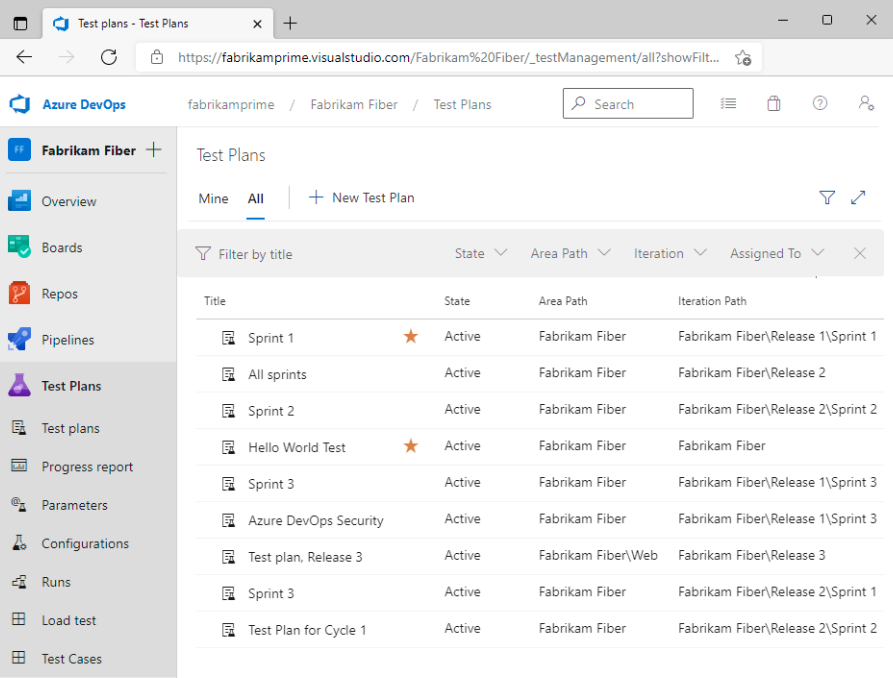
Test Plans is a test management module within Azure DevOps that helps teams to manage test plans, test suites, and test cases in a structured manner. With this, teams can manage all test cases in one place and connect them back to ADO work items like user stories within Azure Boards. This way, everything from user stories to test cases stays connected in one place and becomes much easier to manage.
Test plans generally allow QA teams to collaboratively perform different types of testing, including manual, automated, integration, user acceptance, or exploratory testing.
At a basic level, it works across three layers (test plans vs test suites vs test cases):

- Test Plan –> A high-level container for a feature or release. For example, “Login feature testing”.
- Test Suite -> A grouping of related test cases. For example, groups for login feature testing can be like “test cases for login with email and password ”, “test cases for login with mobile number”, etc.
- Test Case -> It covers step-by-step validation of a scenario.
Test suites can be organized in different ways depending on how your team works:
- Static suites -> Manually created and managed.
- Requirement-based suites -> Linked directly to user stories or backlog items.
- Query-based suites -> Auto-generated based on work item queries.
Overall, Azure Test Plans help to integrate test management and execution into the DevOps life cycle.
Also read: AI for DevOps: Everything You Need to Know
Creating Test Plans in Azure DevOps (Step-by-Step)
Setting up Azure DevOps Test Plans may seem technical, but it is straightforward. Follow the steps given below:
Step 1: Go to Test Plans. For that:
- Open your Azure DevOps project.
- From the left menu, click Test Plans.

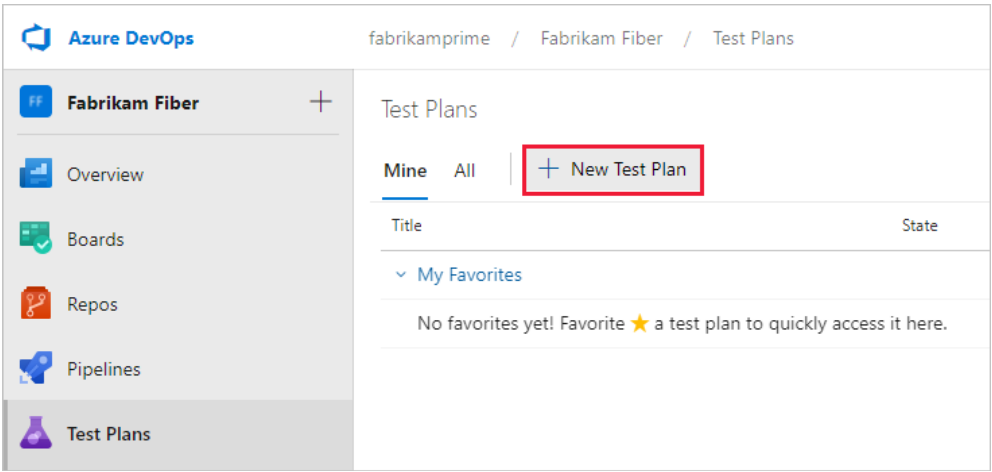
Step 2: Create a new Test Plan by clicking on the “+ New Test Plan”.
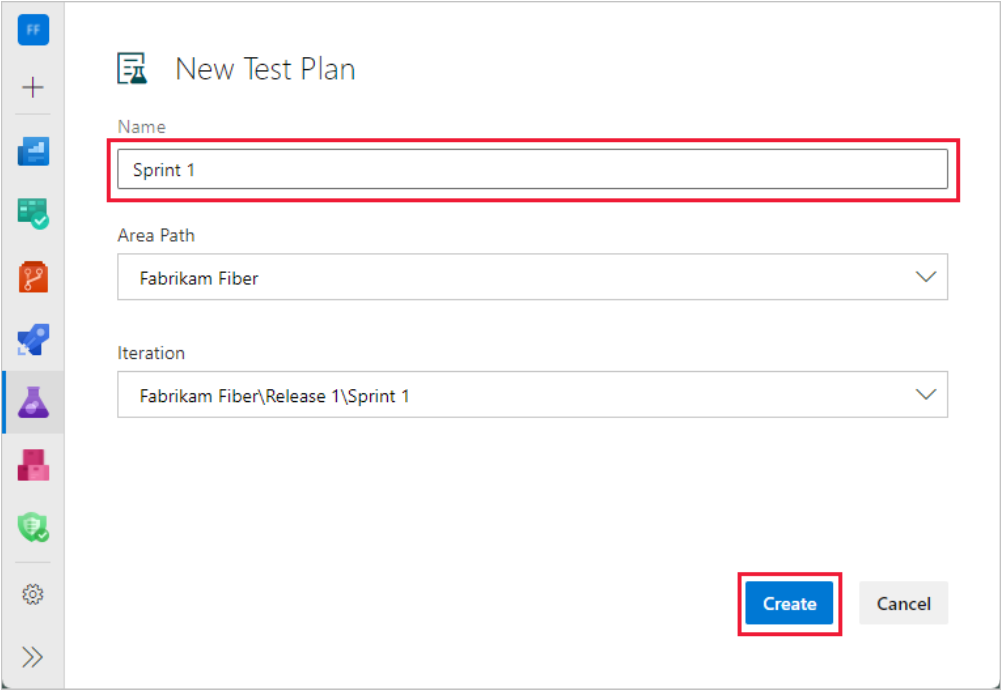
Step 3: Then, give a proper name like “Sprint 1” or “Login Feature Testing” and select the area path and iteration. This helps in defining scope and sprint alignment.
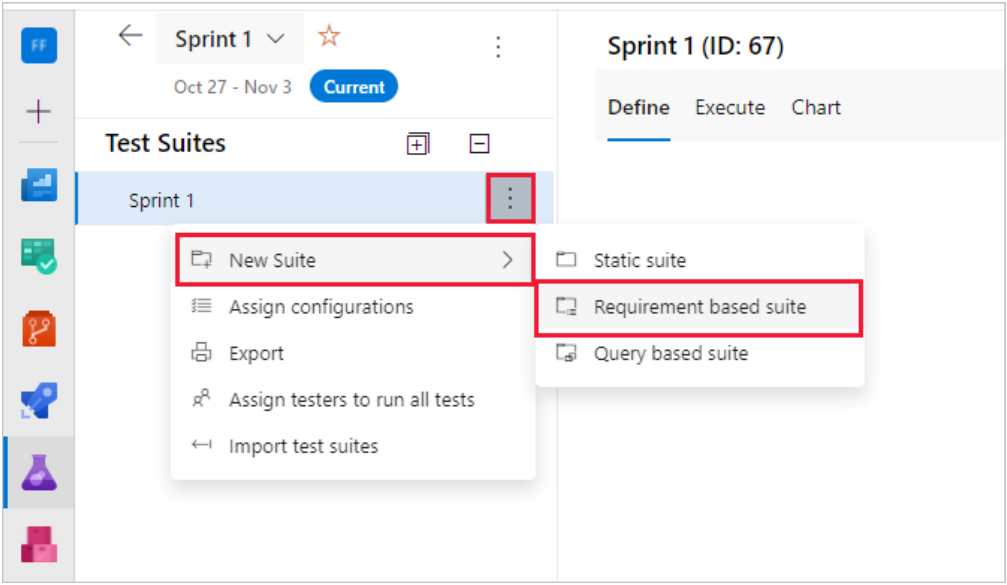
Step 4: The next step is to add Test Suites to the Test Plan. You can click on three vertical dots, select “New Suite”, and then select type. For now, we will create a requirements-based test suite.
Step 5: Here, set filters to find all requirements that you want to test, and then click on “Run Query”.
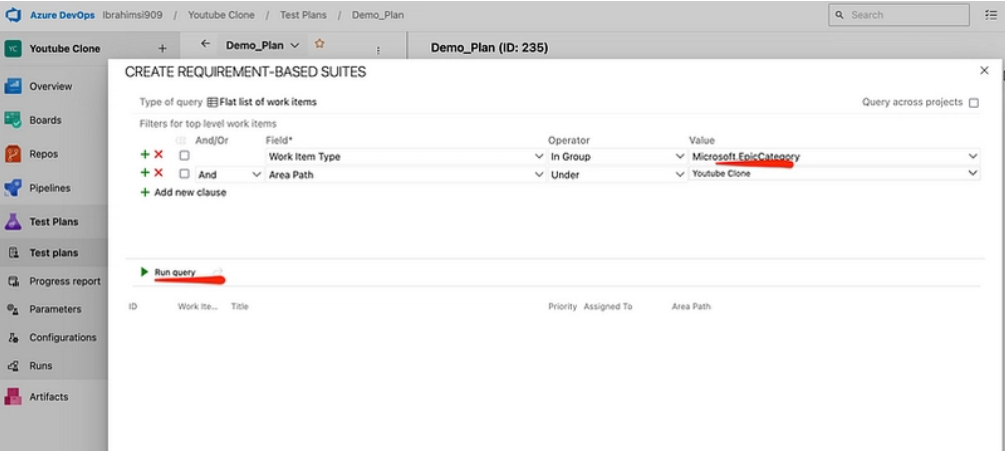
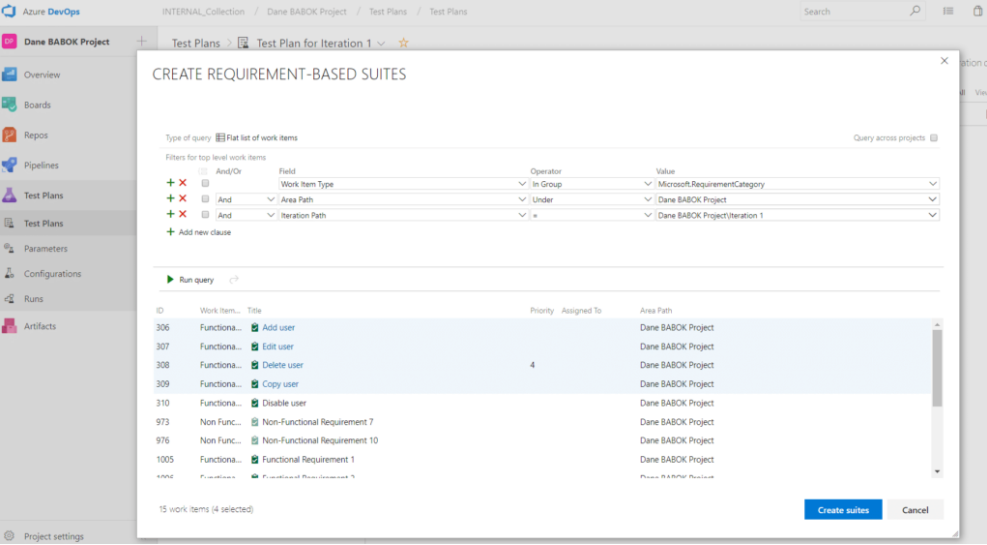
Step 6: You can see that it has filtered all work items that we are going to test in this sprint. Now, you can click on the “Create Suites” button to create a separate test suite for each one.
Step 7: Next, open a suite. Click “New Test Case”, and add a title, steps, and expected results.
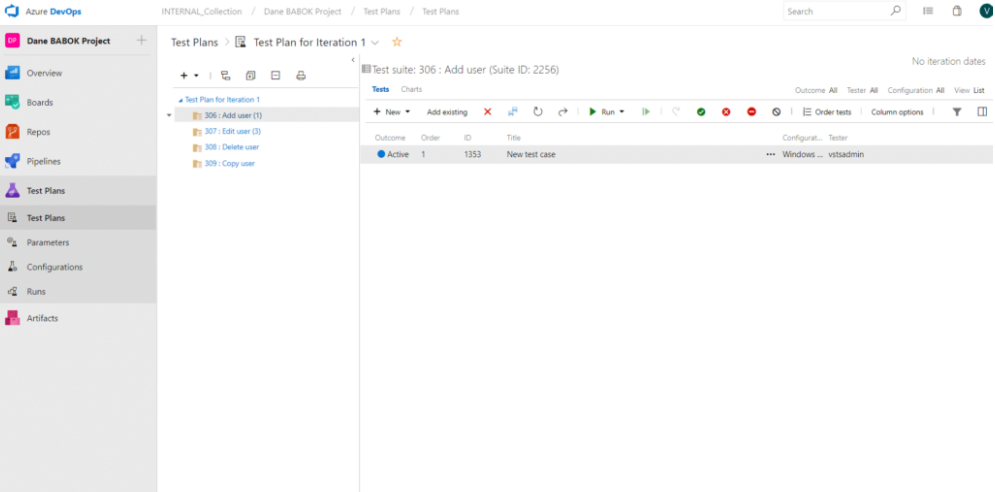
Step 8: Assign test cases to team members and set priority and configurations. This helps in structured execution.
Step 9: Next, select the test case that you want to execute and click on the “Run” button at the top.

If you run it for a web application, it will open Test Runner in the side panel while your app is opened in another tab. Then, the tester can follow each step and mark them as passed or failed manually.
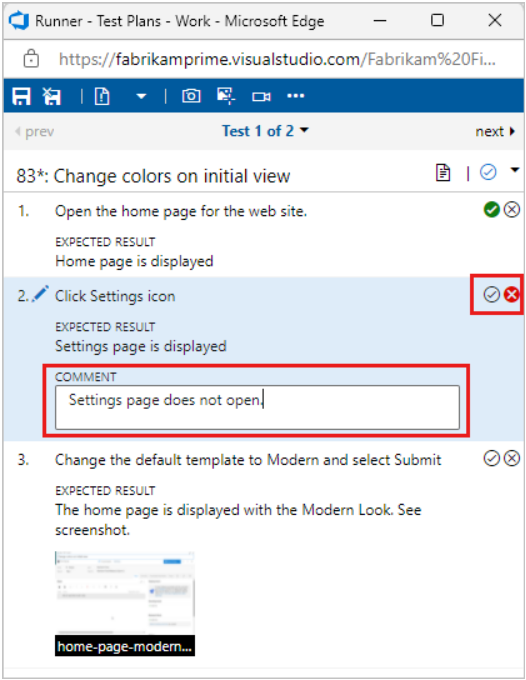
Step 10: If a test fails, click “Create Bug” directly from the test run. This links a bug with a test case.
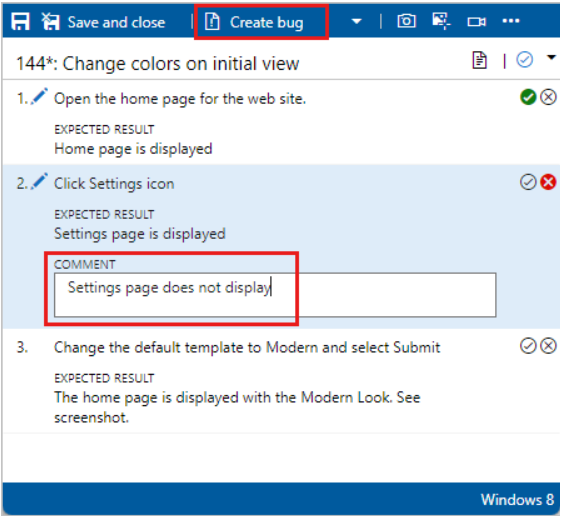
Step 11: Next, you can track results and reports, view pass/fail trends, check progress across suites, and identify risk areas.

Limitations of Azure DevOps Test Plans
We agree that Azure DevOps Test Plans offer a structured way to perform manual or automated testing. However, there are a few gaps and challenges below that teams face regularly:
- High manual effort: Teams generally spend multiple hours every day writing test cases manually. By using generative AI tools to write test cases, teams can save time and invest it in actual testing.
- Ongoing test maintenance: When requirements or ADO work items change, teams also need to update test cases. Manually updating each test case takes time, and teams miss important changes.
- Difficulty in scaling: As the number of test cases increases, organizing suites and reviewing coverage becomes harder and slower.
- Gaps in coverage: First of all, manually checking test coverage for each user story is very hard. Also, teams miss edge cases and negative scenarios during manual creation.
- Manual switching between tools while using AI: 40% of QA teams use generative AI tools like ChatGPT for test case generation. However, they need to manually copy-paste test cases from ChatGPT to Azure Test Plans, and that’s why they struggle with productivity gain.
How Copilot4DevOps Transforms Azure DevOps Test Plans
QA teams have already started adopting AI in testing. Even AI-enabled testing is projected to grow from USD 1.21 billion in 2026 to USD 4.64 billion by 2034.
Furthermore, tools like Copilot4DevOps, an AI assistant within Azure DevOps that helps to make testing more scalable with AI, and overcome challenges that teams face while using Azure DevOps Test Plans. Here is how:
- Generates test cases: It takes user stories, documents, or other ADO work items as context and generates step-by-step test cases without missing edge cases or negative scenarios. With this, teams can generate test cases for every test suite within seconds.
- Link test cases with ADO work items: Of course, it generates test cases directly inside Azure DevOps, so teams can directly link them with related ADO work items. This helps to ensure traceability in regulated industries.
- Prepare test coverage report using AI: The Dynamic Prompt module of Copilot4DevOps helps to prepare a test coverage report using AI. It even allows the use of AI to fix test coverage.
Overall, this reduces manual efforts for developers and QA testers and boosts their productivity.