

Save and Run Reusable Prompts to Interect With ADO Work Items at Scale
Create prompt templates once and reuse them to run consistent AI-driven checks on Azure DevOps work items. Perform repeated analysis, reviews, or validations without rewriting instructions every time.

Trusted by the world’s leading businesses















There’s a smarter way to run repeated checks on ADO work items
The old way
- I manually review the description of each ADO work item.
- I check test coverage for user stories manually.
- I manually check whether requirements align with compliance.
- When I fix issues, I re-check again manually from scratch.
New way with Dynamic Prompt
- I select all work items to review, open the Dynamic Prompt module, and ask AI to find gaps.
- I ask AI to validate the coverage between test cases and user stories.
- I ask AI to find compliance gaps in selected requirements.
- I rerun the same saved prompt template after updates to confirm issues are resolved.
Dynamic Prompt module: A quick overview
Dynamic Prompt is an advanced AI feature of Copilot4DevOps that lets teams run custom natural-language prompts across batches of ADO work items or saved queries.
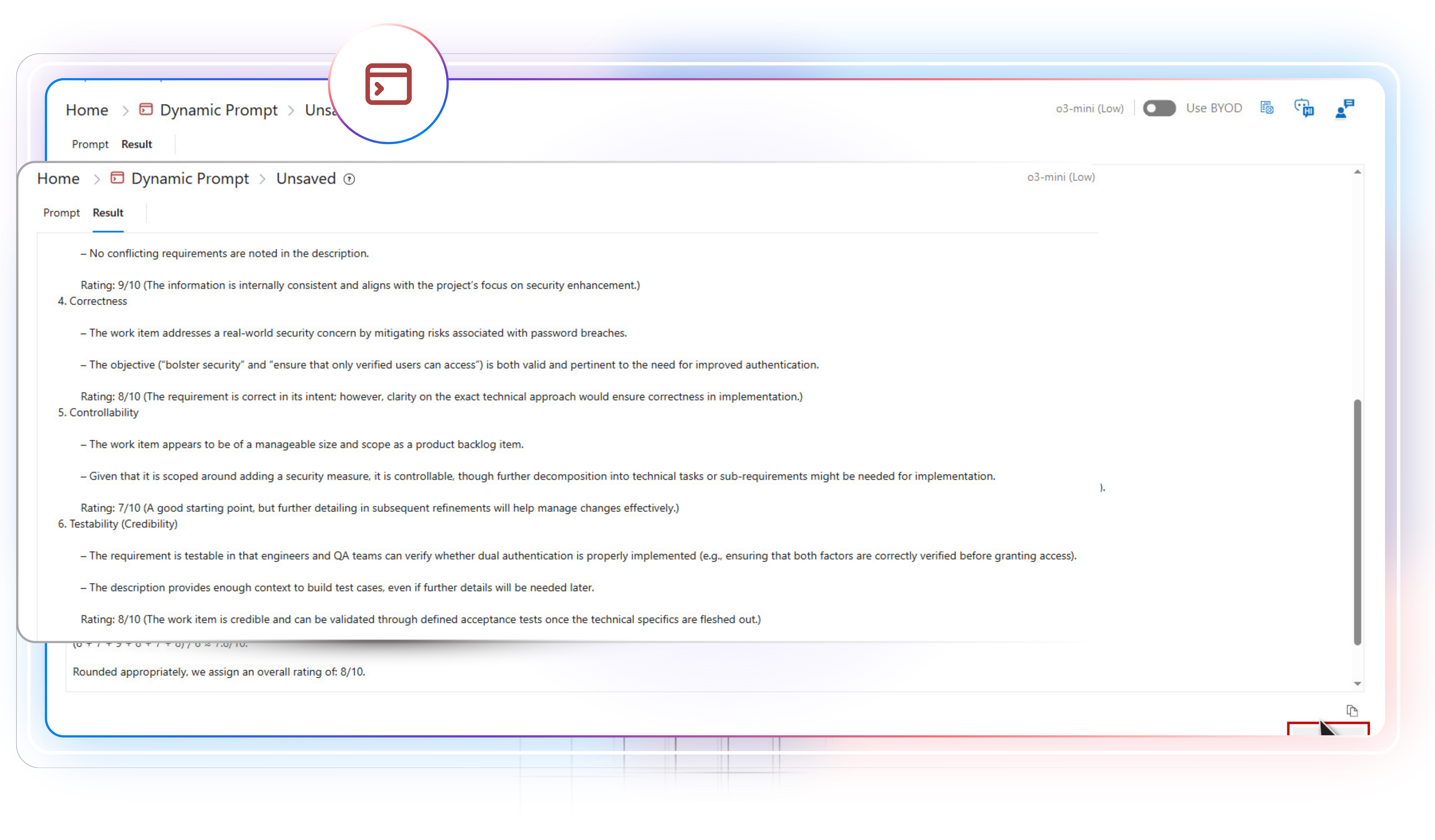
Instead of manually inspecting dozens of requirements, you simply select the relevant items and type a prompt telling Copilot4DevOps what action to perform, which could be mapping user stories to test cases, identifying gaps, or preparing reports. Within seconds, Copilot4DevOps processes all the data using AI and returns structured results in the asked format.
Also, these prompts can be saved as templates, so the same checks can be run again whenever needed, and without rewriting anything.
Dynamic Prompt is made for everyone

Project Manager
Validate requirements readiness during backlog grooming using an AI. Identify missing requirements, find scope gaps, and unclear ownership. Generate structured summaries of project progress with AI.

Business Analyst
Use AI and saved prompts to repeatedly analyze the quality of requirements within Azure DevOps. Identify inconsistent and vague requirements and fix them before shipping for development.

Scrum Master
Filter high-priority ADO work items using an AI during sprint planning and ship them for development.

Developer
Use the saved prompt to view all requirements related to any features, such as login, payment, etc., and find user stories with missing acceptance criteria.

Test Lead
Use AI to prepare a table showing how test cases cover user stories. Identify gaps in test cases directly within Azure DevOps.

DevOps Engineer
Use saved prompts to validate release and rollback-related tasks before each production deployment using AI.
SRE
Extract repeated failure patterns, weak action items, and missing follow-ups. Use custom prompts to produce structured outputs for reliability planning.

Compliance Manager
Provide custom prompts to AI to check whether requirements follow particular compliance, such as ISO 9001, SOC Type II, etc., and detect missing evidence references, incomplete trace links, and weak audit descriptions. Re-run after updates to confirm closure.

Risk Manager
Identify work items in the current sprint that have a risk score of more than 80% and fix them.

Security Engineer
Use AI with custom prompts to detect missing security controls and weak validation plans. Generate a proper report of security gaps using an AI.
Here is what the Dynamic Prompt module offers.
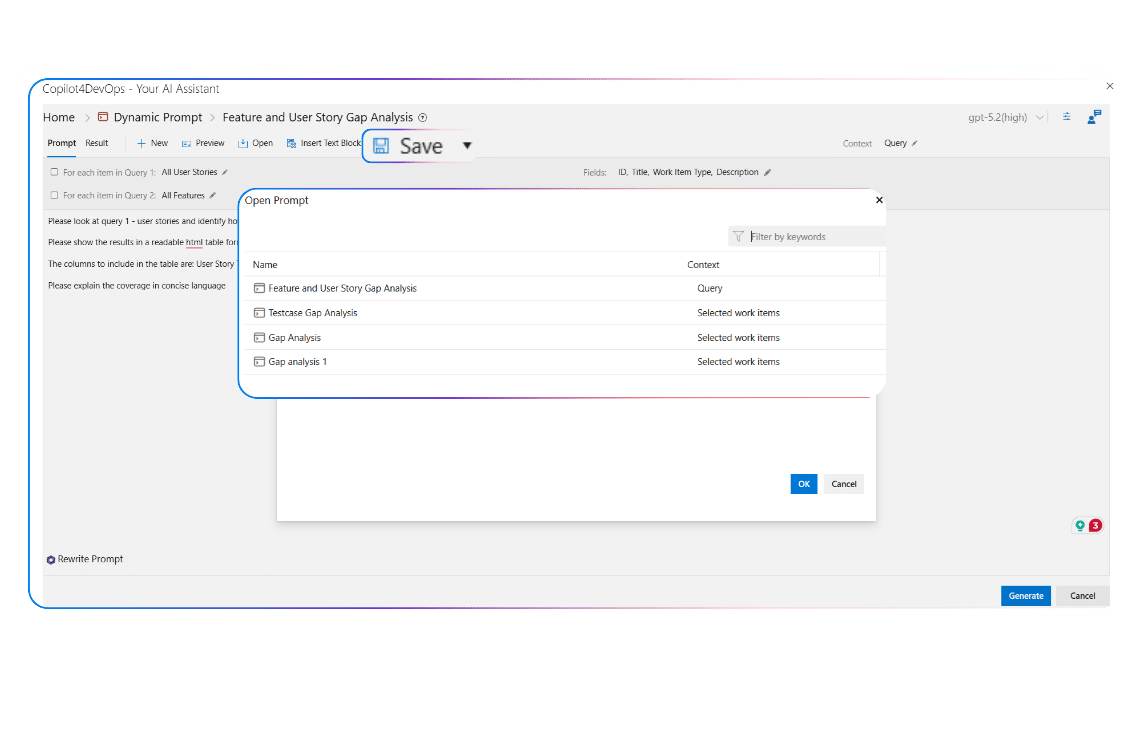
Save prompts as a template
Tired of rewriting the same prompt?
Save prompts as a template once and run it anytime on different data. This helps in keeping checks consistent across teams and saves time when teams need to perform validation steps repeatedly.
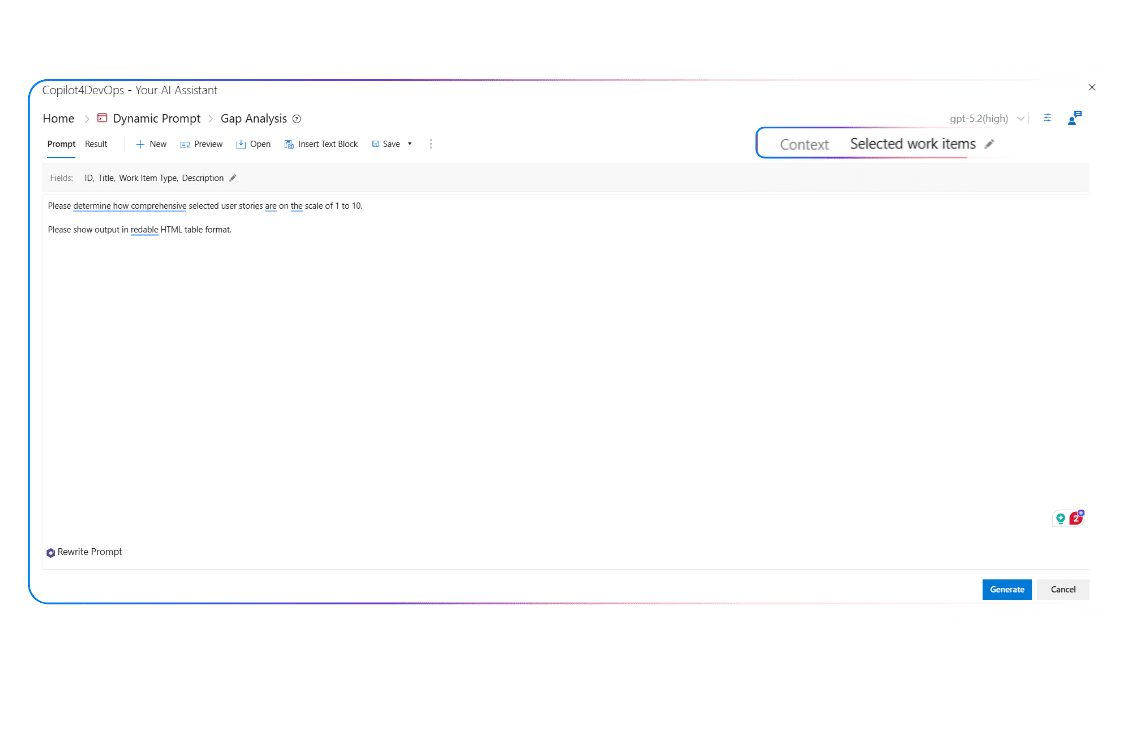
Specific Work Items as a context
Want to perform checks on handpicked work items?
Select specific work items from the Azure backlog, add a prompt to review or analyze them, and press generate. Within a few seconds, AI generates a structured response based on the provided instructions.
Query-based context
Want to select ADO work items in bulk to perform any action?
Select up to two queries and write a prompt that applies to the items in one or both. Run comparisons, coverage checks, or any logic across full query sets.

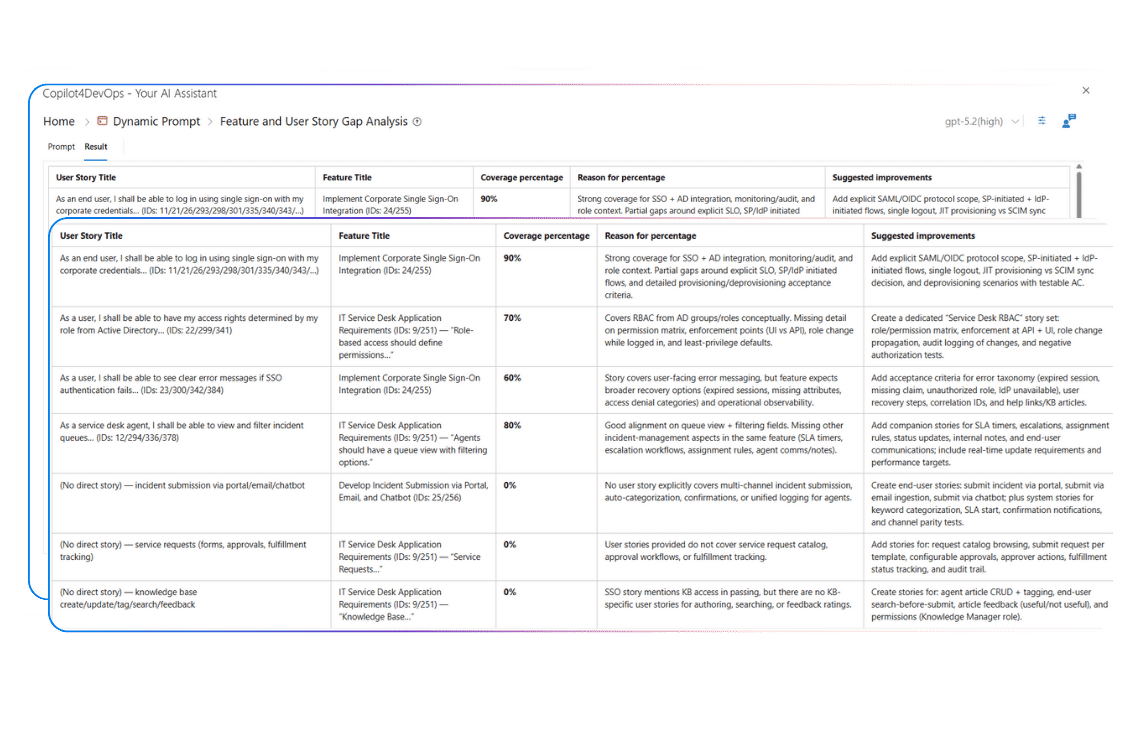
Get structured output
Need the output in a particular format?
Specify the output format in the prompt, and the system will generate output accordingly. For example, you can say generate output in table format that should contain the requirement, priority score, risk score, and coverage gap columns.
Rewrite Prompt
Not getting the results you expected?
Use the “Rewrite Prompt” feature to write a better prompt using an AI. This helps the user in getting a better response.

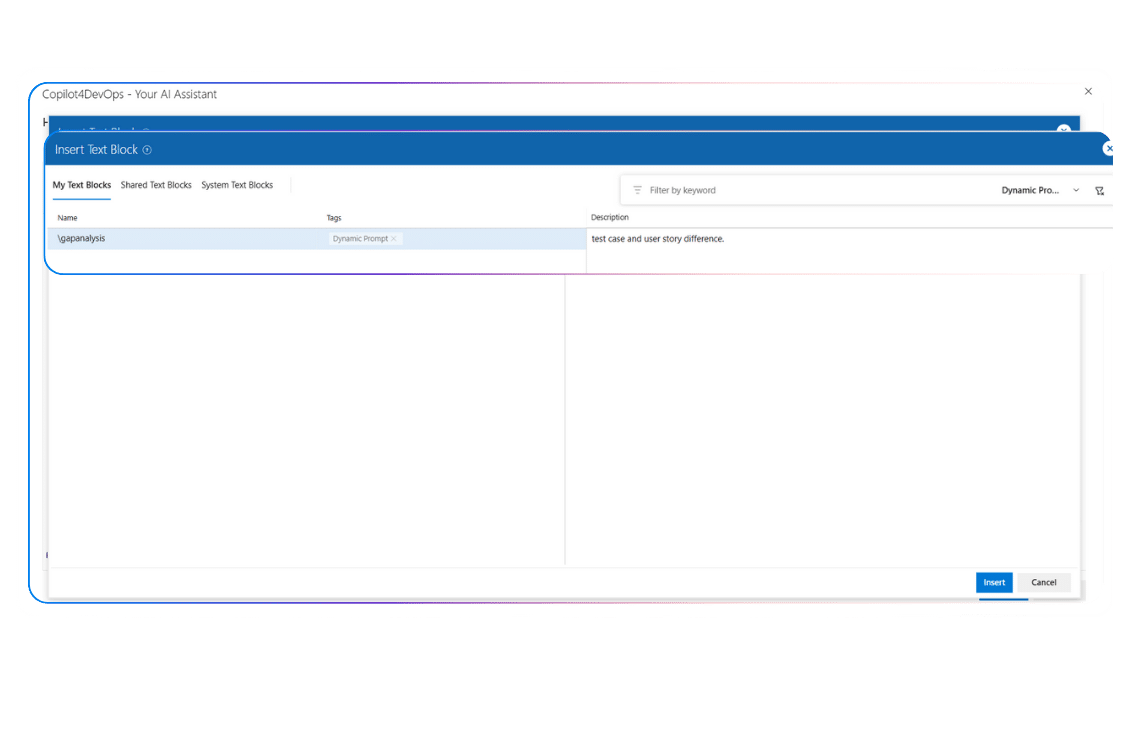
Insert Text Blocks
Repetitively writing the same text across prompts?
Save commonly used texts into the text blocks, and you can directly insert them into any prompt. Ideal for fixed instructions or shared rules that apply across many reviews or checks.
Top use cases in different industries
Insurance
- As a BA, I want to use AI to validate that “Customer Login and MFA” related ADO user stories include lockout rules, session timeout, and password expiry policies.
- As a compliance manager, I want to check whether “Claims intake” related requirements include mandatory consent wording, disclosure text, and audit trail fields.
- As a scrum master, during sprint planning, I use the Dynamic Prompt module to run saved prompts to filter all high-priority requirements related to policy cancellation and refund.
Healthcare
- As a product owner, I want to use AI to verify that patient login and consent-related user stories follow HIPAA-required consent handling and session timeout rules.
- As a compliance manager, I want to rerun saved prompts every time e-signature-related requirements change to ensure they meet FDA 21 CFR Part 11 compliance.
- As a QA lead, I want to use Dynamic Prompt to ensure “Device Firmware Update” related test cases align with IEC 62304 expectations.
Energy & Utilities
- As an OT network administrator, I want to validate “SCADA Remote Access” work items for NERC CIP alignment by executing saved prompts to check MFA enforcement, access logs, jump host rules, and account expiry.
- As a grid operations analyst, I want to review “Outage Detection Rules” requirements to flag missing conditions like feeder overload, false alarms, and restoration verification by re-running a saved prompt template.
- As a metering program manager, I want to verify “Smart Meter Firmware Rollout” change requests include phased deployment logic, rollback triggers, telemetry verification, and outage impact notes using saved prompts.
Banking & Finance
- As a payment product manager, I want to flag missing edge cases in “UPI/Card Authorization Flow” related user stories.
- As a financial crime compliance analyst, I use AI to prepare a report to validate transaction monitoring-related requirements.
- As a card data protection officer, I want to validate “Card Storage and Tokenization” work items against PCI DSS.
Aerospace & Defence
- As a system safety engineer, I repeatedly execute prompts to ensure that all software-related requirements for avionics follow DO-178C compliance.
- As a QA lead, I execute saved prompts to verify “Mission Planning Workflow” test cases cover negative paths, degraded mode behavior, and recovery steps.
- As a systems engineer, I want to rerun a saved prompt on “Sensor Data Processing” stories to flag missing failure handling, boundary limits, and timing constraints after every refinement update.
Service & Technology
- As a security engineer, I want to verify that all requirements related to API key management and AI model training comply with SOC Type II.
- As a developer, I rerun saved prompts to find missing acceptance criteria in all user stories of the selected query.
- As a release manager, I would like to use AI to verify that production release-related requirements are up to date and nothing is missing.
Railways
- As a railway operations analyst, I use the Dynamic prompt to review requirements related to train delay alerts and find missing gaps.
- As a product manager, I ensure ticket booking login-related ADO work items contain OTP retry caps, session expiry, lockout policy, and fraud checks.
- As a station systems engineer, I want to verify that “Gate Entry Validation” requirements cover offline mode, barcode failure, manual override, and reconciliation rules by executing a repeat prompt on selected requirements.
Automotive
- As a functional safety engineer, I use AI to prepare a report to validate alignment between ADAS feature-related requirements with ISO 26262 by executing saved prompt templates.
- As a Service Engineering Lead, I want to validate that “Diagnostic Trouble Code (DTC) logging” work items include freeze-frame data, severity mapping, service tool steps, and customer-impact notes by re-running saved prompts.
- As an ECU validation engineer, I verify that “OTA Update” test cases cover low-battery shutdown, corrupted package detection, rollback, retry rules, and safe-state correctly using AI.
Government
- As a compliance manager, I execute saved prompts to validate “Citizen Data Collection and Consent” requirements against privacy policy rules.
- As a security engineer, I want to prepare a report of NIST 800-53 related gaps in “Privileged Admin Actions” requirements.
- As a project manager, I would like to use AI to identify gaps and risks associated with vendor onboarding requirements for software systems.
Clear gains with reusable AI prompts
Your Questions are Answered Here
Does Dynamic Prompt support output formats other than tables?
Yes. In the prompt itself, you can define the output format, such as JSON, table, checklist, document, structured bullet, or HTML. Then, AI generates the output in the specified format only.
What security advantages of using Dynamic Prompt?
The Dynamic Prompt module works directly within your Azure DevOps workspace. Also, Copilot4DevOps is SOC Type II certified, so it doesn’t store any of your data or use it to train its models.
What makes Dynamic Prompt different from standard AI chat?
The Dynamic Prompt module is a part of Copilot4DevOps, which runs directly inside Azure DevOps. It has direct access to your ADO work items and performs the required action on them using AI that you can’t do from normal AI chat.
How do teams use Dynamic Prompt for compliance checks?
It’s very simple. Teams can save prompt templates to identify compliance gaps, run them on selected requirements repeatedly, and get a quick idea of what’s missing.
How do I control which work item fields the AI uses?
Dynamic prompt modules allow selecting work item fields, such as Title, Description, Acceptance Criteria, Steps, or custom fields, before running the prompt. AI reads only selected fields of work items. This helps in providing a requirements context to AI in a better way.
How do teams use Dynamic Prompt during release readiness?
Teams can use the Dynamic prompt module to check that rollback steps are complete, the priority of release-related requirements is set properly, and any requirements are not missed during reviews.
What types of tasks fit Dynamic Prompt well?
Repeated checks like completeness review, inconsistency detection, coverage checks, duplicate detection, risk scoring, and compliance validation across man
Which plan of Copilot4DevOps includes the Dynamic Prompt module?
The dynamic prompt module is included in the “Copilot4DevOps Plus” plan that starts with $25/month/member.
Are there any limits for saving prompt templates?
There are no limits for creating and saving prompt templates. You can create as many templates as you want. All templates get stored within your ADO workspace.
Interact with ADO work items by executing custom prompts
Utilize AI to analyze, compare, validate, find compliance gaps, and extract insights repeatedly from ADO work items using saved prompts.
Explore Relevant Features
Analyze
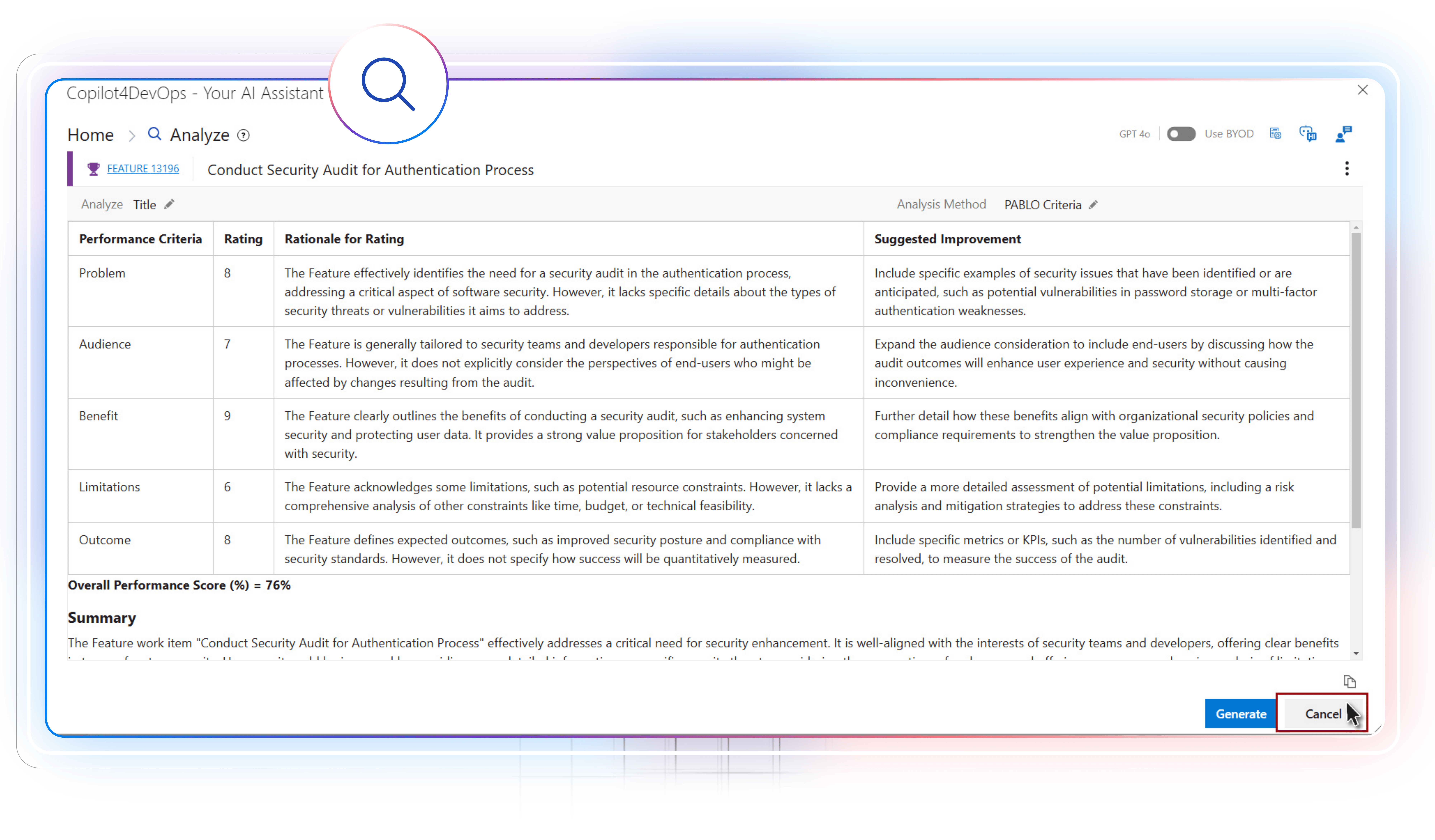
AI for reviewing requirements
Analyze ADO work items against proven frameworks, such as MoSCoW, INVEST, PABLO Criteria, and the 6C’s method, using AI to find gaps and inconsistencies before any development starts.

SOP and Document Generator
AI to generate documents from ADO work items
Create well-structured technical documents, SOPs, or PRDs based on ADO work items’ descriptions. Documents can include a TOC, multiple sections and subsections, diagrams, and an interactive UI.
AI Chat
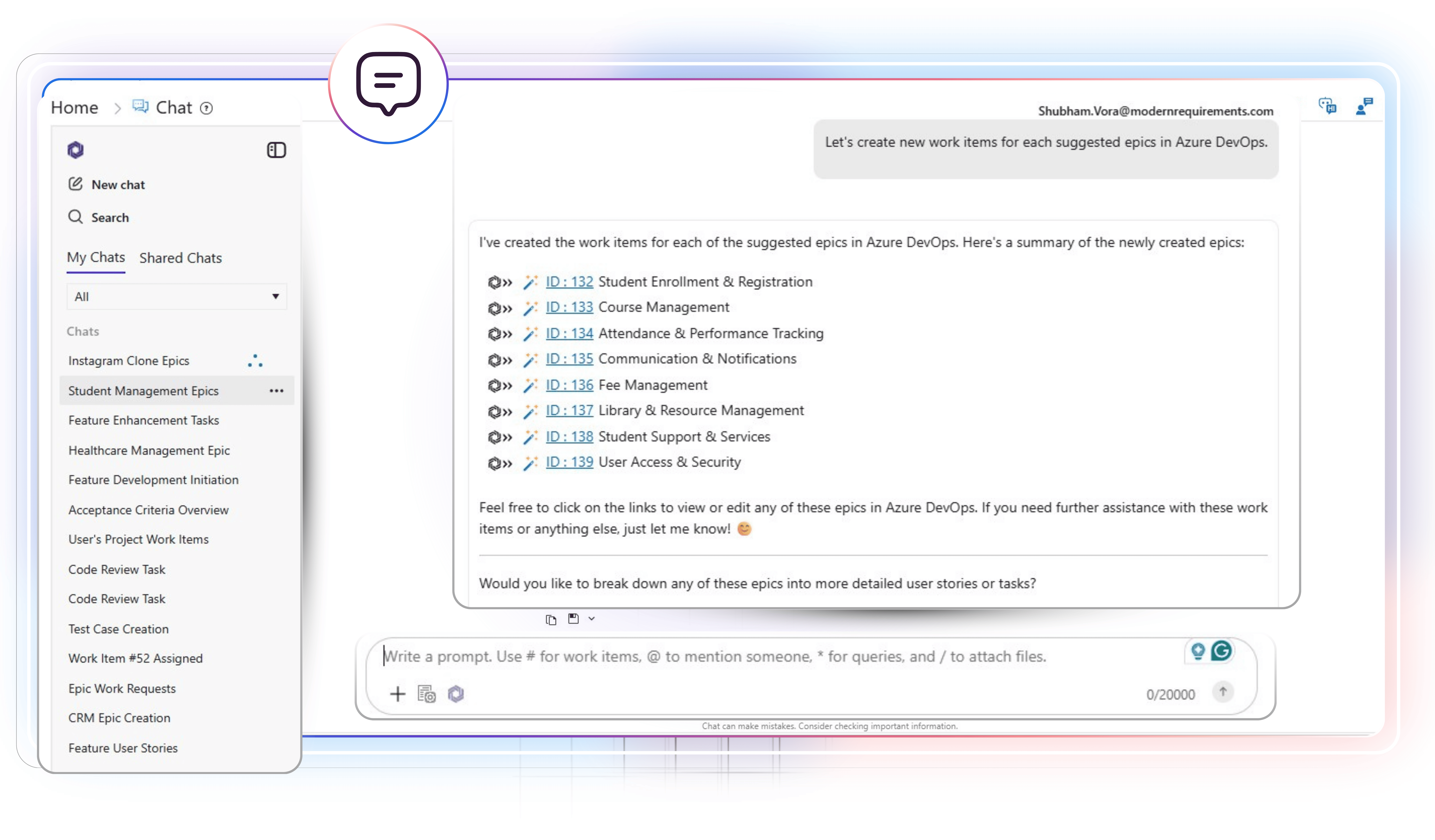
Interact with Azure work items using natural language
Type a prompt in plain English to list all required Azure work items. Then you may ask follow-up questions, create a workflow diagram based on multiple requirements, generate pseudocode or test scripts, or update work items using an AI.