The Best AI-Powered Requirements Management Assistant Built for BA Teams
Use AI to turn stakeholder inputs or meeting notes into traceable requirements within Azure DevOps. Copilot4DevOps allows drafting requirements documents and diagrams directly from ADO work items using AI, reducing manual effort.
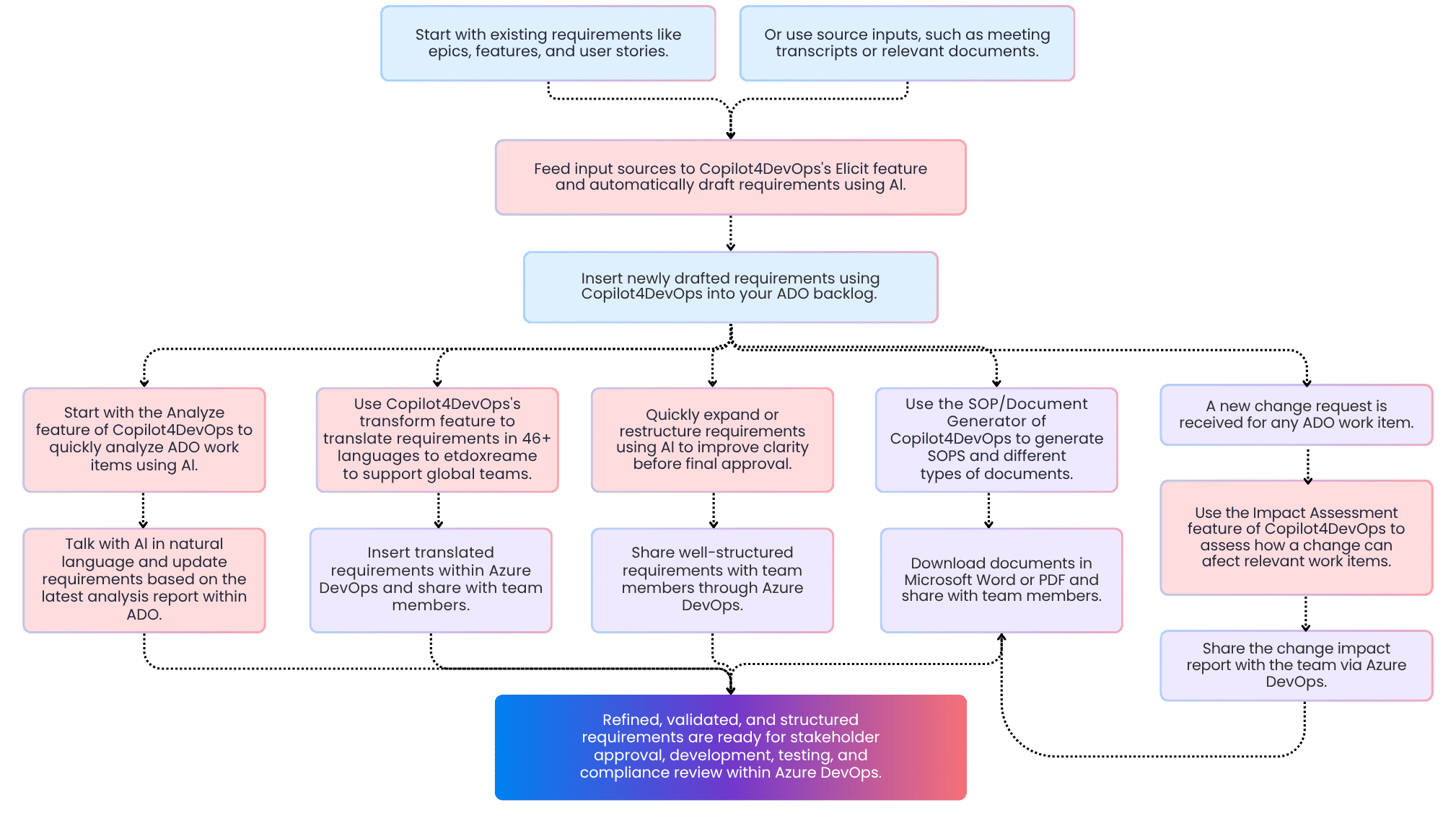
Provide legacy documents, emails, meeting transcripts, or any other sources as a reference to Copilot4DevOps, which analyzes text using AI and drafts ready-to-use work items directly within Azure DevOps without missing anything—saving time for BAs.
Refines and edits requirements
AI edit allows polishing requirements and improving grammar errors, updating length, or improving readability with a single click. BAs can also update requirements by providing natural language instructions to AI—reducing overall efforts required to edit requirements.
Converts inputs into user stories
Automatically convert raw requirements, customer feedback, change requests, or legacy documents into well-structured user stories, use cases, or Gherkin scenarios using AI—ensuring consistent backlog quality without repetitive drafting.
Identifies gaps and ambiguities
AI analyzes requirements against different frameworks, such as MoSCoW, the 6C’s method, the PABLO Criteria, the INVEST method, etc., and provides a requirements quality score and structured feedback—helping BAs to reduce requirements gaps before development starts.
Automates requirements document creation
AI generates structured SOPs, functional and non-functional requirements documents, and PRDs that contain structured sections, subsections, diagrams, and interactive UI. So, BAs don’t need to start drafting documents from scratch.
Evaluates change impact
Evaluate the change impact on linked work items and dependencies using AI and directly within Azure DevOps—Allowing BAs to quickly understand the impact before approvals.
Generates requirement diagrams
Provide ADO work items as context for AI and generate different types of diagrams, including flowcharts and sequence diagrams, directly within Azure DevOps—improving visualization without manual drawing.
Supports multilingual requirements
Translate requirements into 46+ languages using AI and share them with teams working across the globe through Azure DevOps—removing language barriers for BA teams.
Prepares structured meeting questions
Prepare structured questions and answers using AI before you jump into stakeholder meetings—helping BAs conduct more productive requirements elicitation sessions.
Azure DevOps + Copilot4DevOps in action for BA teams
Industries
Built for BA teams working in regulatory industries
Regulatory-driven requirement control
Copilot4DevOps uses AI to draft and structure requirements and documents based on relevant regulatory standards. This reduces interpretation errors and manual rewriting effort.
End-to-end trace visibility
Each drafted requirement stays within your ADO workspace and can be linked to existing ADO work items. This helps in keeping traceability intact.
Operates within existing permissions
Role-based access remains governed by Azure DevOps permissions. Copilot4DevOps respects organizational access controls and does not bypass approval boundaries.
No data used for model training
Regulated organizations require strict data handling. Copilot4DevOps does not use customer data to train public models, supporting internal data protection policies.
Use Cases
How Business Analysts Use Copilot4DevOps Daily
Drafting ISO 9001 epics
A senior BA working in the automotive industry can use Copilot4DevOps AI to draft epics and features to develop car components that align with the ISO 26262 standard.
Regulatory change breakdown
A BA working in regulatory industries can use AI to review a new circular and convert it into structured requirements and fix impacted work items directly within Azure DevOps.
Core banking risk analysis
A Banking BA reviews transaction processing requirements and uses AI to validate them against the 6C’s method and detect missing validation rules before regulatory release approval.
MoSCoW backlog prioritization
A Lead BA uses AI to analyze the backlog against the MoSCoW framework and prioritizes all critical requirements within Azure DevOps.
BRD to user story conversion
A Junior BA uploads the BRD document to Azure DevOps and extracts well-structured user stories with acceptance criteria that are ready for development using AI.
Impact review before changing requirements
An IT Business Analyst uses AI to evaluate the downstream impact of a change request in the payment processing feature of the system and prepares structured impact notes before presenting to the Change Advisory Board.
Requirements elaboration
A BA working in the healthcare industry can use AI to elaborate medical device development-related requirements for providing better context to development teams.
Multilingual requirement publication
A BA working in the aerospace industry translates flight control-related requirements into Spanish or another language using AI to share with regional development teams while maintaining structure.
Railway compliance documentation draft
A Railway BA prepares a structured requirements document for track monitoring systems and generates a compliance-ready draft directly from Azure DevOps work items.
Insurance claim workflow validation
A Lead BA in insurance analyzes claim approval requirements against the SWOT framework to identify strengths and weaknesses of systems using AI prior to the start of development.
Automotive feature decomposition
A Senior BA breaks down autonomous braking system epics into structured user stories and validates completeness using AI within Azure DevOps.
Hospital system change review
A Healthcare BA uses AI to evaluate requirement updates for patient admission workflows and generates an impact summary within Azure DevOps.
Government procurement assessment
A Public Sector BA reviews procurement system requirements and uses AI to detect incomplete compliance references prior to internal audit.
Requirement Rephrasing Support
A Senior BA working in the railway industry uses AI to rephrase complex requirements related to signaling into structured bullet points and shares them with development teams within Azure DevOps.
Aerospace architecture diagram generation
An Aerospace Systems BA generates requirement diagrams for avionics communication flows to validate integration logic before technical design approval.
Will this disrupt our existing Azure DevOps workflow?
Not at all. Business Analysts can continue working within Azure DevOps, and Copilot4DevOps enhances the current workflow and boosts the productivity of the team.
How does this reduce requirement rework?
Requirements drafted using Copilot4DevOps AI have 90% less ambiguity, missing logic, or unclear acceptance criteria. This reduces the overall rework required.
Can we control what gets updated in work items?
Yes, while using AI to edit requirements, you can clearly instruct AI on what to change and what to keep the same. This helps in updating a specific part of the requirements within Azure DevOps.
How does this help during audit reviews?
BAs can generate a quick summary of requirements using AI and quickly review them within ADO.
Can we enforce internal requirement standards?
Yes, Copilot4DevOps provides an option to enter custom instructions during requirements or document generation. This helps in maintaining consistency across requirements and document structure.
Does this replace the role of a Business Analyst?
It doesn’t replace BAs entirely, but it improves their productivity. You can consider Copilot4DevOps as an AI requirements management partner for a BA that performs repetitive tasks. So, BAs can focus on strategic work.
Can we use it for large enterprise backlogs?
Yes. Copilot4DevOps can be used within any startup or enterprise-level organization. It reduces work for both.
Is it suitable for global BA teams?
Yes. It supports multilingual transformation and structured outputs for distributed teams.
Does it store my data anywhere?
No. Copilot4DevOps is SOC II certified, which means it doesn’t store clients’ data or use it for model training.
How steep is the learning curve?
Business Analysts work inside familiar Azure DevOps screens, so adoption typically requires minimal training.
Why should a regulated BA team consider this now?
Because manual drafting and review create risk and rework. Structured assistance improves control without increasing process complexity.