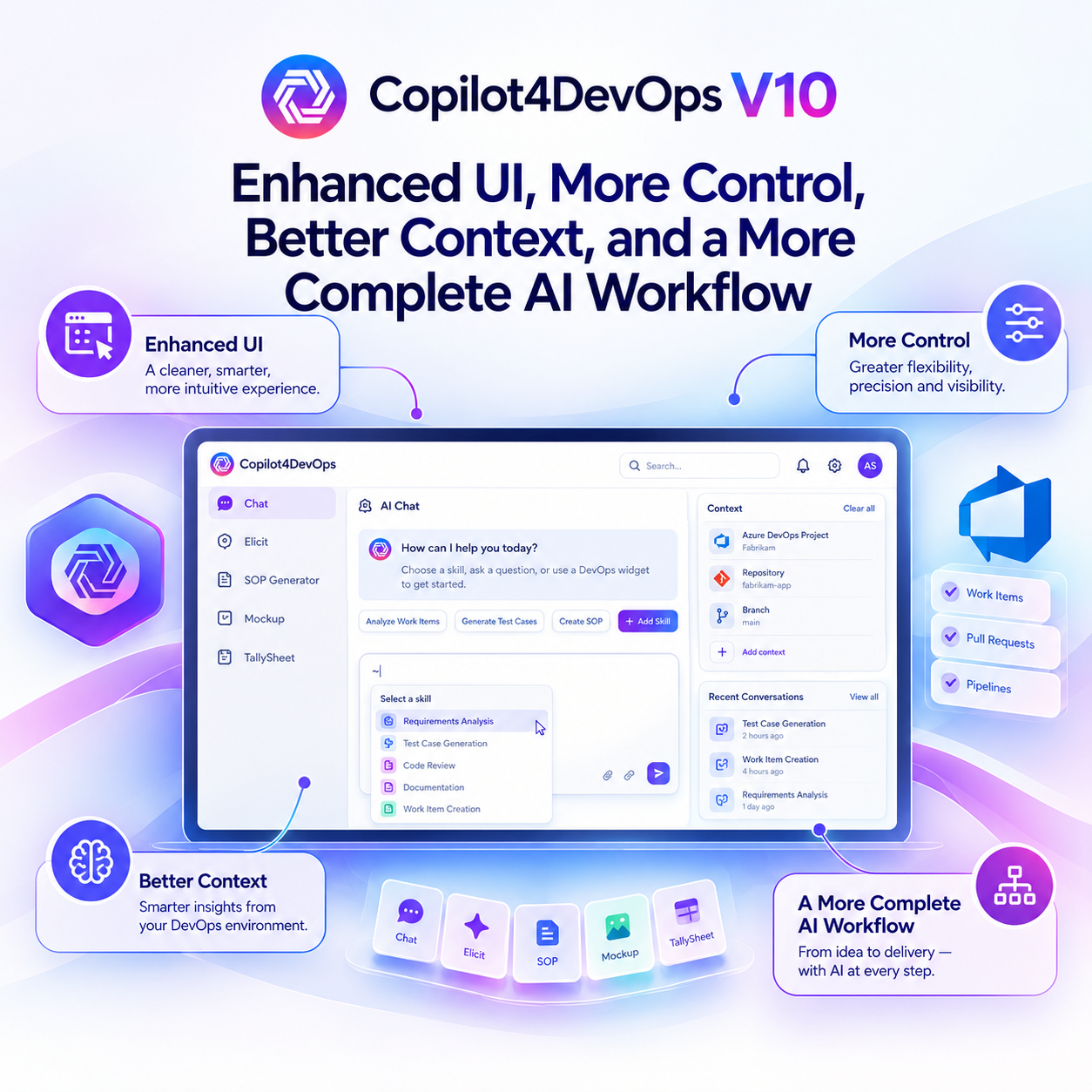
Copilot4DevOps V10: Enhanced UI, More Control, Better Context, and a More Complete AI Workflow

In August 2026, we introduced Copilot4DevOps V9 with agent-based execution to handle complex requests through specialized agents instead of pushing every task through a single prompt. That made Copilot4DevOps stronger at handling multi-step complex tasks.

Now, in September 2026, we are releasing Copilot4DevOps V10 that builds on the foundation of V9 and introduces more foundational changes. 

In this release, our focus is to give users better UI workflows, improving the quality of generated output and making the overall experience easier to manage across different modules like AI Chat, TallySheet, SOP Document Generator, and Mockup.

What's New in Copilot4DevOps V10

What's New in Copilot4DevOps V10

A module-by-module look at the key improvements in this release and what they mean for your team.

Module Key improvements in V10 Benefit to users
Copilot4DevOps Chat Key improvements in V10
  • Reference specific skills directly within Chat.
  • Ask clarifying questions before writing output.
  • Work with interactive DevOps widgets inside Chat.
  • Organize conversations using sorting and filtering options.
Benefit to users
  • Get more control over AI-assisted tasks.
  • Provide better context before receiving responses.
  • Work with DevOps data directly within Chat.
  • Find and manage conversations more easily.
Elicit Key improvements in V10
  • Ask clarifying questions before generating work items.
  • Generate complete multi-level hierarchies in one run.
  • Score generated titles by requirement relevance.
  • Review and edit candidates in full-screen mode.
Benefit to users
  • Improve requirement coverage before generating work items.
  • Reduce manual hierarchy creation and linking.
  • Prioritize the most relevant generated work items.
  • Review and refine candidates more efficiently.
SOP / Document Generator Key improvements in V10
  • Save documents automatically with persistent thread history.
  • Start faster using reusable document prompt templates.
  • Ask clarifying questions before writing output.
  • Edit documents using AI chat and inline controls.
Benefit to users
  • Resume document work without losing previous context.
  • Reduce effort when creating recurring document types.
  • Improve accuracy by resolving gaps before generation.
  • Refine content without regenerating the document.
Mockup Key improvements in V10
  • Ask clarifying questions before generating mockups.
  • Control theme, fidelity, and target platform directly.
  • Create variants without replacing the original mockup.
  • Edit individual components directly through Chat.
Benefit to users
  • Improve mockup accuracy before generation begins.
  • Get direct control over visual output.
  • Compare design directions while preserving originals.
  • Make targeted changes without rebuilding everything.
Overall UI Key improvements in V10
  • Refresh the interface across Copilot4DevOps modules.
Benefit to users
  • Get a more consistent experience across modules.

Overall UI Enhancement

We have enhanced the overall UI and user interface of Copilot4DevOps throughout all of its modules. Now, it offers a cleaner, more polished, and more intuitive experience for users navigating and working across all modules.

Copilot4DevOps Chat: More Control Over How AI Works

We have introduced multiple changes in AI chat.

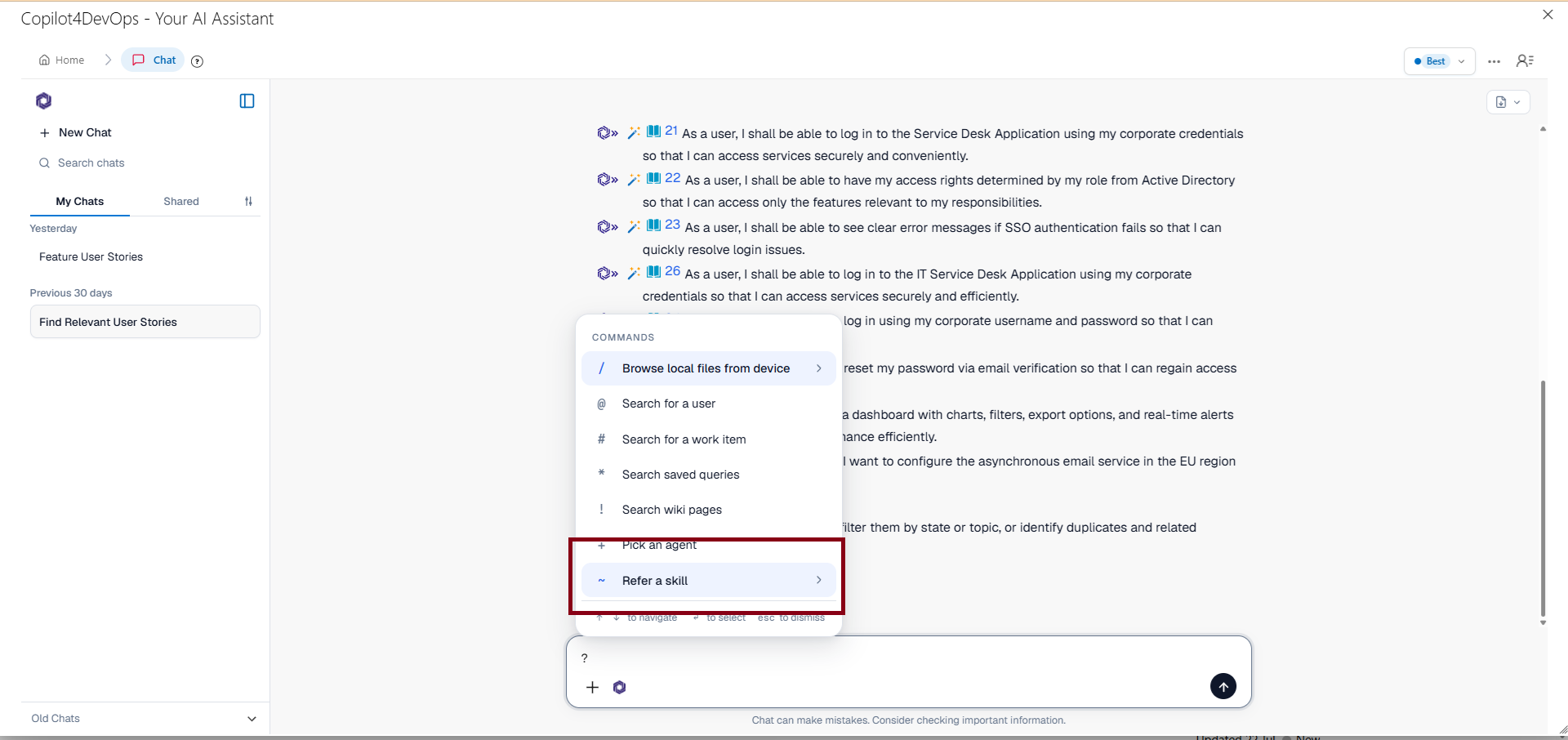
In V9, users were able to select agents for particular types of work within AI chat. But now in V10, users can also add skill select skills and add them as a reference for any task execution through chat. Users can select a skill from the command menu or use the ~ shortcut while writing a request. When an agent is already selected, the selected agent and skill work together. Without an agent, the default Worker agent handles the request. This offers more control to users for handling complex tasks.
Furthermore, Chat responses can now include interactive widgets, rather than relying only on text. These widgets cover areas such as builds, code review, incidents, work tracking, observability, infrastructure, security, Azure DevOps work items, test plans, sprint metrics, repositories, pull requests, and code search. Write operations such as creating branches or completing pull requests include confirmation for higher-risk actions.

The benefit is practical: users can inspect and act on DevOps information from the conversation instead of switching between multiple screens.

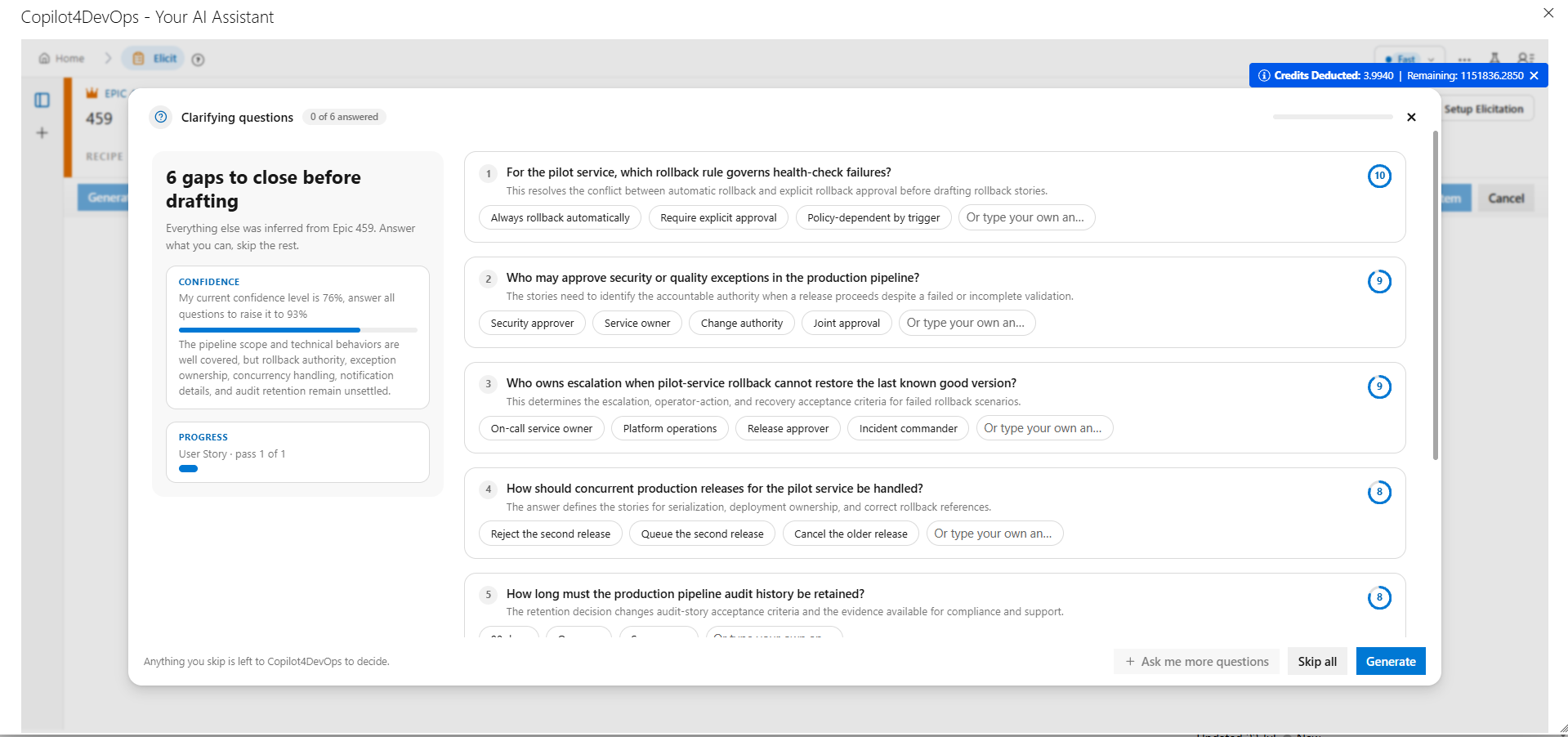
Previously, outputs were generated based on the prompt and work item or document references. V10 also adds clarifying question cards in the chat when you start with any request. It asks a few questions with multiple-choice options. You can select relevant options and write correct answers, and the tool also uses that as references while generating responses.

Another basic UI update is that we have added sorting, filtering, grouping, and bulk selection for threads. This helps in organizing large conversation histories more easily.

Elicit: From Work Item Generation to Controlled Backlog Creation

We have made three major improvements in the Elicit module of Copilot4DevOps in this release.

Similar to the AI chat, we have now added a clarifying questions card in this module. So, before any title generation starts, it shows a few multiple-choice questions that you can answer, and the AI uses them as additional context while generating the work item. This helps in generating a better work item and resolving important gaps before it starts creating the backlog.
The best enhancement? V10 introduces a work item hierarchy generation feature. Instead of creating epics from given documents, then dividing epics into features, then features into user stories and tasks, users can generate a multi-level hierarchy, such as epic -> feature -> user stories -> tasks from one source item or document. Here, users can choose between auto and menu generation modes, where “Auto mode” means it automatically generates all work items in a single go. When you select “Manual”, it stops at every level, and once you approve it moves forward. This human-in-the-loop approach is very important for teams working in the regulatory industries. After that, all work items in the same hierarchy can be added into Azure DevOps with a single click.
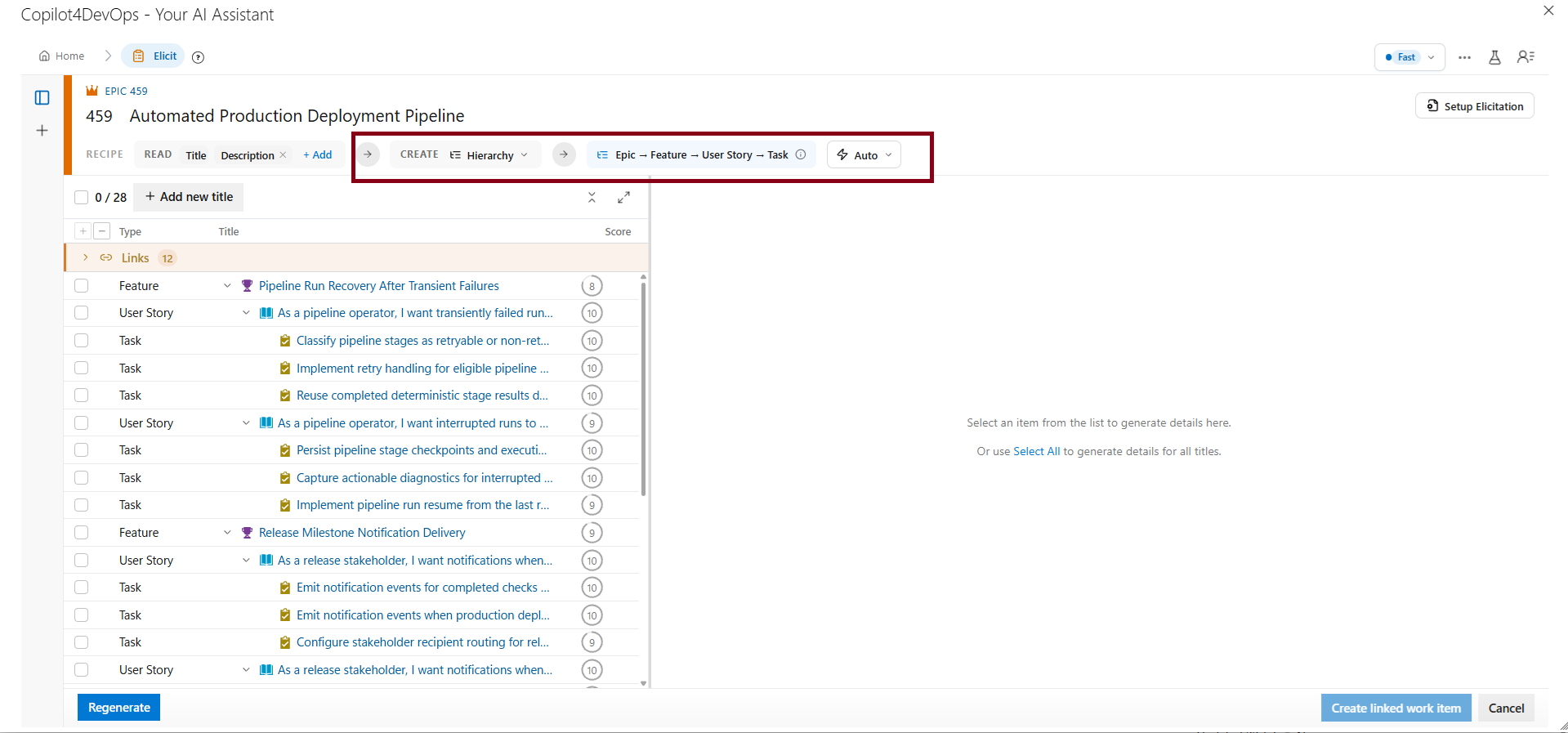
 

Elicit now retains persistent thread history, so previous generation runs can be reopened with their candidates and context intact. Title generation is also now based on requirement coverage, rather than a fixed number of suggestions. AI-generated titles receive relevancy scores from 0 to 10, making it easier to prioritize useful candidates.

In practice, Elicit becomes less of a one-click generator and more of a controlled backlog creation workspace.

SOP/Document Generator: From First Draft to Managed Document

V10 now supports the document lifecycle from creation through review and revision. Generated documents are saved as persistent threads, keeping prompts, answers, conversations, document content, and version history together.

Prompt templates for SRS, SOP, Test Plan, Release Notes, User Guide, and other formats provide a ready starting structure, while users can still adjust the template before generation.

The generator can also ask clarifying questions before writing output when important context is missing. Answers are saved and reused during regeneration, reducing repeated input. This helps in generating documents with better context.
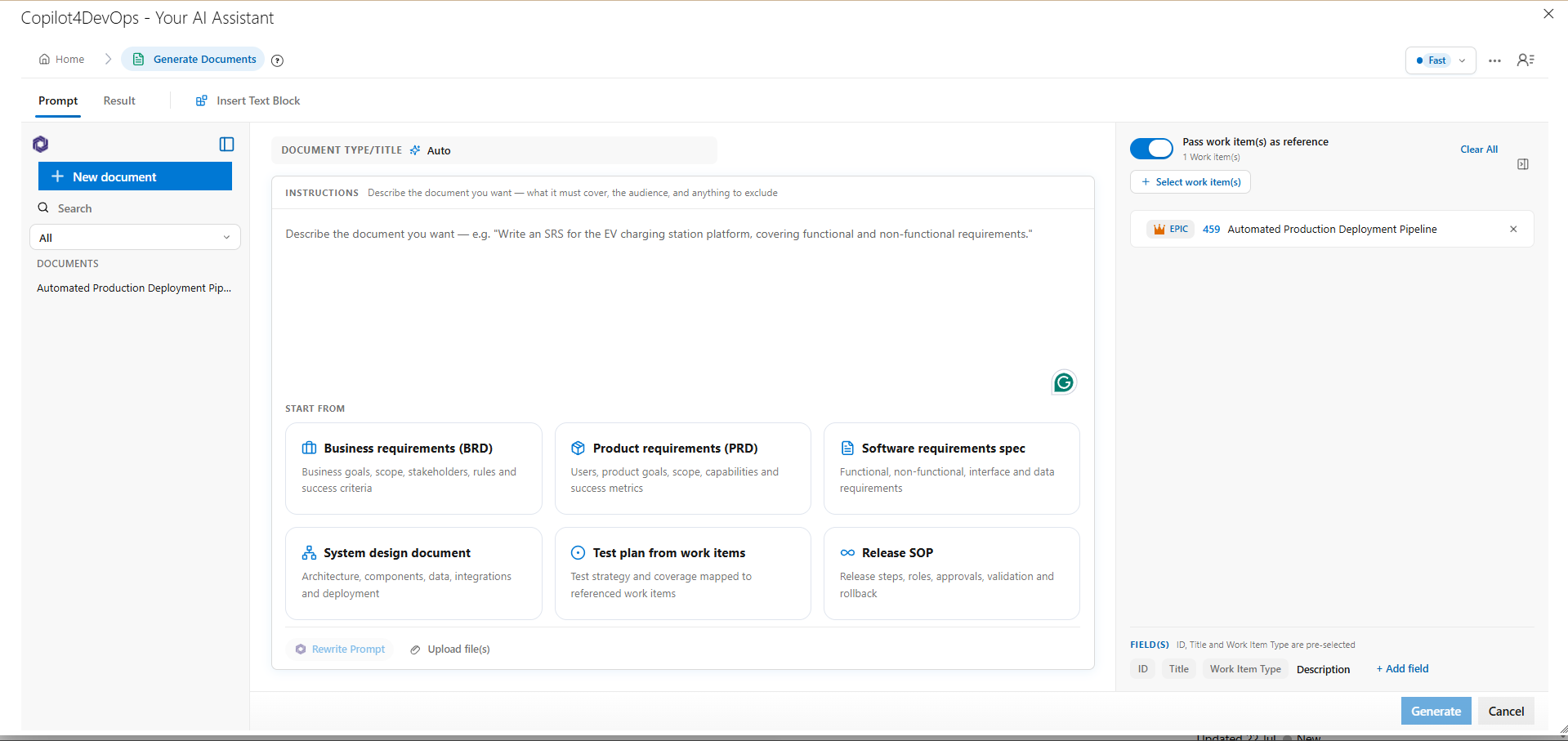
For revisions, users can use AI Chat, inline editing, section-level actions, and Edit with AI to make targeted changes without regenerating the entire document. AI changes appear as marked differences for review before they are applied, as is necessary in regulatory industries.
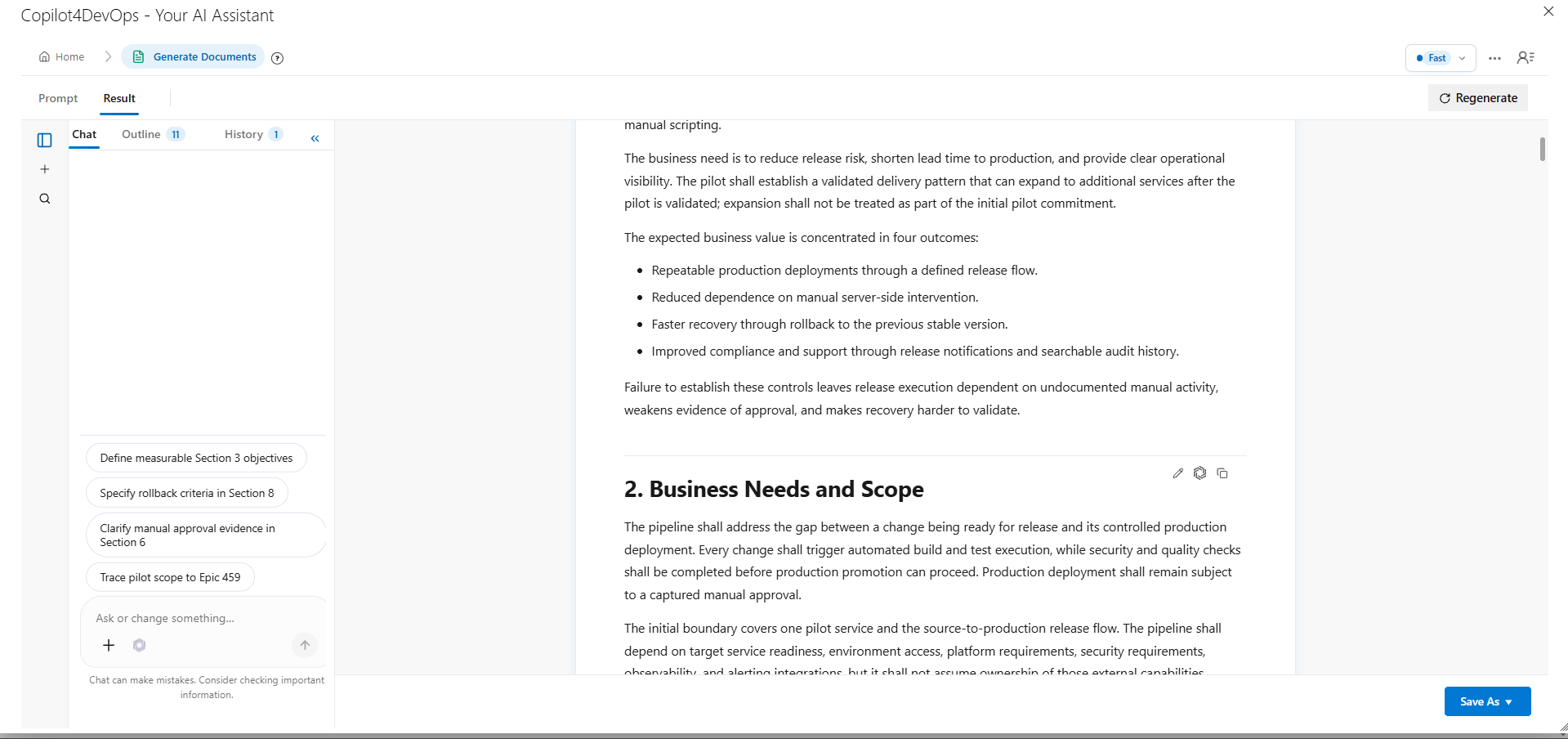
Outline and version history make longer documents easier to review and maintain. Users can compare versions, restore earlier versions, and retain the complete revision history.

Documents can then be exported as Word, PDF, or Markdown, published to an Azure DevOps Wiki, or attached directly to work items.

Mockup: More Control From Idea to Handoff

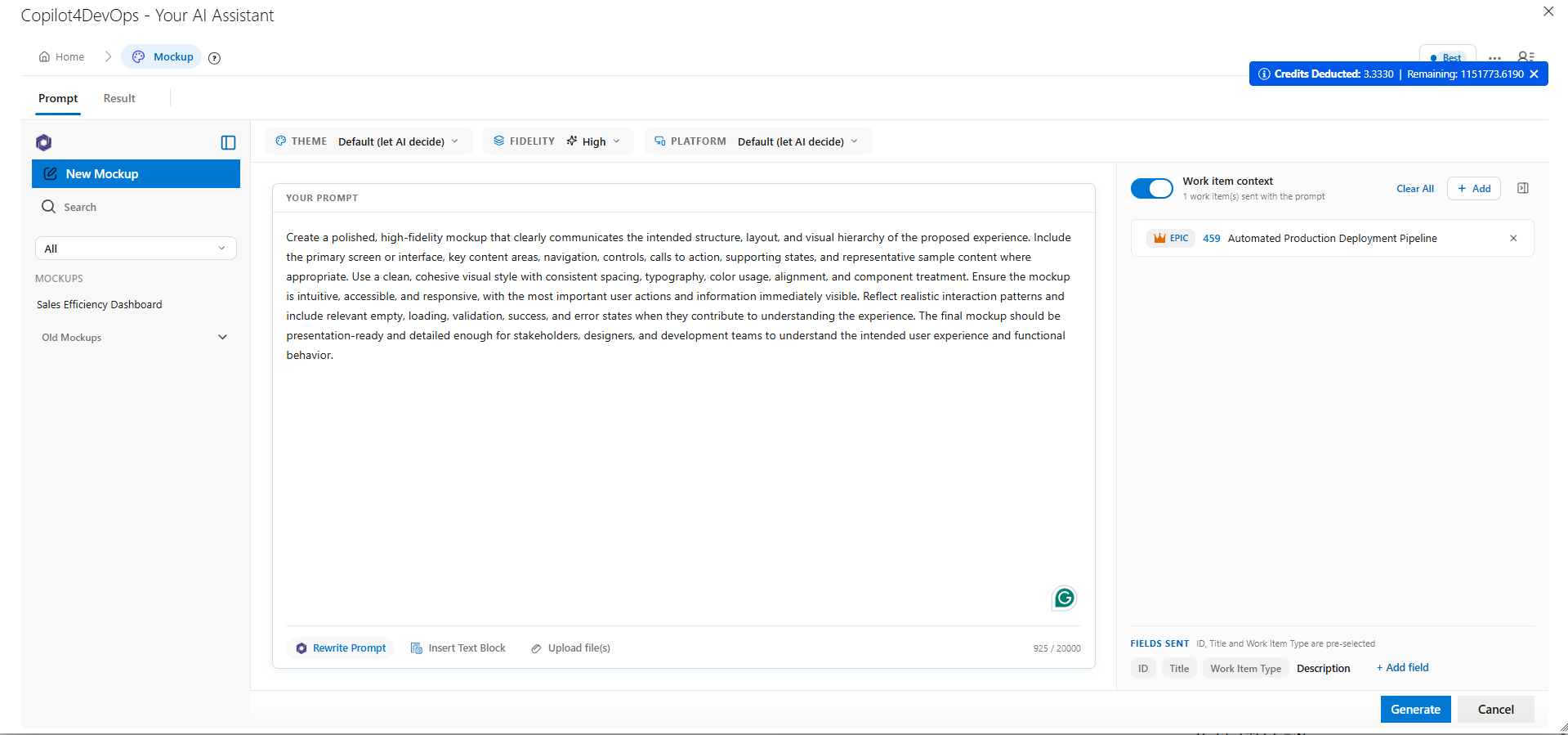
V10 gives users greater control over how mockups are created and refined. Users can answer clarifying questions before generation and set Theme, Fidelity, and Platform controls directly, giving the AI clearer direction from the start. It makes the overall mockup generation flow easier and gives better output quality.
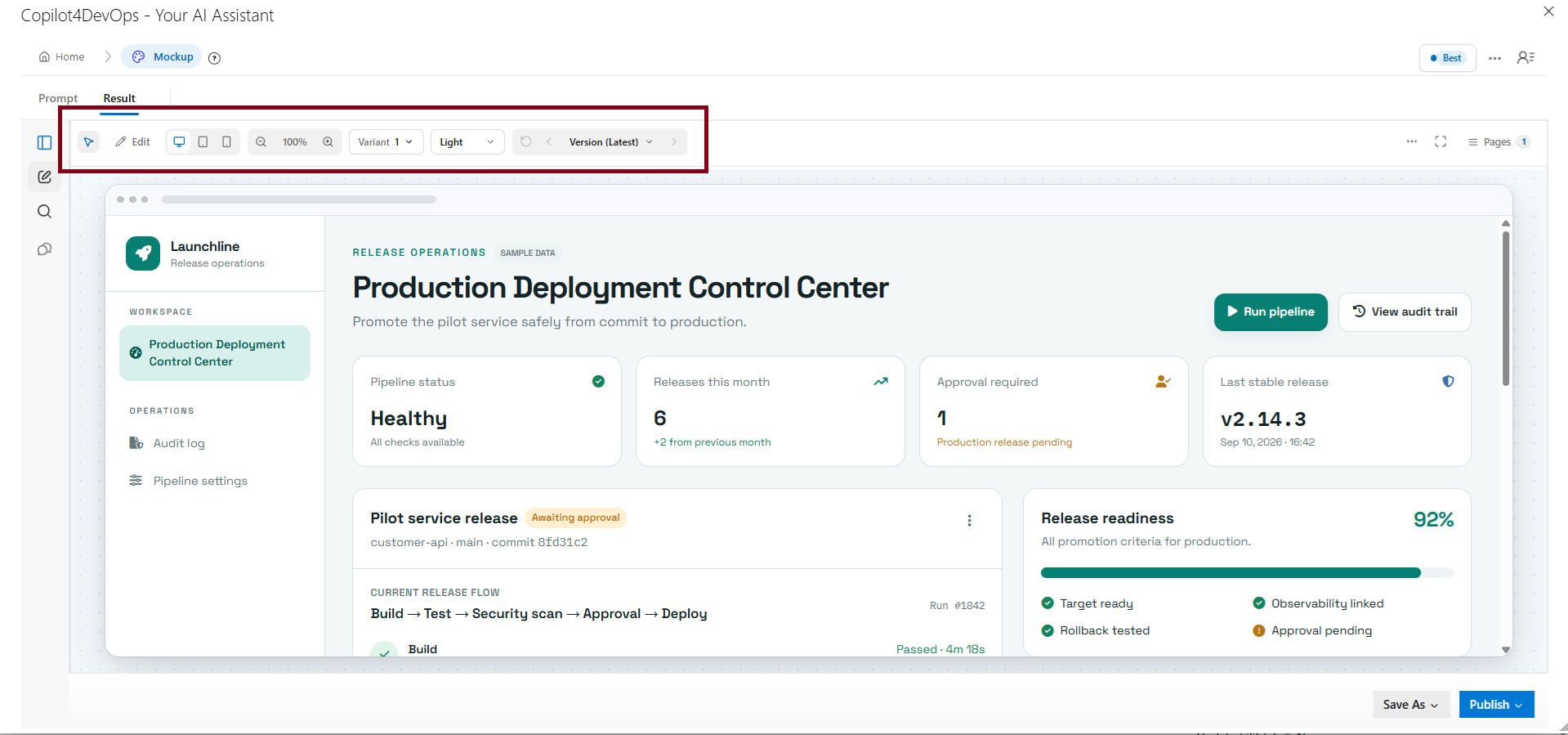
Users can also create variants without replacing the original mockup, making it easier to compare different design options. The new viewport switcher lets users review the same mockup across Desktop, Tablet, and Mobile without generating separate versions. Expanded Save As options also support HTML, JSON design tokens, CSS variables, Tailwind themes, files, and images, making the output easier to pass into development.
What V10 Means for Copilot4DevOps Users

Copilot4DevOps V10 gives users greater control over how AI-generated work is created, reviewed, and refined. Across Chat, Elicit, SOP/Document Generator, and Mockup, users can provide better context before generation, select the skills they need, review AI output, make targeted changes, and retain the history behind their work.

These improvements make AI output easier to manage within real DevOps workflows. Instead of stopping at generation, users can review the result, make changes where needed, track revisions, and move the final output into Azure DevOps or other required formats.

V10 is focused on giving users more control over the complete AI-assisted workflow, from the first request to the final output.

We regularly look into customers’ feedback, and if you have any, you can send us an email.

Try it Yourself

Ready to transform your DevOps with Copilot4DevOps?

Get a free trial today.
Table of Contents

Table of Contents

In August 2026, we introduced Copilot4DevOps V9 with agent-based execution to handle complex requests through specialized agents instead of pushing every task through a single prompt. That made Copilot4DevOps stronger at handling multi-step complex tasks.

Now, in September 2026, we are releasing Copilot4DevOps V10 that builds on the foundation of V9 and introduces more foundational changes. 

In this release, our focus is to give users better UI workflows, improving the quality of generated output and making the overall experience easier to manage across different modules like AI Chat, TallySheet, SOP Document Generator, and Mockup.

What's New in Copilot4DevOps V10

What's New in Copilot4DevOps V10

A module-by-module look at the key improvements in this release and what they mean for your team.

Module Key improvements in V10 Benefit to users
Copilot4DevOps Chat Key improvements in V10
  • Reference specific skills directly within Chat.
  • Ask clarifying questions before writing output.
  • Work with interactive DevOps widgets inside Chat.
  • Organize conversations using sorting and filtering options.
Benefit to users
  • Get more control over AI-assisted tasks.
  • Provide better context before receiving responses.
  • Work with DevOps data directly within Chat.
  • Find and manage conversations more easily.
Elicit Key improvements in V10
  • Ask clarifying questions before generating work items.
  • Generate complete multi-level hierarchies in one run.
  • Score generated titles by requirement relevance.
  • Review and edit candidates in full-screen mode.
Benefit to users
  • Improve requirement coverage before generating work items.
  • Reduce manual hierarchy creation and linking.
  • Prioritize the most relevant generated work items.
  • Review and refine candidates more efficiently.
SOP / Document Generator Key improvements in V10
  • Save documents automatically with persistent thread history.
  • Start faster using reusable document prompt templates.
  • Ask clarifying questions before writing output.
  • Edit documents using AI chat and inline controls.
Benefit to users
  • Resume document work without losing previous context.
  • Reduce effort when creating recurring document types.
  • Improve accuracy by resolving gaps before generation.
  • Refine content without regenerating the document.
Mockup Key improvements in V10
  • Ask clarifying questions before generating mockups.
  • Control theme, fidelity, and target platform directly.
  • Create variants without replacing the original mockup.
  • Edit individual components directly through Chat.
Benefit to users
  • Improve mockup accuracy before generation begins.
  • Get direct control over visual output.
  • Compare design directions while preserving originals.
  • Make targeted changes without rebuilding everything.
Overall UI Key improvements in V10
  • Refresh the interface across Copilot4DevOps modules.
Benefit to users
  • Get a more consistent experience across modules.

Overall UI Enhancement

We have enhanced the overall UI and user interface of Copilot4DevOps throughout all of its modules. Now, it offers a cleaner, more polished, and more intuitive experience for users navigating and working across all modules.

Copilot4DevOps Chat: More Control Over How AI Works

We have introduced multiple changes in AI chat.

In V9, users were able to select agents for particular types of work within AI chat. But now in V10, users can also add skill select skills and add them as a reference for any task execution through chat. Users can select a skill from the command menu or use the ~ shortcut while writing a request. When an agent is already selected, the selected agent and skill work together. Without an agent, the default Worker agent handles the request. This offers more control to users for handling complex tasks.

Furthermore, Chat responses can now include interactive widgets, rather than relying only on text. These widgets cover areas such as builds, code review, incidents, work tracking, observability, infrastructure, security, Azure DevOps work items, test plans, sprint metrics, repositories, pull requests, and code search. Write operations such as creating branches or completing pull requests include confirmation for higher-risk actions.

The benefit is practical: users can inspect and act on DevOps information from the conversation instead of switching between multiple screens.

Previously, outputs were generated based on the prompt and work item or document references. V10 also adds clarifying question cards in the chat when you start with any request. It asks a few questions with multiple-choice options. You can select relevant options and write correct answers, and the tool also uses that as references while generating responses.

Another basic UI update is that we have added sorting, filtering, grouping, and bulk selection for threads. This helps in organizing large conversation histories more easily.

Elicit: From Work Item Generation to Controlled Backlog Creation

We have made three major improvements in the Elicit module of Copilot4DevOps in this release.

Similar to the AI chat, we have now added a clarifying questions card in this module. So, before any title generation starts, it shows a few multiple-choice questions that you can answer, and the AI uses them as additional context while generating the work item. This helps in generating a better work item and resolving important gaps before it starts creating the backlog.

The best enhancement? V10 introduces a work item hierarchy generation feature. Instead of creating epics from given documents, then dividing epics into features, then features into user stories and tasks, users can generate a multi-level hierarchy, such as epic -> feature -> user stories -> tasks from one source item or document. Here, users can choose between auto and menu generation modes, where “Auto mode” means it automatically generates all work items in a single go. When you select “Manual”, it stops at every level, and once you approve it moves forward. This human-in-the-loop approach is very important for teams working in the regulatory industries. After that, all work items in the same hierarchy can be added into Azure DevOps with a single click.


Elicit now retains persistent thread history, so previous generation runs can be reopened with their candidates and context intact. Title generation is also now based on requirement coverage, rather than a fixed number of suggestions. AI-generated titles receive relevancy scores from 0 to 10, making it easier to prioritize useful candidates.

In practice, Elicit becomes less of a one-click generator and more of a controlled backlog creation workspace.

SOP/Document Generator: From First Draft to Managed Document

V10 now supports the document lifecycle from creation through review and revision. Generated documents are saved as persistent threads, keeping prompts, answers, conversations, document content, and version history together.

Prompt templates for SRS, SOP, Test Plan, Release Notes, User Guide, and other formats provide a ready starting structure, while users can still adjust the template before generation.

The generator can also ask clarifying questions before writing output when important context is missing. Answers are saved and reused during regeneration, reducing repeated input. This helps in generating documents with better context.

For revisions, users can use AI Chat, inline editing, section-level actions, and Edit with AI to make targeted changes without regenerating the entire document. AI changes appear as marked differences for review before they are applied, as is necessary in regulatory industries.

Outline and version history make longer documents easier to review and maintain. Users can compare versions, restore earlier versions, and retain the complete revision history.

Documents can then be exported as Word, PDF, or Markdown, published to an Azure DevOps Wiki, or attached directly to work items.

Mockup: More Control From Idea to Handoff

V10 gives users greater control over how mockups are created and refined. Users can answer clarifying questions before generation and set Theme, Fidelity, and Platform controls directly, giving the AI clearer direction from the start. It makes the overall mockup generation flow easier and gives better output quality.

Users can also create variants without replacing the original mockup, making it easier to compare different design options. The new viewport switcher lets users review the same mockup across Desktop, Tablet, and Mobile without generating separate versions. Expanded Save As options also support HTML, JSON design tokens, CSS variables, Tailwind themes, files, and images, making the output easier to pass into development.

What V10 Means for Copilot4DevOps Users

Copilot4DevOps V10 gives users greater control over how AI-generated work is created, reviewed, and refined. Across Chat, Elicit, SOP/Document Generator, and Mockup, users can provide better context before generation, select the skills they need, review AI output, make targeted changes, and retain the history behind their work.

These improvements make AI output easier to manage within real DevOps workflows. Instead of stopping at generation, users can review the result, make changes where needed, track revisions, and move the final output into Azure DevOps or other required formats.

V10 is focused on giving users more control over the complete AI-assisted workflow, from the first request to the final output.

We regularly look into customers’ feedback, and if you have any, you can send us an email.

Try it Yourself

Ready to transform your DevOps with Copilot4DevOps?

Get a free trial today.
Demo Free Trial