AI is becoming a part of everyday work inside Azure DevOps. Business analysts review requirements directly inside Azure DevOps, QA teams validate coverage between user stories and test cases, and project managers assess release readiness and generate reports using AI, yet output quality still depends on who runs the check.
That’s not a skill problem. Suppose 5 analysts reviewing the same work item with their own prompts can reach different conclusions, and an organization might report AI output varying in tone, depth, and format across departments running the same task.
This happens due to an inconsistent prompt used across departments. A reusable prompt library removes this friction. It allows users to save the prompts and reuse them whenever required instead of starting from scratch, so that each team member uses the same prompts and gets consistent AI output.
In this blog, we have covered why it is important to use consistent prompts, what a usable AI prompt library is, and how to build one into Azure DevOps.
Why One-Off AI Prompts Break Down At Team Scale
- Good prompts stay with individuals: According to PromptAnthology, a single employee develops roughly 15 reusable prompts in 6 months. Each of these prompts takes 30 minutes of trial and error to develop and stays within their personal account. When they leave, replacement starts from zero, and they need to repeat the same experiment.
- Every reviewer gets different results: When two people working on the same process (for example, reviewing work items, analyzing coverage gaps, etc.) use different prompts, they get different outputs, and from them, one might get approved, and the other gets rejected.
- Repeated rewriting wastes time: Rewriting the same prompts before every sprint wastes the time of teams and invites drifts in the output.
- New team members struggle to catch up: Without a shared prompt library, new team members must learn through trial and error instead of following review methods that have already been tested by the team.
- No version anyone can point to: Multiple team members might share the same prompt via documents or emails, everyone changes the prompt according to needs, and no one can tell which one is correct or current.
- Old prompts outlive old standards: For example, acceptance criteria templates change, and compliance gets added, but prompts written months earlier still check work against old rules.
- Untracked prompts never improve: A prompt without any name, owner, or history never gets tracked and refined. Instead, it is just retyped worse with each rewrite.
What Is A Reusable AI Prompt Library?
A reusable AI prompt library is a set of saved dynamic prompt templates inside Azure DevOps that is shared across every team member. They can reuse each of these prompts every time they need to perform a particular action on an ADO work item, whether it’s analyzing them, preparing sprint reports, drafting a test coverage report, etc., and get consistent output, no matter who is using the prompt.
Prompts saved in the library are named so that any user can identify them instantly. As process standards change, the template is updated once instead of leaving every team member to maintain separate copies. The result is a single source of truth that supports repeatable and consistent AI checks inside Azure DevOps and across the entire team.
How To Build A Dynamic Prompt Library In Copilot4DevOps
Copilot4DevOps, an AI assistant for requirement management within Azure DevOps, allows teams to create prompts, save them inside Azure DevOps, and execute them repeatedly using AI without writing them from scratch. Here is how it works:
Step 1: Open the “Dynamic prompt” module in Copilot4DevOps.
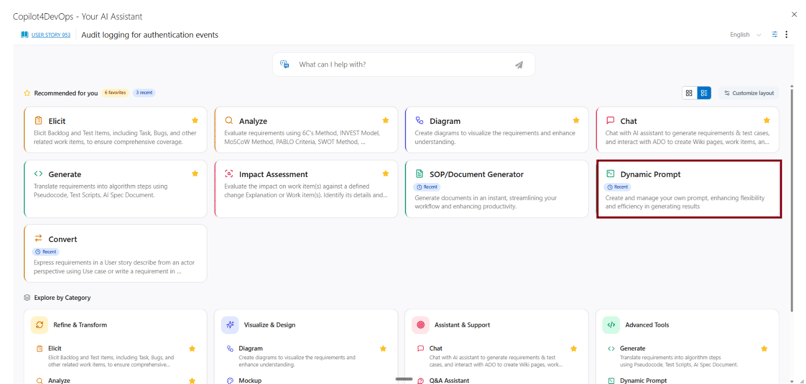
Step 2: Write a prompt to perform any action on selected ADO work items.
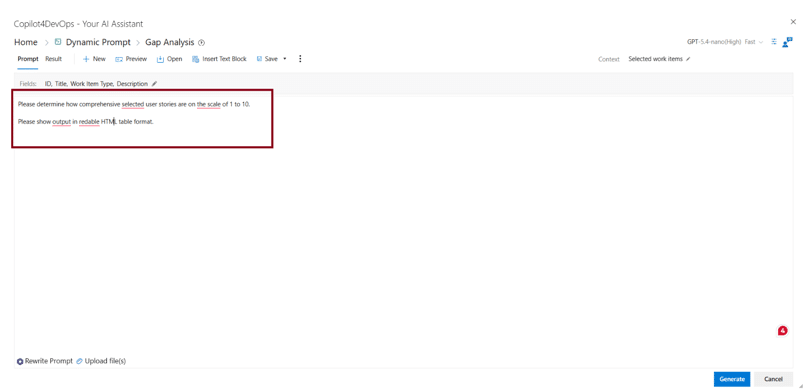
Step 2.1: If required, click on the “Rewrite Prompt” feature at the bottom left corner and optimize the prompt before saving. AI will rewrite your instructions in a clear way, and you will get better output.
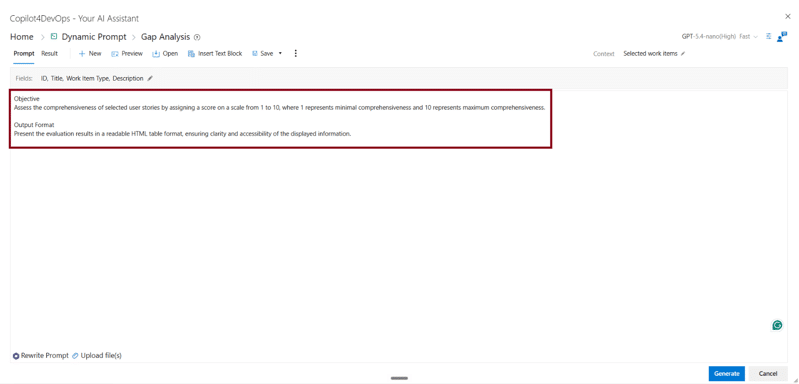
Step 3: Now, our prompt is ready to save. So, click on the “Save” button if you have updated an existing prompt and want to save it, or add a totally new prompt into the library. You can click on “Save as” if you want to save the updated prompt as a new one.
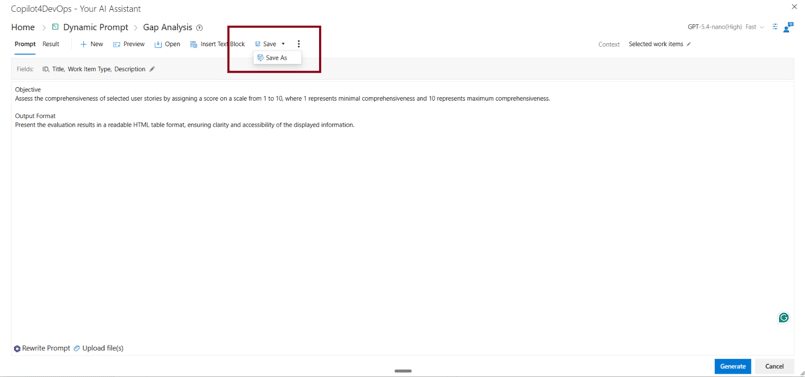
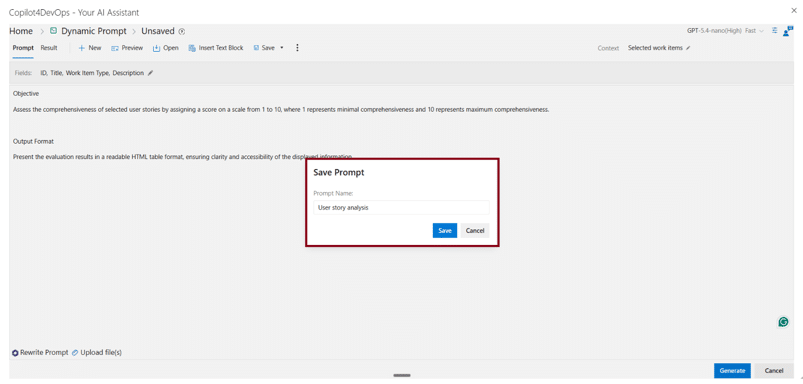
Step 3.1: Enter the name for the prompt and hit “Save”.
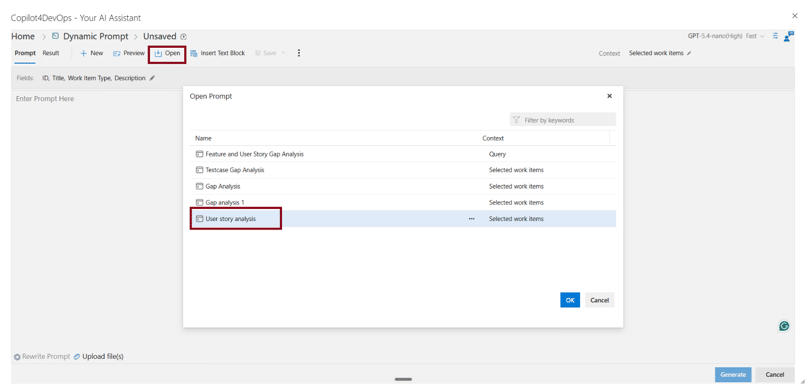
Step 4: Now, if any team member wants to reuse the prompt, they can click on “Open”. Here, they can see all saved prompt templates for requirements and filter them by keyword. To use a particular saved prompt, select it and click “OK”. The prompt will be imported into the prompt area.
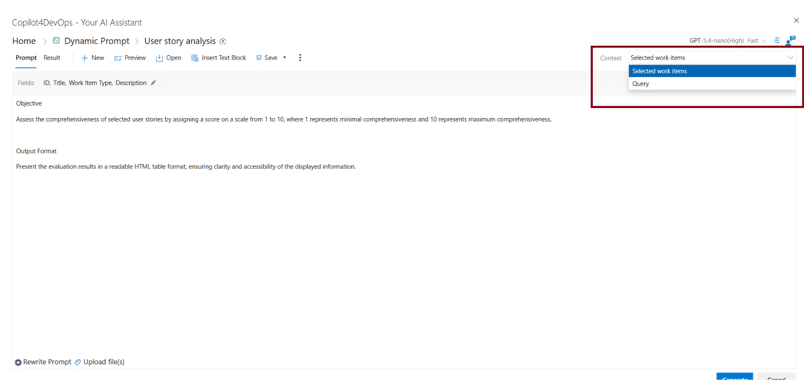
Step 5: Before executing the prompt, teams need to provide an ADO work item as context on which they want to execute the prompt. So, teams can provide a single selected work item or multiple work items using an ADO query as context.
Step 6: Then, click “Generate” at the bottom. AI will instantly execute the prompt and provide the output.
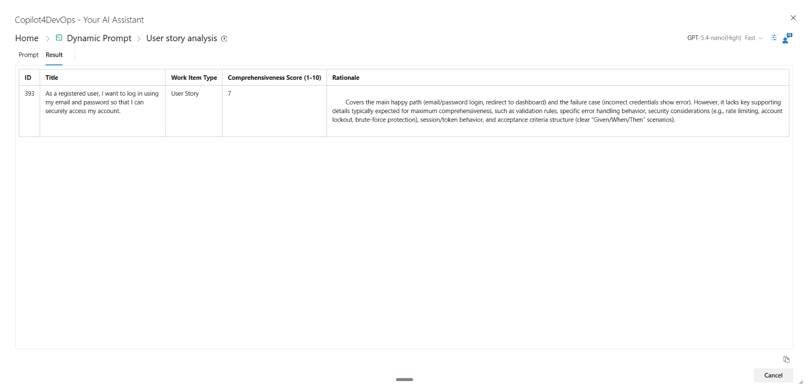
Similarly, different team members can use the Dynamic Prompt module of Copilot4DevOps to execute the same prompt on different ADO work items and get the output in a consistent tone and format.
What Changes When Teams Start Adopting Prompt Libraries Offered By Tools Like Copilot4DevOps
- Knowledge becomes a team asset: All effective prompts are stored in a shared location, from where everyone can access, improve, and maintain them instead of keeping prompts in personal chats, notes, or Google Drives.
- New team members become productive sooner: Instead of creating all prompts from scratch or collecting them from colleagues, they can use already established templates that reflect the team’s process standards and expectations without wasting any time.
- Managers gain a consistent review process: Team leads can introduce standard AI-assisted checks across projects without depending on each person’s preferred prompting style.
- Template improvements benefit everyone: When any single team member refines the particular prompt, everyone can start using the latest version of the prompt and get AI output based on the latest standards.
Frequently Asked Questions
Yes. Teams can update prompt templates when business rules, compliance requirements, or internal review standards change and save them so that everyone can access the latest version.
Now there is no limit on how many prompt templates a team can save. However, it uses storage inside your Azure Dev Workspace.
For that, you can use the Dynamic Prompt module of Copilot4DevOps, which allows you to save the prompt, reuse it, and execute those prompts directly within Azure DevOps.
Try it Yourself
Ready to transform your DevOps with Copilot4DevOps?
Get a free trial today.