Most DevOps teams today rely on Azure DevOps to manage requirements, testing, and deployments under one roof. Among its many built-in tools, Azure Pipelines stands out as the go-to option for automating code builds, testing, and deployments.
Of course, Azure Pipelines helps teams release updates more often while reducing manual effort, but AI is taking it further and changing the overall game. Instead of spending time writing YAML files, tracing failed runs, or fixing repeated pipeline issues, teams can use AI assistants like Copilot4DevOps that work within Azure DevOps and automate such tasks.
In this blog, we will first explain what Azure Pipelines is and how teams can use Copilot4DevOps with it to boost productivity.
A Quick Overview Of Azure Pipelines
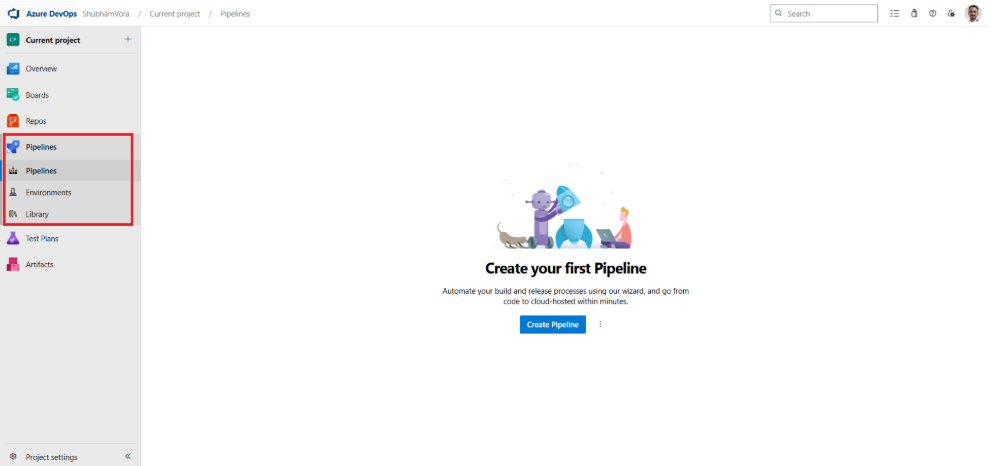
Azure Pipelines is a cloud-based solution developed by Microsoft, which allows automating CI/CD services within Azure DevOps. Instead of handling code changes and deployments manually, DevOps and operations teams can use Azure Pipelines CI/CD automation to create workflows that move code changes from commit to deployment through a well-structured process.
Azure Pipelines supports continuous integration (CI) by triggering workflow execution whenever any new code changes are committed. These workflows might have the following common steps:
- Restoring dependencies
- Compiling source code
- Running unit tests
- Checking code quality
- Packaging build artifacts
It helps in finding bugs before the code goes into production.
Similarly, testing is also built directly into the pipeline. So, once the build is done, it executes different types of test cases, including integration testing, UI or browser testing, API validation, security scans, or performance checks.
Furthermore, continuous delivery and deployment are also done through Azure Pipelines. Once the code passes all tests, it can move code changes from staging to production. Teams may choose automatic deployments or approval-based releases depending on internal policy.
Core Components of Azure Pipelines
Here are the core components of Azure Pipelines:
- Pipelines: Teams can create full workflows for build, test, and release by defining YAML configuration.
- Stages: Each phase, such as Build, Test, and Deploy, works separately.
- Jobs: It’s a group of tasks that is executed when workflow triggers.
- Tasks: Individual actions like npm install or Docker build
- Agents: Machines that run pipeline jobs
- Artifacts: Packaged output used for releases
Why Teams Adopt Azure Pipelines
The main benefit of Azure Pipelines is that it supports different programming languages and platforms, including Node.js, Python, Java, PHP, Ruby, C#, C++, Go, XCode, .NET, Android, and iOS. This flexibility is the major reason DevOps teams choose it.
Other common benefits include:
- It helps with frequent releases without manual intervention.
- Integrates with GitHub
- Automated workflows follow consistent deployment steps
- Works on different machines, such as Windows, Linux, or Mac
- Better traceability and logs in one place (Azure DevOps)
- Easy scaling with cloud-hosted agents
- Fully supports open-source projects.
So, for DevOps teams, Azure Pipelines provides a structured way to automate deployments without losing control.
Where Azure Pipelines Gets Complicated – and Where Teams Lose Time
Azure Pipelines are very powerful for DevOps automation, but as the project grows, it becomes hard to manage in some scenarios. Here are some of the common challenges that teams face with Azure Pipelines:
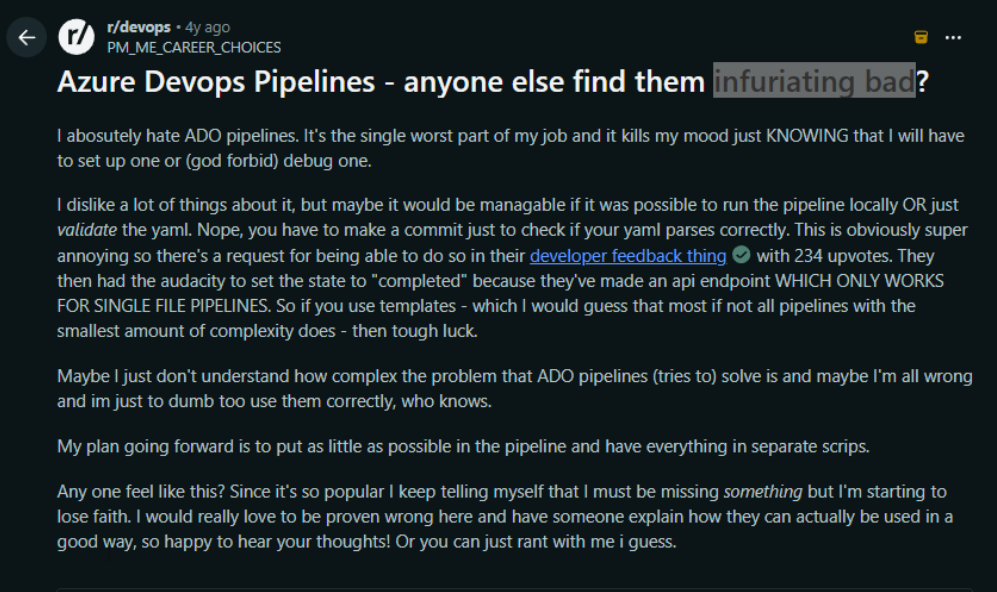
Hard to create and manage YAML files: Automated workflows within Azure Pipelines are created using YAML files. One Redditor has mentioned that Azure Pipelines are infuriatingly bad, as they can’t validate without making a commit. By using AI tools to generate and validate YAML configurations, this issue can be solved.
Start your 15-day free trial of Copilot4DevOps and see Dynamic Prompt within Azure DevOps in action.
- Build failures take too long to trace: Many DevOps engineers look at error summaries and start guessing the cause of failure, and the root cause stays buried under logs. So, manually analyzing these logs takes hours of time.
- Keeping pipelines current: Microsoft regularly updates agent images, and in some cases, YAML built months ago starts breaking, and teams find out when production fails only. So, updating these outdated files takes lots of time for DevOps teams.
- Test coverage is manually maintained: Teams manually write test steps for Azure Pipelines. Also, they manually validate test coverage, which takes them days. By having in-place traceability within Azure Boards with Pipelines, teams can quickly validate test coverage and solve these challenges.
- Onboarding new engineers is painful: New DevOps joinees often struggle with understanding the pipeline configuration and current workflow. However, using AI built-in into Azure DevOps, they can quickly learn about all workflows and configurations.
How Copilot4DevOps Transforms Azure Pipelines
You will be shocked to know that 73% of organizations still don’t use AI in CI/CD pipelines, and they are already behind. The remaining 27% has already started using tools like Copilot4DevOps, an AI assistant built inside Azure DevOps, to boost productivity while managing CI/CD within Azure Pipelines, reduce repetitive tasks, shorten troubleshooting time, and improve release quality. Here is how it helps:
- Prepares YAML configuration files: You provide deployment tasks as input to Copilot4DevOps, and it generates ready-to-use YAML configuration for CI, CD, approvals, environments, and scheduled runs based on instructions. This can save multiple hours for DevOps teams.
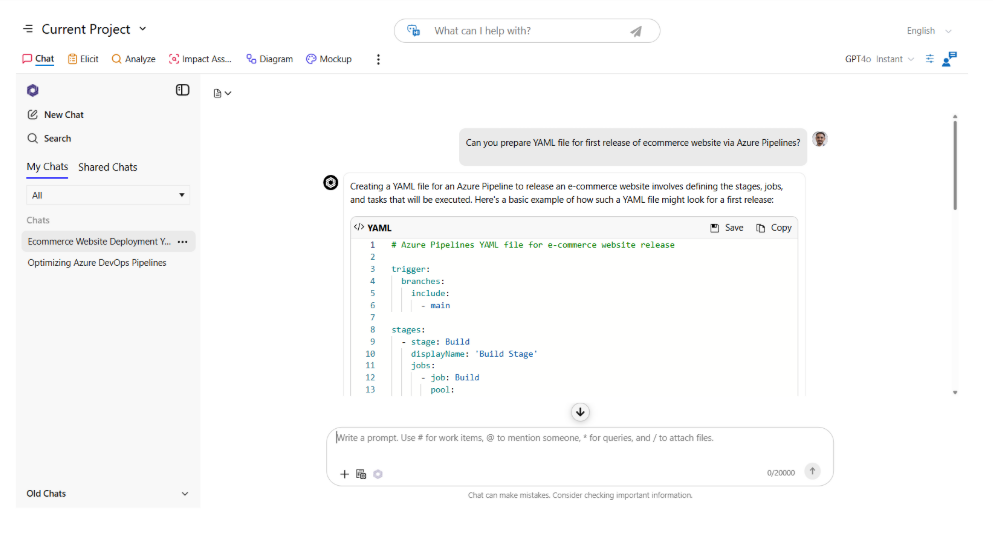
- Draft deployment tasks using AI: By using the Elicit feature of Copilot4DevOps, teams can draft tasks to manage Azure Pipelines. It takes raw requirements as an input and produces ready-to-implement tasks that can be added to Azure Boards and shared with team members.
- Speeds up failure debugging: Instead of manually scanning logs, teams can ask AI Chat of Copilot4DevOps to filter all logs related to specific errors and analyze them for root cause directly inside Azure DevOps. This reduces human dependency in solving errors.
- Automates test case preparation and management: Teams can ask AI Chat to generate test cases in bulk and insert them into Azure Boards, which can be directly used with Azure Pipelines from there. The Dynamic prompt module also helps in validating test coverage automatically using AI.
- Reduces repetitive DevOps work: From task creation to deployment reviews, it helps free engineers from repeated maintenance work so they can focus on delivery.
- Edits existing pipelines safely: Generally, making changes in YAML manually is risky. You write one wrong word, and the pipeline breaks. However, Copilot4DevOps AI can suggest cleaner edits, stage changes, or task updates without rebuilding the pipeline.
Try it Yourself
Ready to transform your DevOps with Copilot4DevOps?
Get a free trial today.