Preparing SOPs, functional and non-functional requirements documents, product requirements documents (PRDs), business requirements documents (BRDs), etc., is a routine task for DevOps teams. Teams already using Azure DevOps regularly spend multiple hours every week collecting details from ADO work items, correcting document formatting, and switching between multiple tools just to prepare a single SOP. As the project scales, it becomes hard for teams to collect all the resources for document preparation.
AI assistants like Copilot4DevOps that work directly within Azure DevOps can generate SOPs and operation documents from existing ADO work items and in the required formats. AI can add hierarchical sections and subsections, diagrams, and bullet points and prepare well-structured documents with a single click based on the team’s requirements.
This blog explains why teams should avoid manual documentation preparation and how to use AI to automate that within Azure DevOps.
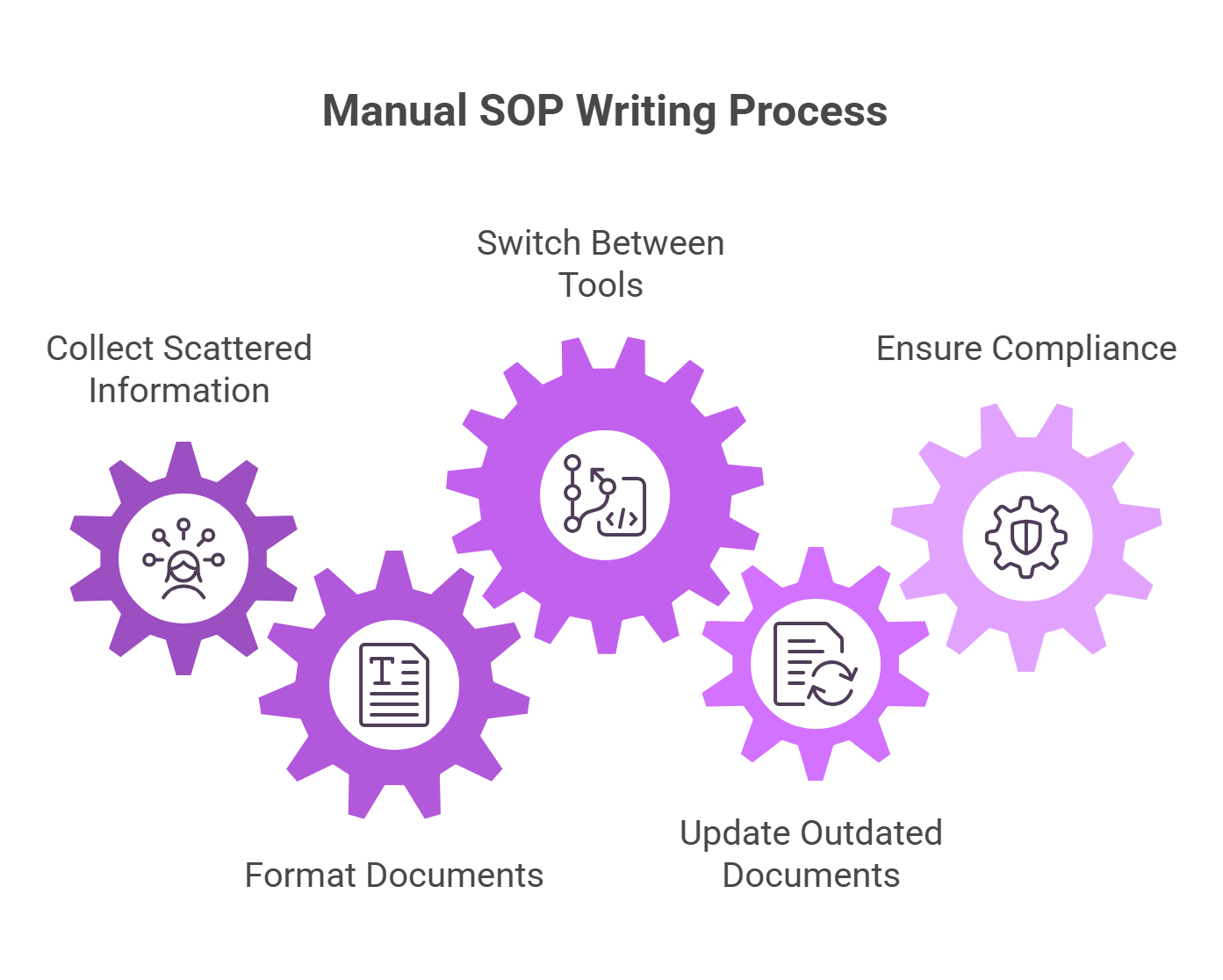
Why Manual SOP Writing Slows Down DevOps Teams
- Collecting scattered information: Before creating an SOP, teams often need to collect information from different user stories, bugs, tasks, test cases, and attachments. While manually doing these, teams often spend multiple hours every week and sometimes miss important information.
- Formatting takes more than actual writing: Generally, teams need to follow a standard structure while preparing documents. Many teams spend more hours fixing headings, tables, and numbering formats than actual writing. Also, manually creating diagrams to add to documents takes up most of the time for teams.
- Context switching between multiple tools: Of course, teams can use LLMs like ChatGPT and Claude to generate documents. But teams need to manually provide ADO work items as context for these LLMs, and this requires lots of context switching between LLMs and Azure DevOps. Usage of external LLMs also creates a risk of exposing important data.
- Updating outdated documents: As the system evolves or requirements changes are introduced, documents become outdated, and teams manually update every change, which really slows down the DevOps cycle.
- Regulated industries face stricter documentation pressure: Teams working in regulatory industries, such as healthcare and finance, must follow compliance obligations while preparing documents, but when teams manually write documents, they may fail to follow some obligations, which can delay product launch.
What Copilot4DevOps Can Generate Inside Azure DevOps
Copilot4DevOps’s SOP/Document Generator feature helps teams to create SOPs and operational documents without leaving Azure DevOps. Here is what it can generate:
- Draft functional specs in Azure DevOps by providing existing functional requirements as context.
- Prepare non-functional requirements documents based on meeting transcripts or other input sources.
- Generate SOPs for configurations and integration setups that adhere to compliance.
- Prepare installation guides, troubleshooting manuals, and maintenance documentation after every release.
- Create a first draft of test reports and QA process documents with structured headings, tables, bullet points, and diagrams.
- Generate SSP (System Security Plan) based on security controls.
That’s not all. Copilot4DevOps can also generate other types of documents, including PRDs, BRDs (Business Requirements Documents), etc., based on the team’s needs.
Also read: AI test case generation in Azure DevOps
How to Automate SOP Documentation with Copilot4DevOps – Step by Step
Step 1: Open Copilot4DevOps from any work item and select the SOP/Document Generator module.
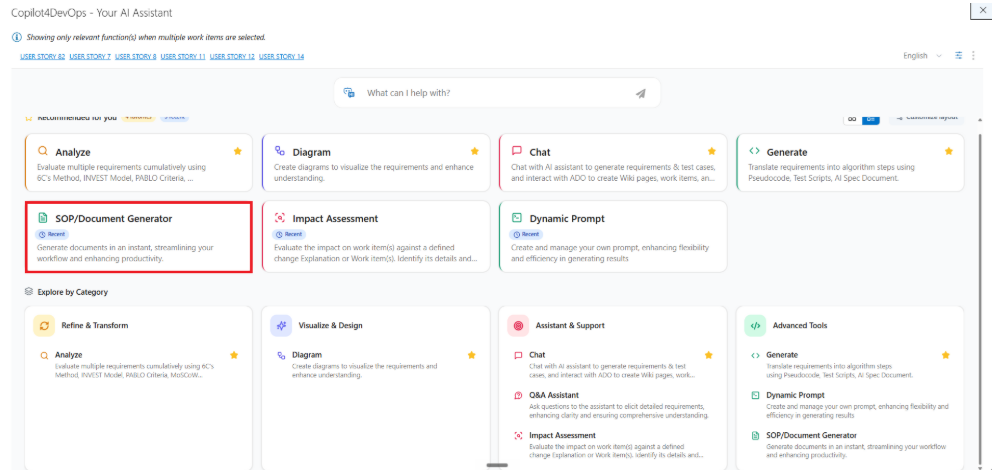
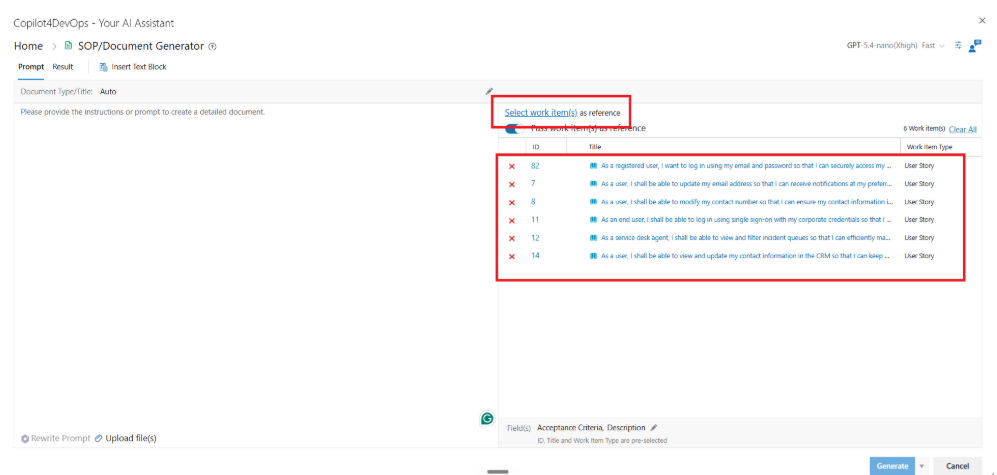
Step 2: The next step is to provide context to AI from work items. You can select existing work items by title, ID, or queries on the right side. Copilot4DevOps reads the content of selected work items directly, and you don’t need to copy/paste or re-enter any content into the chat window. The more content your work item contains, the more complete the output you can get.
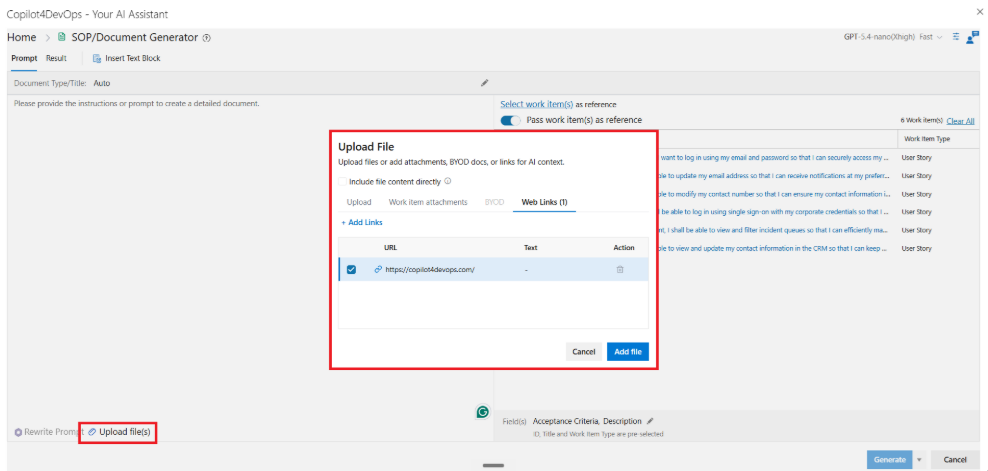
Step 3: If you want to provide more context, then you can upload existing documents (meeting transcripts, image files, etc.). Also, you can provide work item attachments directly as a reference without uploading them, or you can just provide a website URL, and it searches the web and automatically gets the context.
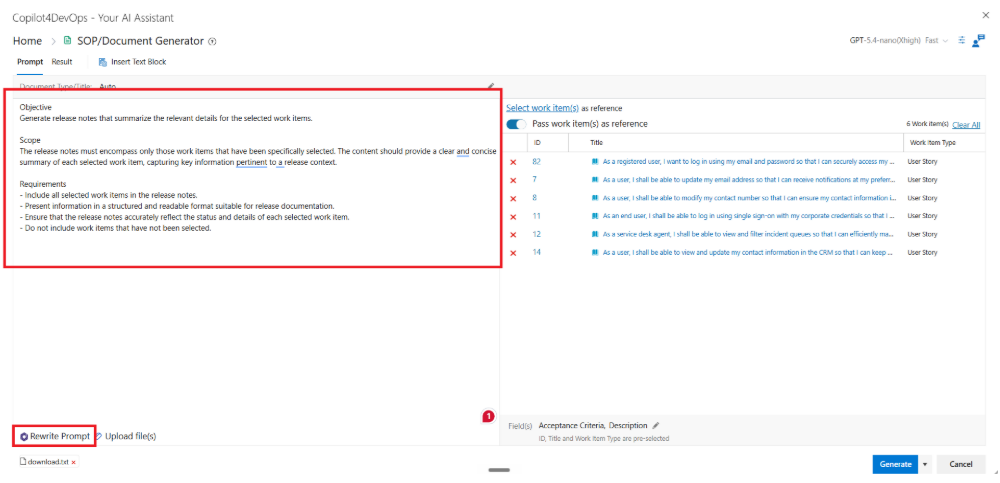
Step 4: Once context setup is done, you can write a prompt to generate the document. You can mention what kind of document you want to generate, like:
- SOP
- Functional specification
- Non-functional requirement document
- DRD
It will automatically pick up the document type from the prompt, or you can also define it manually. If you want to refine your prompt, then you can use the “Rewrite Prompt” feature, which uses the AI to enhance your prompt instructions.
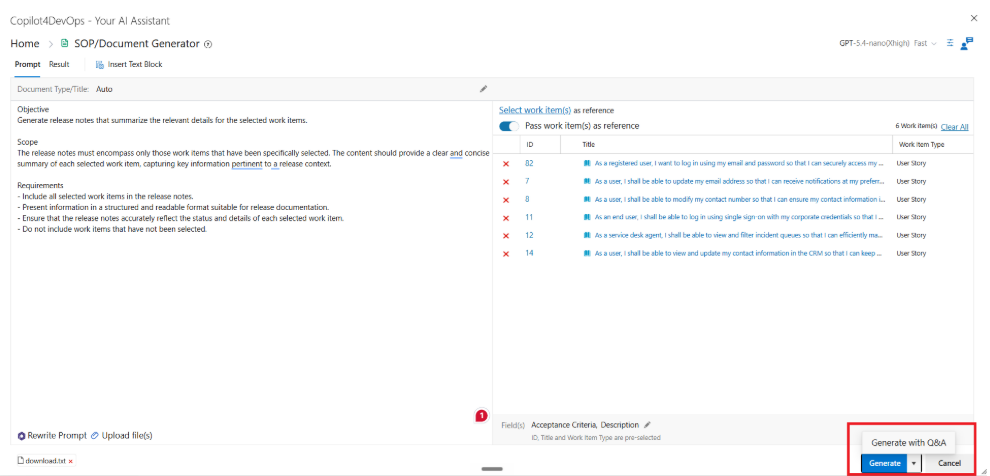
Step 5: To start generating a document, click on the “Generate” or “Generate with Q&A” button at the bottom.
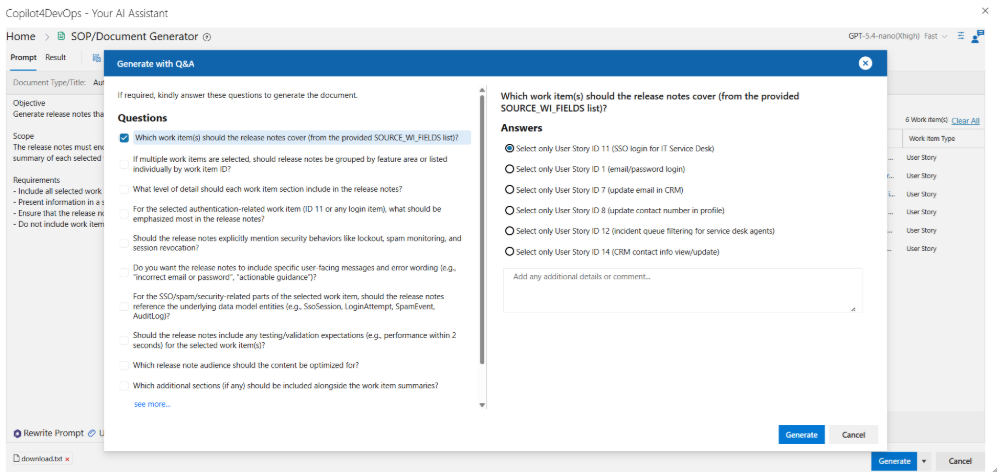
The “Generate with Q&A” asks a few more multiple-choice questions and takes users’ answers as context while generating the document.
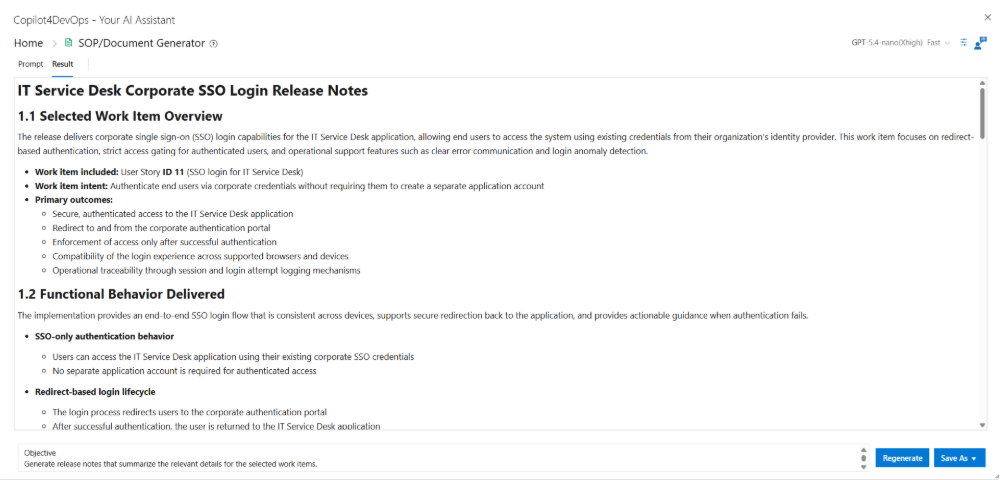
Step 6: Once generated, you can see that it contains sections, subsections, structured bullet points, and diagrams. This is the first draft of release notes, and Copilot4DevOps recommends reviewing this before submitting for compliance sign-offs.
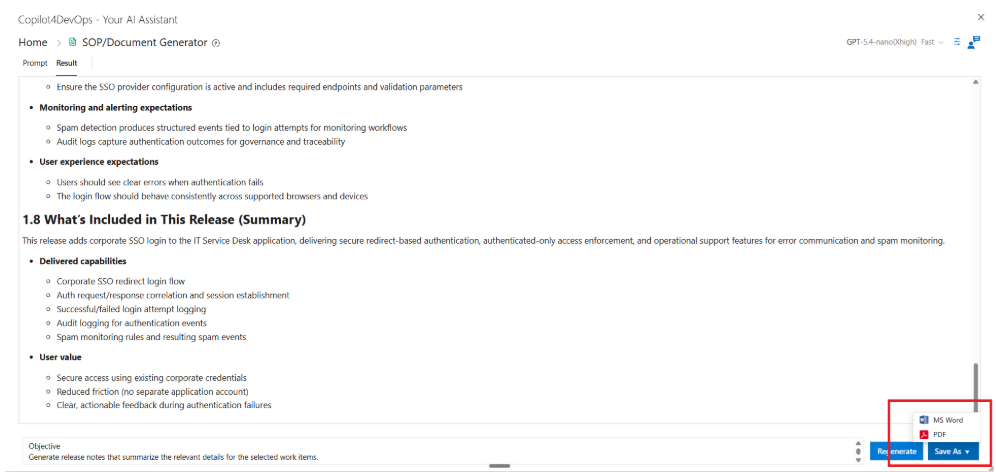
Step 7: If you don’t like the output, then you can regenerate the document. Otherwise, you can save it as a Microsoft Word or PDF and then review collaboratively with your team.
This way, Copilot4DevOps allows to auto generate SOPs from work items.
How Copilot4DevOps Differs from Generic SOP Tools
There are multiple SOP and document generators available in the market. Tools like Scribe and Tango generally capture actions you take on the screen and convert them into a step-by-step process. This works well for documenting workflows, but what if you want the document that follows actual project requirements, takes context from backlog work items, and engineering discussions? In this case, they fail short, and teams need to manually provide context to them, which takes multiple context switches and lots of extra time.
On the other hand, the Copilot4DevOps SOP generator works differently. Instead of recording screening activity, it drafts the document based on the Azure DevOps work items, task requirements, attachments, and uploaded reference files. The generated SOP aligns with the implementation context, and everything stays within Azure DevOps, so teams don’t need to use additional tools or switch contexts. It can even follow compliance obligations that reside within Azure DevOps, which is very helpful for teams working in regulatory industries.
FAQs
In Copilot4DevOps Ultimate, which comes at $40 per month, includes the SOP document generator feature.
Yes. Teams can upload supporting files such as PNG, JPG, PDF, and SVG files while generating documents. This helps developers include infrastructure diagrams, UI screenshots, workflow visuals, and reference material directly within the generated documentation flow.
Copilot4DevOps takes only a few seconds to generate the first draft of the document. If that is done manually, teams can take weeks of time to prepare the same document.
The SOP/Document Generator is built by keeping a broad audience, such as business analysts, project managers, product owners, DevOps managers, and developers—in short, the whole DevOps—team in mind.
Try it Yourself
Ready to transform your DevOps with Copilot4DevOps?
Get a free trial today.