Starting a software project without a software design document is like building a house without a floor plan. You may finish it, but problems will show up when it’s too late.
Similarly, most bugs in the software and delays in delivery don’t come from poor coding skills. They usually happen because the team didn’t plan things well in the first place.
That’s where a software design document helps DevOps teams. It translates the client’s requirements from the SRS (Software Requirements Specification) into clear technical plans that developers can actually build from.
This blog explains what a software design document (SDD) is, its importance in DevOps, its components, and how to create one.
What Is a Software Design Document (SDD)?
According to the IEEE, the software design document is “a description of software developed to facilitate analysis, planning, implementation, and decision-making.” The SDD is considered a blueprint or model of the system. If the Software requirements specification (SRS) document describes what needs to be built, the SDD outlines how to build it. For instance:- If an SRS document contains:
- “Users should be able to sign up using their email and social login.”
- Then, SDD breaks it down into technical details such as:
-
- What database fields are needed?
- What API endpoints will be created?
- Which third-party service will handle social login?
- How will the front end interact with the back end?
- What should happen if the login fails?
Importance of Software Design Documentation
Here are the key benefits that software design documents offer to the DevOps teams:- Keeps everyone on the same page: Software development documentation makes sure that everyone on the team understands what is going on. It serves as a shared source of information for developers, testers, and project leads, which helps avoid mistakes and misunderstandings.
- Reduces rework and delays: Developers are less likely to make mistakes and have to redo work when they know exactly what to do and how to do it. This makes the whole development process go faster.
- Speeds up onboarding: When any new team members join, they need to learn about the system architecture, and SDD can help with the same. This is a proven way to hand off knowledge efficiently.
- Ensures consistency and standards: SDD can contain design principles, coding standards, and best practices. By following these principles and standards, developers can ensure consistency throughout the development cycle.
What Should Be Included in Software Design Documents?
A good SDD should be clear, well-structured, and include all technical details to develop software. Below are the main components of SDD that help guide the development process:1. Introduction
The introduction section of the SDD defines the purpose and scope of the document. It also outlines the overall overview of the document in a short form. In some cases, teams also define the target audience and complex glossary in the introduction section.2. System Architecture
The system architecture provides a top-level overview of the system components and structural framework of the software application. It focuses on defining the relationship between multiple components of the system and how they interact to work together. It also includes diagrams of the overall architecture so that development teams can easily understand the system and write better code.3. Components Design
This section focuses on providing detailed information on each component of the system and its subsystems. Mainly, it defines the core functionality of each component. It also outlines all classes that need to be implemented and their design, which includes class attributes, methods, and other important details. It also explains the algorithm and logical flow in a diagram format so that it can be easier for developers to implement the code.4. User Interface Designs
This section of the software documentation contains the UI mockups and wireframes of the application. It shows what an application should look like. It also explains how users should interact with each component of the UI.5. Security Consideration
Define how security should be embedded during the development process. It talks about user authentication, data encryption, etc. The end goal of this section is to enhance the system’s security and save it from potential threats and cyberattacks.6. Technical Specifications
This part of the SDD defines details of programming languages, external libraries and frameworks, development tools, deployment, and testing environments that should be used during the development. It also includes data structures and storage systems that should be used to handle system data efficiently. Moreover, it also outlines how to handle different kinds of errors.7. Implementation Plan
This part of the technical documentation guides developers about code structure and modularization. It also includes information about testing strategies and deployment considerations.Best Practices for Creating Software Design Documents
Teams should follow the best practices below while creating the SDD:- Keep it clear and structured: Use sections, subsections, bullet points, diagrams, etc., to keep the document well-structured.
- Be consistent: Make sure to define terminologies at the start and use the same across the document. Similarly, follow the same format for each section of the document.
- Use AI tools: By using the AI tools, teams can quickly create software design documentation and reduce the chances of errors.
- Ask for feedback: Once the first draft of the document is ready, share it with the client and other stakeholders and ask them to review it. If you get any feedback from the team, revise the document accordingly and ensure everyone is on the same page.
- Keep it updated: Always update the document when any requirements or design changes are introduced.
How to Create Software Design Documents Using Copilot4DevOps?
Copilot4DevOps is a built-in AI assistant within Azure DevOps, a project management tool. It allows teams to generate SOPs/documents from Azure work items with a single click. For instance, as shown in the image below, you can pass Azure work items as a reference, choose document type “SDD,” and write a prompt to create a document.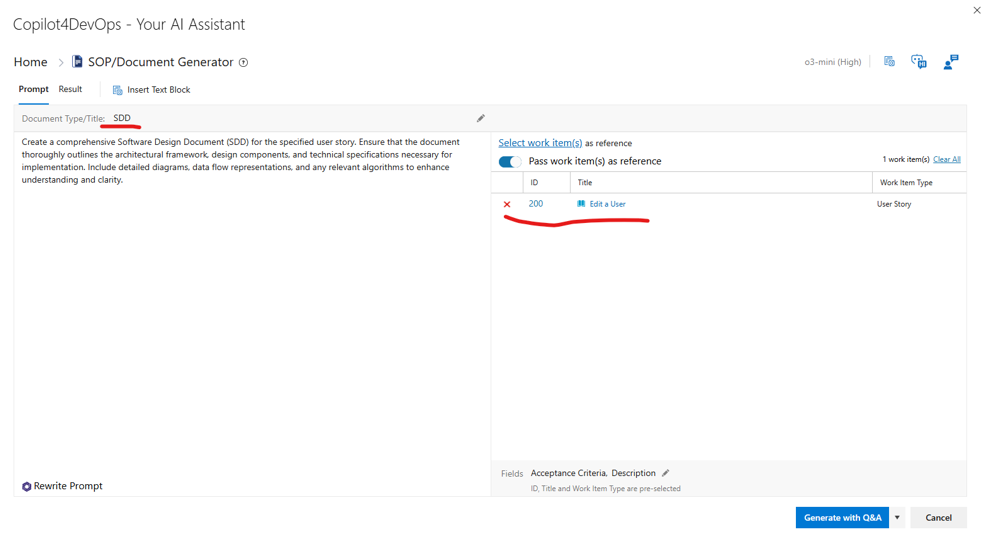
After that, when you click on the “Generate” button, it will read details of referenced work items and generate a document based on that using AI, as shown in the image below.
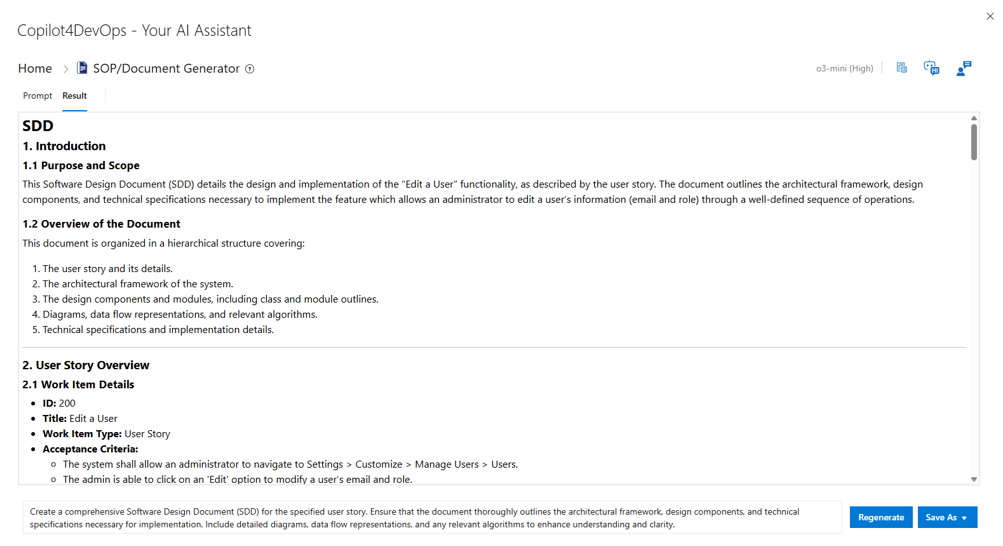
It also allows you to download the document in the PDF or Microsoft Word format, which you can directly share with other team members or stakeholders. The best part is that the tool also generates system architecture and algorithm flow diagrams, as well as UI mockups, and adds them to the document.
You can download a sample software design document, which is generated using Copilot4DevOps AI, from here .
Try it Yourself
Ready to transform your DevOps with Copilot4DevOps?
Get a free trial today.